190-01263-01 Rev. A
Garmin G2000 Pilot’s Guide for the Cessna T240
431
Hazard avoidance
SYSTeM
overvieW
FLiGHT
inSTrUMenTS
eiS aUdio & cnS
FLiGHT
ManaGeMenT
Hazard
avoidance
aFcS
addiTionaL
FeaTUreS
aPPendiceS indeX
Selecting an operating mode:
1) From Home, touch Traffic > Traffic Settings.
Or:
a) From Home, touch Map > Map Settings.
b) If necessary, touch the Sensor Tab.
c) Touch the Traffic Settings Button.
2) In the Mode Window, touch one of the following buttons:
• Operate: System interrogates other aircraft transponders and displays traffic.
• Standby: Traffic system does not interrogate other aircraft transponders or display traffic.
• Test: Traffic system performs system test, then changes to Standby Mode (Test Mode only accessible when
system is in Standby Mode.
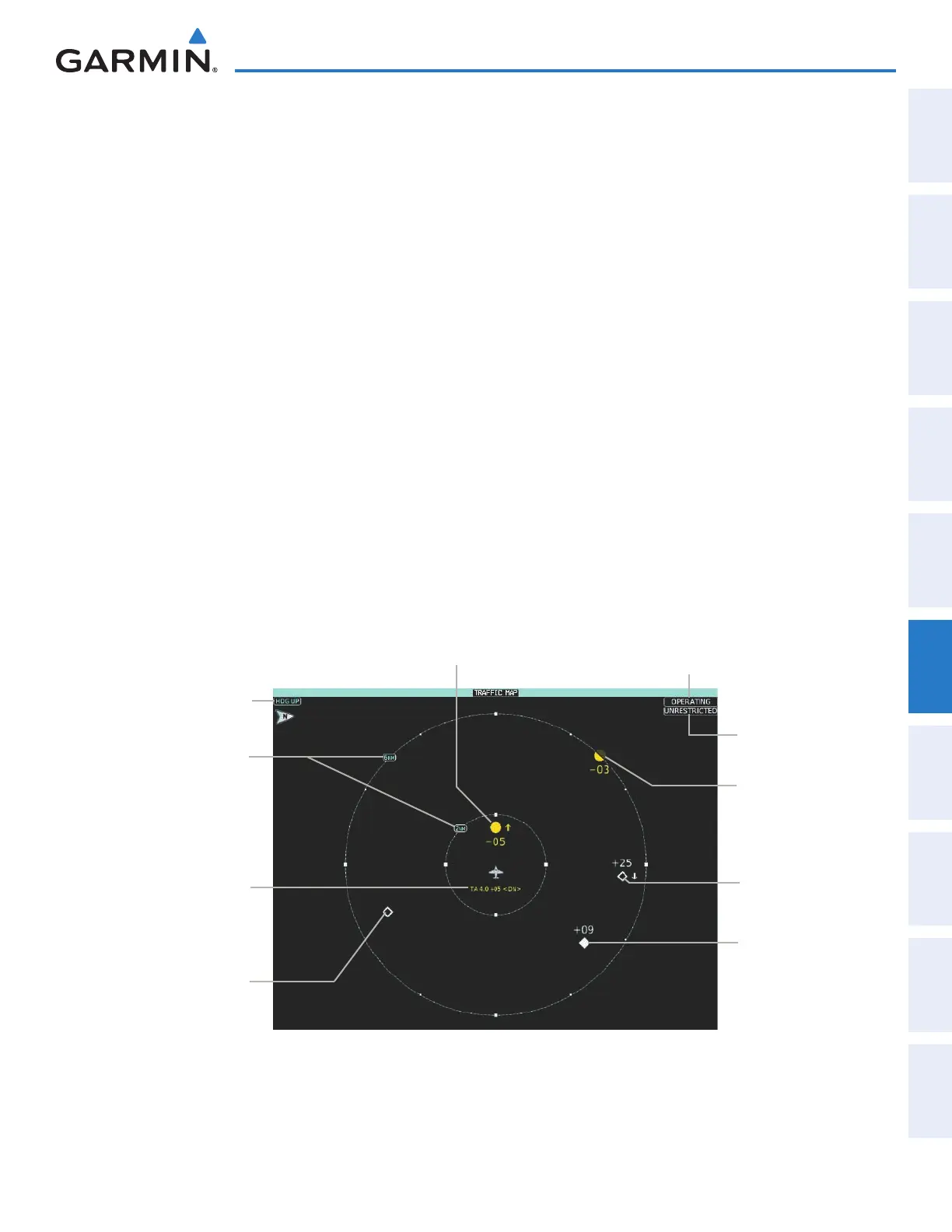
TRAFFIC MAP PANE
The Traffic Map Pane shows surrounding traffic data in relation to the aircraft’s current position and altitude,
without basemap clutter. It is the principal map pane for viewing traffic information. Aircraft orientation
is always heading up unless there is no valid heading. Range rings indicate map ranges. Turn the Joystick
counter-clockwise to decrease the map range, or clockwise to increase the range.
The traffic operating mode and altitude display mode appear in the upper right corner of the Traffic Map
Pane.
Figure 6-105 Traffic Map Pane
Map Orientation
Traffic Display
Range Rings
Altitude
Mode
Operating
Mode
Non-Bearing
Traffic
Advisory,
4.0 nm,
500’ Above,
Descending
Traffic Advisory
Off-Scale, 300’
Below, Level
Traffic Advisory, 500’ Below, Climbing
Proximity
Advisory, 900’
Above, Level
Non-Threat
Traffic, Altitude
Not Reported
Non-Threat
Traffic, 2500’
Above,
Descending
This manual downloaded from http://www.manualowl.com



 To Next Page