Garmin G2000 Pilot’s Guide for the Cessna T240
190-01263-01 Rev. A522
AdditionAl FeAtures
sYsteM
oVerVieW
FliGHt
instruMents
eis
Audio PAnel
& Cns
FliGHt
MAnAGeMent
HAZArd
AVoidAnCe
AFCs
AdditionAl
FeAtures
APPendiCesindeX
SENDING A TEXT MESSAGE
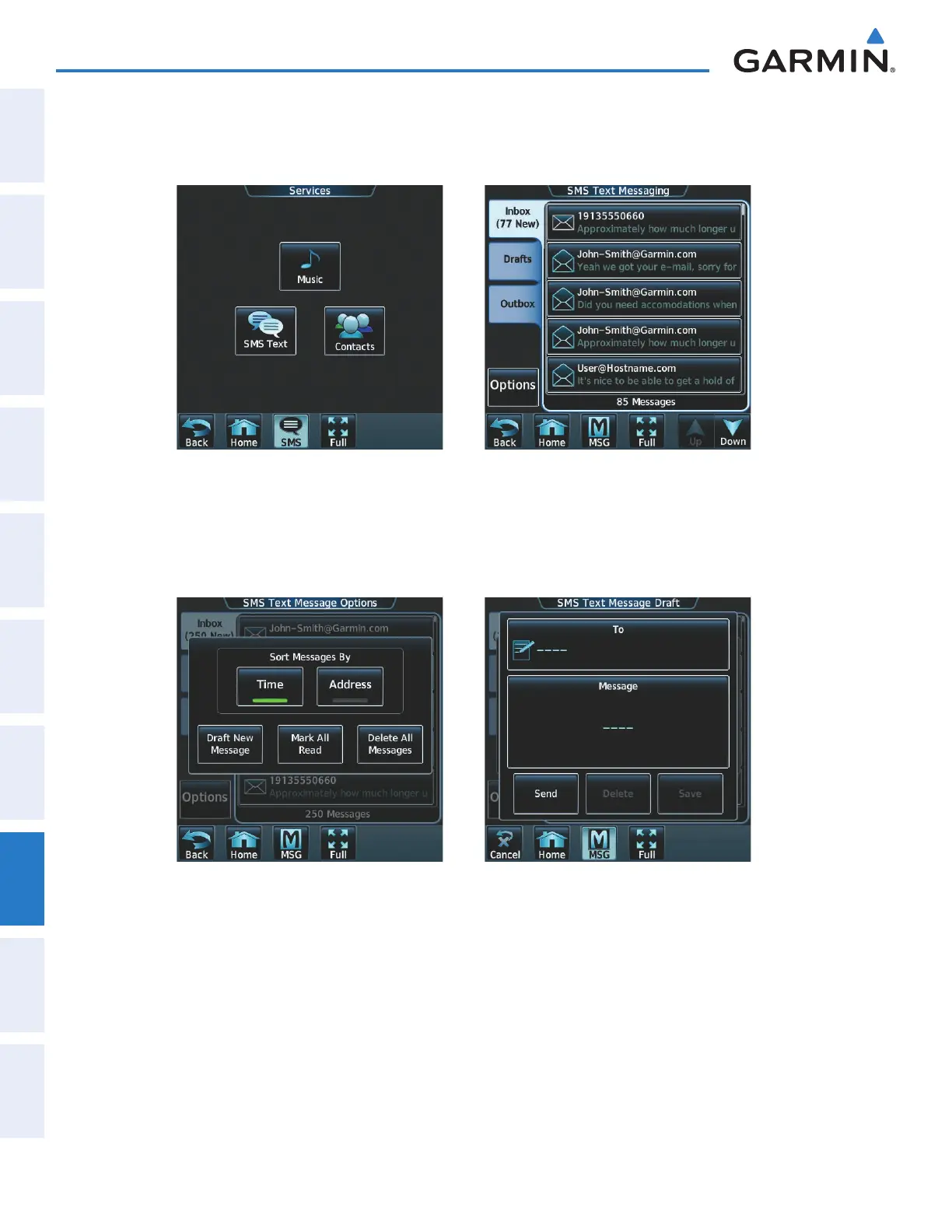
1) From the Home Screen, touch Services > SMS Text.
Figure 8-71 Select OptionsFigure 8-70 SMS Text Services Selection
2) Touch the Options Button as seen in Figure 8-71. The available options are displayed as in Figure 8-72.
3) Touch the Draft New Message Button. The SMS Text Message Draft Screen is displayed as shown in Figure
8-73. The Draft New Message option is also available from within the Drafts and Outbox Tabs.
Figure 8-73 Touch ‘To’ WindowFigure 8-72 Select Draft New Message
This manual downloaded from http://www.manualowl.com



 To Next Page