190-01263-01 Rev. A
Garmin G2000 Pilot’s Guide for the Cessna T240
523
AdditionAl FeAtures
sYsteM
oVerVieW
FliGHt
instruMents
eis
Audio PAnel
& Cns
FliGHt
MAnAGeMent
HAZArd
AVoidAnCe
AFCs
AdditionAl
FeAtures
APPendiCes indeX
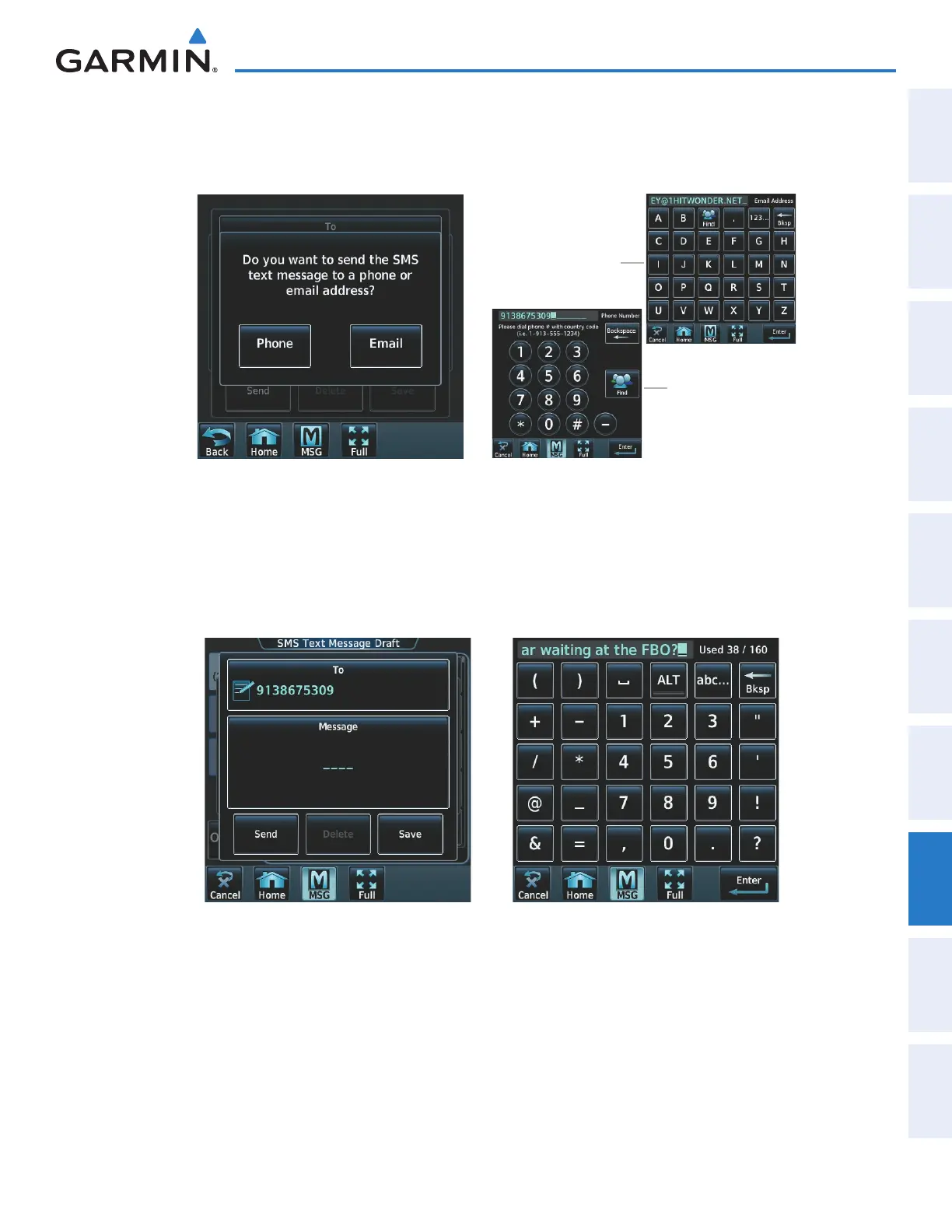
4) Touch the ‘To’ Window. A selection screen is displayed like in Figure 8-74. If the text message is to be sent to
SMS compatible telephone, touch the Phone Button. If the message is to be sent to an email address, touch
Email.
Figure 8-75 Enter Number or AddressFigure 8-74 Select Message Destination
Numeric Buttons
are displayed when
the Phone Button is
touched
Alpha Buttons are
displayed when the
Email Button is
touched
5) Enter the telephone number or email address as seen in Figure 8-75. The number or address may be obtained
from the Contacts by touching the Find Button.
6) Touch the Enter Button. The number or address is now displayed as in Figure 8-76.
7) Touch the ‘Message’ Window. The alphanumeric buttons are displayed as in Figure 8-77.
Figure 8-77 Reply MessageFigure 8-76 Touch Message Window
8) Enter the message text.
This manual downloaded from http://www.manualowl.com



 To Next Page