Garmin G2000 Pilot’s Guide for the Cessna T240
190-01263-01 Rev. A526
AdditionAl FeAtures
sYsteM
oVerVieW
FliGHt
instruMents
eis
Audio PAnel
& Cns
FliGHt
MAnAGeMent
HAZArd
AVoidAnCe
AFCs
AdditionAl
FeAtures
APPendiCesindeX
MANAGING TEXT MESSAGES
The following table illustrates the various message status icons.
Message Symbol Description
Received text message that has not been opened
Received text message that has been opened
A reply has been sent for this text message
Saved text message, draft not sent
System is sending text message
Text message has been sent
System failed to send text message
Table 8-5 Text Message Symbols
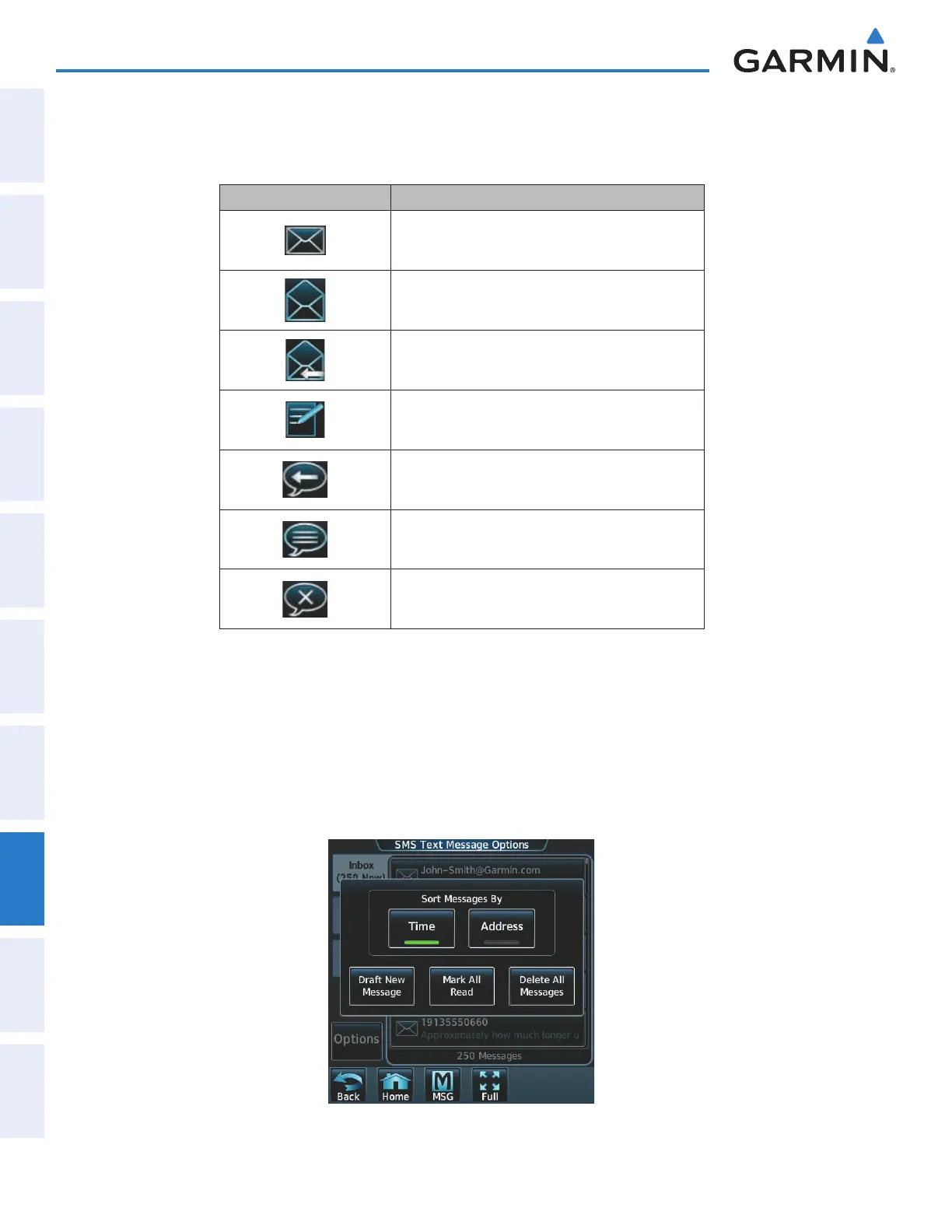
The viewed messages in the Inbox, Outbox, or Drafts may be listed according to the date/time the message
was sent or received or by message address.
Viewing messages sorted by message date/time:
1) From the Home Screen, touch Services > SMS Text.
2) Touch the Options Tab. The ‘Sort Messages By’ selections are displayed as in Figure 8-82.
Figure 8-82 Message Sort Options
This manual downloaded from http://www.manualowl.com



 To Next Page