190-01263-01 Rev. A
Garmin G2000 Pilot’s Guide for the Cessna T240
539
AdditionAl FeAtures
sYsteM
oVerVieW
FliGHt
instruMents
eis
Audio PAnel
& Cns
FliGHt
MAnAGeMent
HAZArd
AVoidAnCe
AFCs
AdditionAl
FeAtures
APPendiCes indeX
To change Document Viewer options:
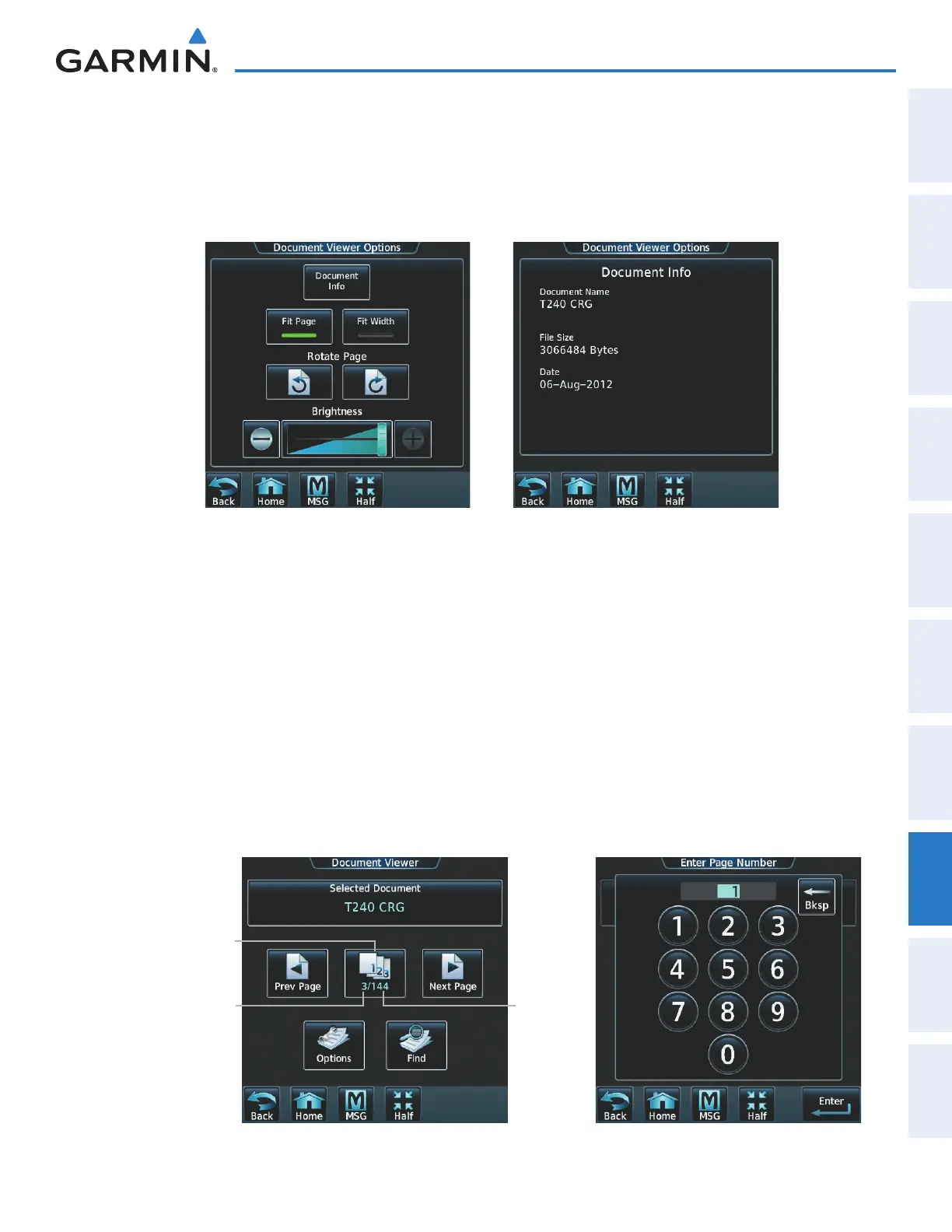
1) From the Home Screen, touch Utilities > Documents > Options. Document Viewer Options is displayed as
in Figure 8-109.
2) Touch Document Info to view information pertaining to the document, such as files size and creation date as
seen in Figure 8-110.
Figure 8-110 Document InformationFigure 8-109 Document Viewer Options
3) Touch Fit Page to view the complete page in the selected pane (Figure 8-109).
4) Touch Fit Width to enlarge the displayed page to fill the width of the selected pane.
5) Touching the Rotate Page Buttons will rotate the displayed page 90 degrees to the right or left (depending on
button touched) within the selected pane. Each subsequent touch will rotate the page another 90 degrees.
6) Touch the Brightness Slider to adjust the brightness of the displayed page.
To browse the document:
1) After selecting the desired document, touch the Next Page and Prev Page buttons to increment and decrement
one page with each touch.
2) The Page Select Button (Figure 8-111) shows the number of pages contained in the document and the page
currently being displayed. Touch the Page Select Button (Figure 8-111) to jump to a specific page number. The
Enter Page Number screen is displayed, as in Figure 8-112.
Figure 8-112 Enter Document Page NumberFigure 8-111 Document Browsing Options
Page Select Button
Total PagesCurrent Page
This manual downloaded from http://www.manualowl.com



 To Next Page