D1 Servo Drive User Manual Servo Drive Configuration
HIWIN MIKROSYSTEM CORP. 5-29
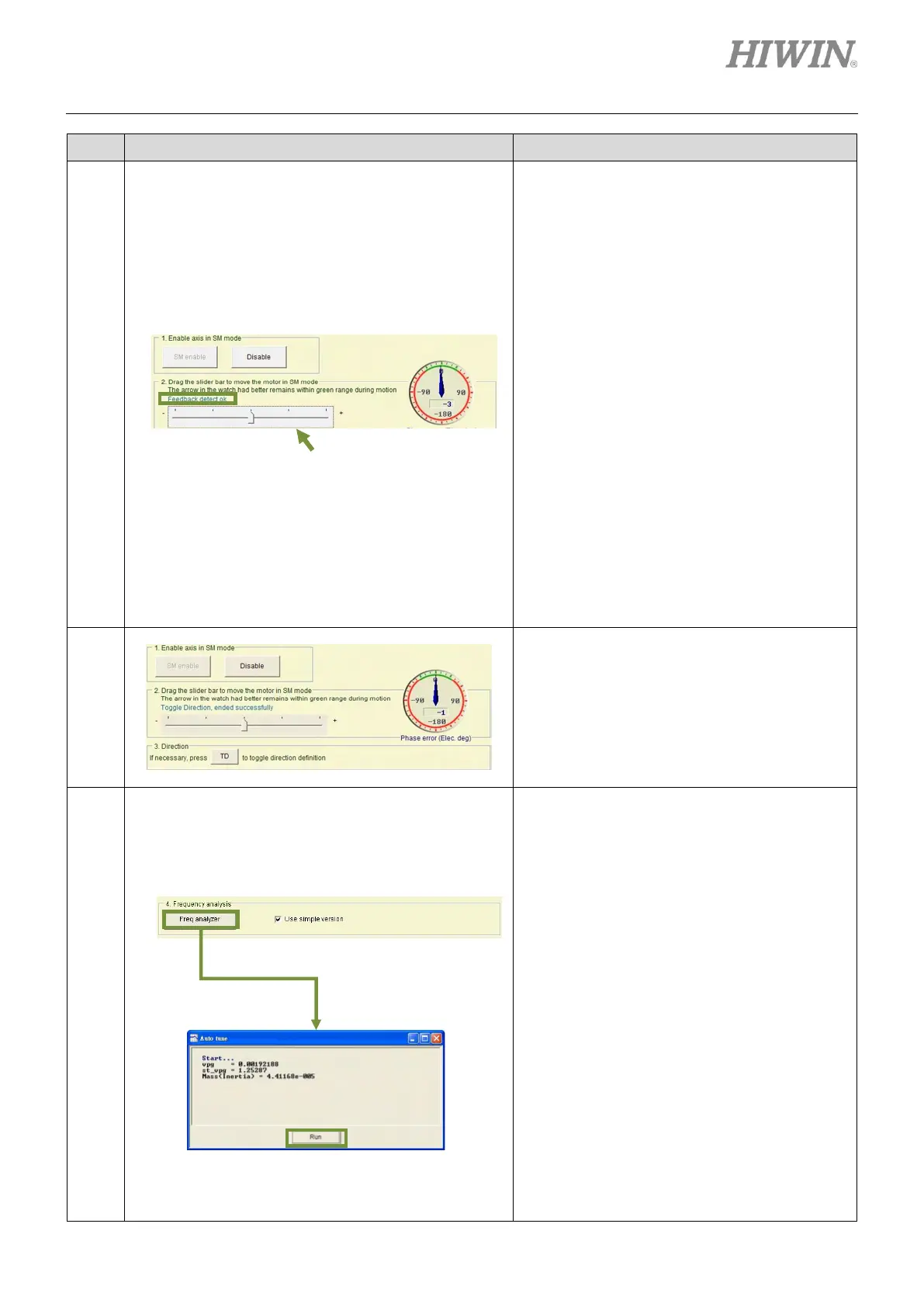
Testing moving direction in SM mode:
Drag the slider bar leftward and rightward to
move the motor. The motor moves in positive
direction while dragging the slider bar
rightward. The motor moves in negative
direction while dragging the slider bar leftward.
Normally the pointer of Phase error (Elec deg)
indicator should be between -30 degrees to +30
degrees (the range colored in green). After
moving the motor by the slider bar, the
message “Feedback detect ok” appears. Then
user can proceed to next step. If the pointer
moves randomly, release the slider bar and
drag the slider bar to move the motor again.
Note:
(1) If the pointer still moves randomly after moving
the motor by the slider bar again, please check
the following items:
The motor power cable and the encoder
cable are correctly connected.
The setting of the encoder or motor, such as
encoder resolution or pole pair number
could be incorrect. Go to Configuration
center and check again.
(2) Enabling signal must be input from controller.
Checking the definition of motion direction:
If moving direction is inconsistent with what
user has defined as positive or negative
direction, click on TD button to reverse the
definition of motion direction. After the message
“Toggle Direction, ended successfully” appears,
return to step 3 to check moving direction
again.
Auto tuning:
Select Use simple version and click on Freq
analyzer button to show Auto tune window.
Click on Run button to analyze frequency
response and calculate parameters.
This function can be used to easily set system
loop gain. But in the following cases, the
calculated parameter values may not be
appropriate for the system.
(1) The stiffness of mechanism is too low.
(2) The backlash of mechanism is too large.
(3) The load has been changed.
(4) The load inertia ratio is over 20.
Note:
(1) If mechanical resonance occurs during
execution, stop inputting hardware enable
signal or press F12 key in Lightening (Refer to
section 6.1.3).
(2) User is allowed to tune manually, please refer
to section 11.3. For the descriptions of
parameters vpg and st_vpg, please refer to
sections 6.6.3 and 11.3.



 To Next Page