D1 Servo Drive User Manual Servo Drive Configuration
HIWIN MIKROSYSTEM CORP. 5-53
Table5.6.1.1
Do not use left side condition.
Move to the left to find end stop.
Move to the left to find limit switch.
Do not use right side condition.
Move to the right to find end stop.
Move to the right to find limit switch.
The left side and right side conditions can be:
(1) None
(2) End stop
(3) Limit switch
If the left side and right side conditions are end stops, parameters ④ and ⑤ must be set. Parameter ④
is the strength of the force while searching for end stop. Parameter ⑤ is the duration of the force. If
parameter ⑤ is set to be too small, the servo drive may not correctly identify end stop. If parameter ⑤
is set to be too large, error “Soft-thermal threshold reached” could occur. To find proper value, please
refer to the following.
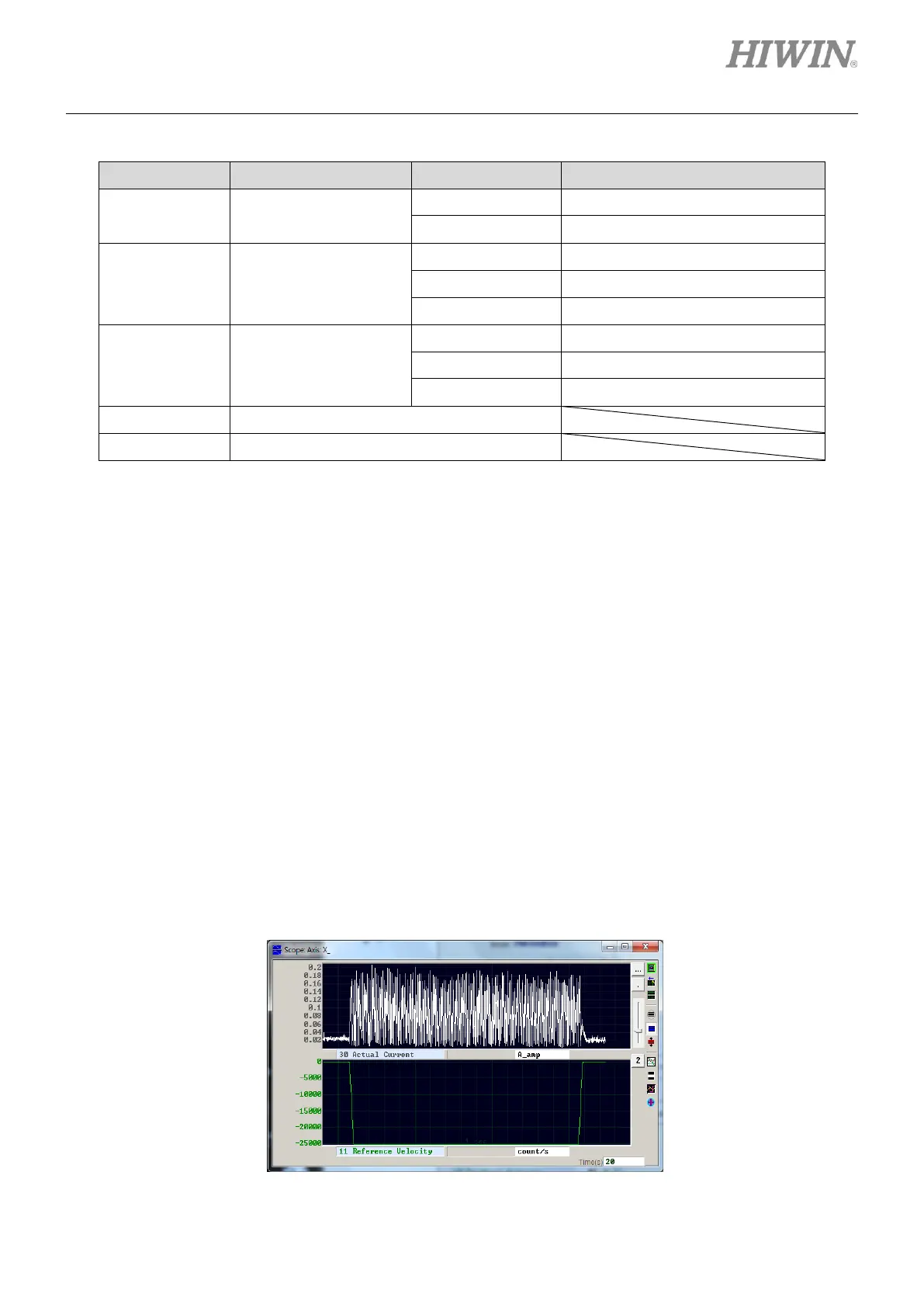
Step 1: Open Scope, as figure 5.6.1.2. Set to observe the value of Actual Current.
Step 2: Let the motor move at slower speed for the total travel distance.
Step 3: Observe the value of Actual Current and record the maximum value, as figure 5.6.1.2. The
maximum value is about 0.2 A, so Search end stop current can be slightly larger than 0.2 A.
In this case, Search end stop current can be set to 0.23 A.
Figure5.6.1.2



 To Next Page