EasyManua.ls Logo

Hiwin D1 - Page 229

Hiwin D1
307 pages
Print Icon
To Next Page IconTo Next Page
To Previous Page IconTo Previous Page
Loading...
D1 Servo Drive User Manual LCD Display
HIWIN MIKROSYSTEM CORP. 7-13
MD20UE01-2109
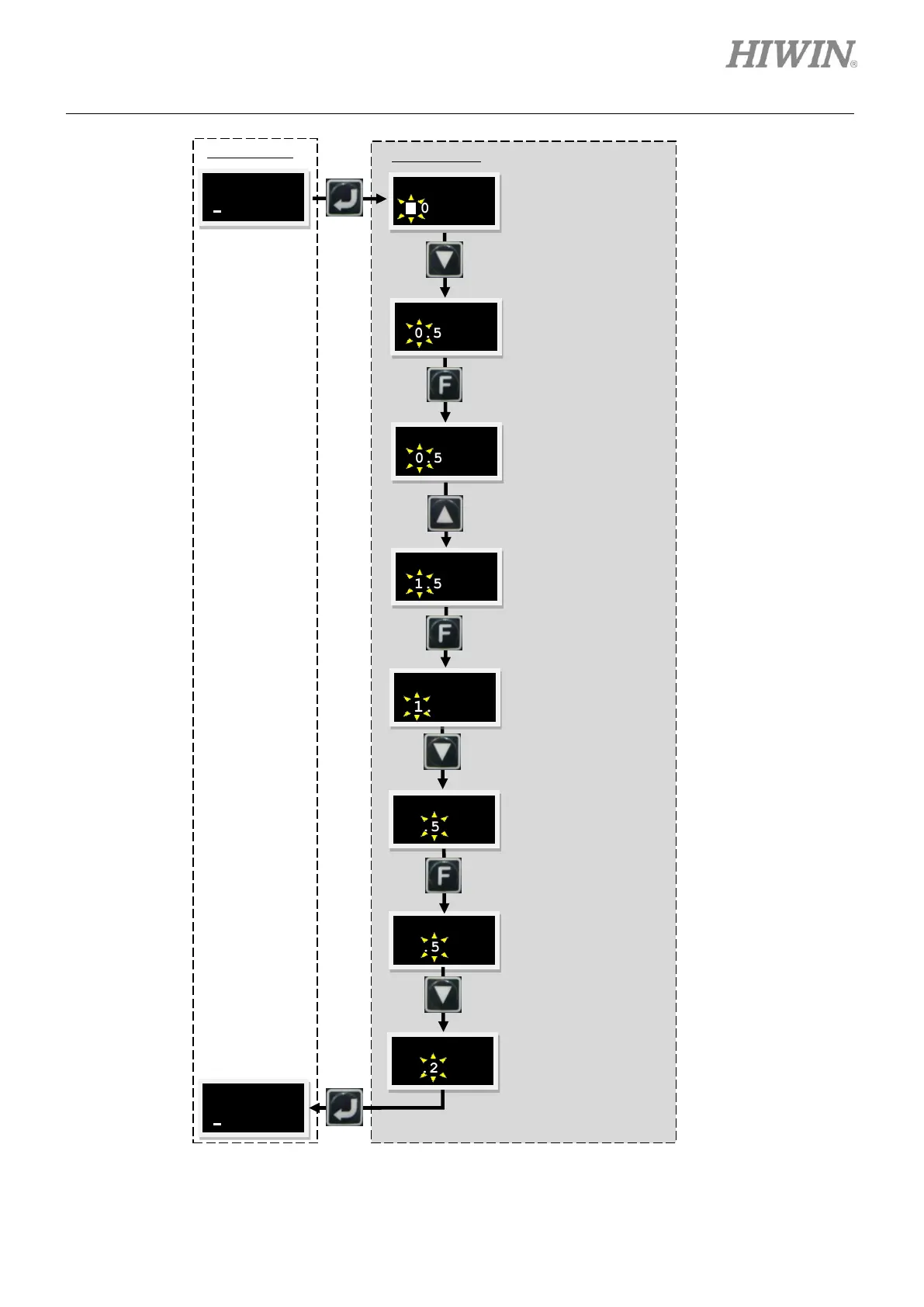
Figure7.4.2.1 Use changing common gain (LCD No. 065) as an example of parameter editing
3 065
0.5
3 065
0.5
3 065
0.5
3 065
1.5
Press Up key twice to let
the number become 1.
(In the sequence of
001)
3 065
0.5
3 065
1.5
3 065
1.5
3 065
1.2
Press Down key for four
times to let the number
become 2.
(In the sequence of
55432)
3 065
1.2
Press F key to change
the function of Up key
and Down key to
moving cursor.
Press F key to change
the function of Up key
and Down key to
changing parameter
value.
Note:
For the switching sequence of
numbers, please refer to figure 7.4.2.2.
LEVEL ONE
LEVEL TWO
Press Down key twice
to move the cursor
rightward.
3 065
1.5
Press F key to change
the function of Up key
and Down key to
changing parameter.

Table of Contents

Related product manuals