D1 Servo Drive User Manual Servo Drive Configuration
HIWIN MIKROSYSTEM CORP. 5-5
(2) mega-ulink communication
While using mega-ulink communication for the first time, please download and install WinPcap. After
the installation of WinPcap completes, click on Tools and select Communication setup… to open
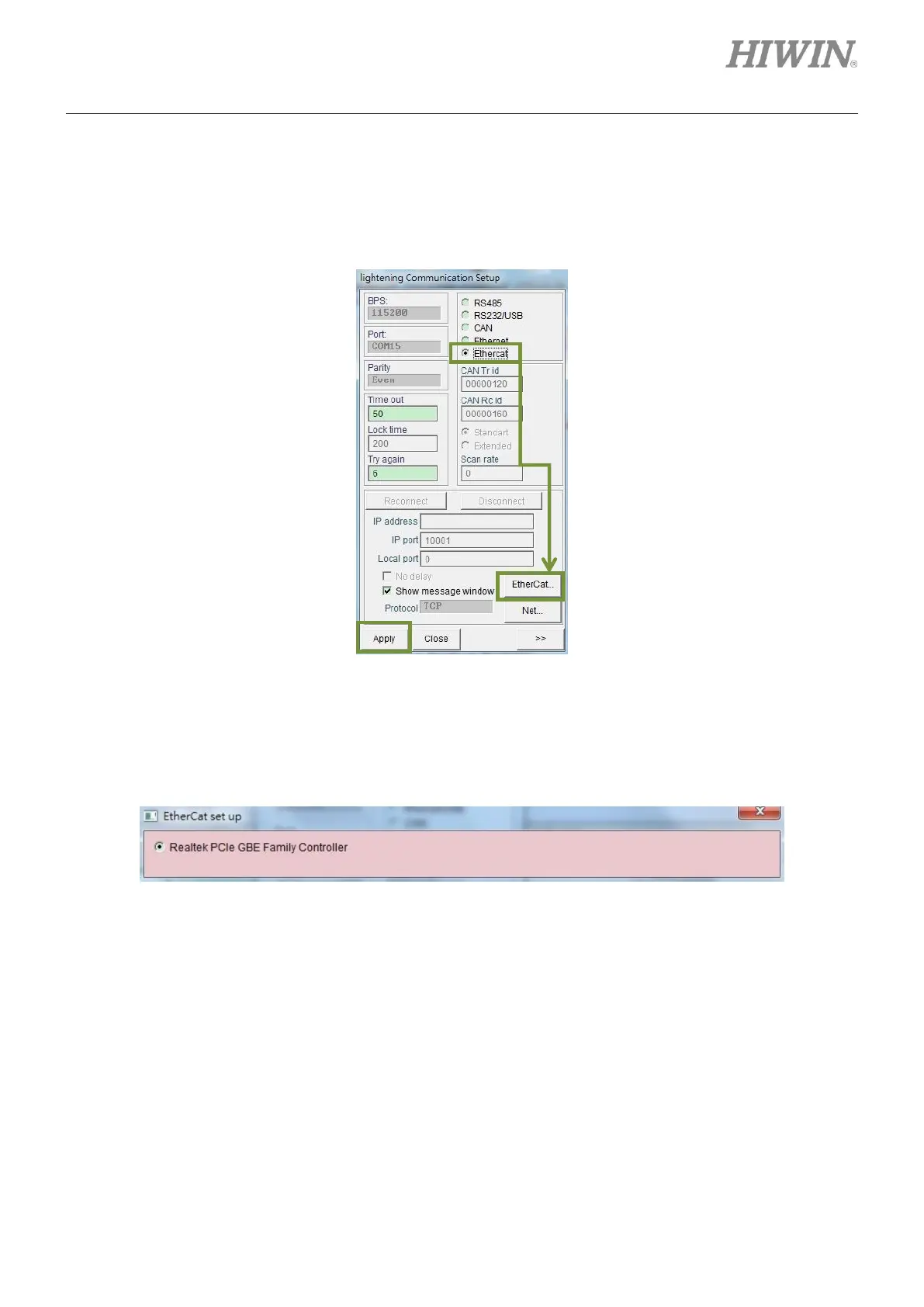
lightening Communication Setup window. Then select Ethercat and click on EtherCat... button.
Figure5.1.2.3
EtherCat set up window appears as figure 5.1.2.4. All the network cards of PC will be shown in the
window. Select the network card in use and close EtherCat set up window. Then click on Apply
button in lightening Communication Setup window.
Figure5.1.2.4
After setting completes, a window appears as figure 5.1.2.5. The connected slaves will be shown in
the window. Return to the main window of Lightening. The connection is established and Ethercat
will appear in the title of the window, as figure 5.1.2.6.



 To Next Page