L-INX User Manual 35 LOYTEC
Version 4.0 LOYTEC electronics GmbH
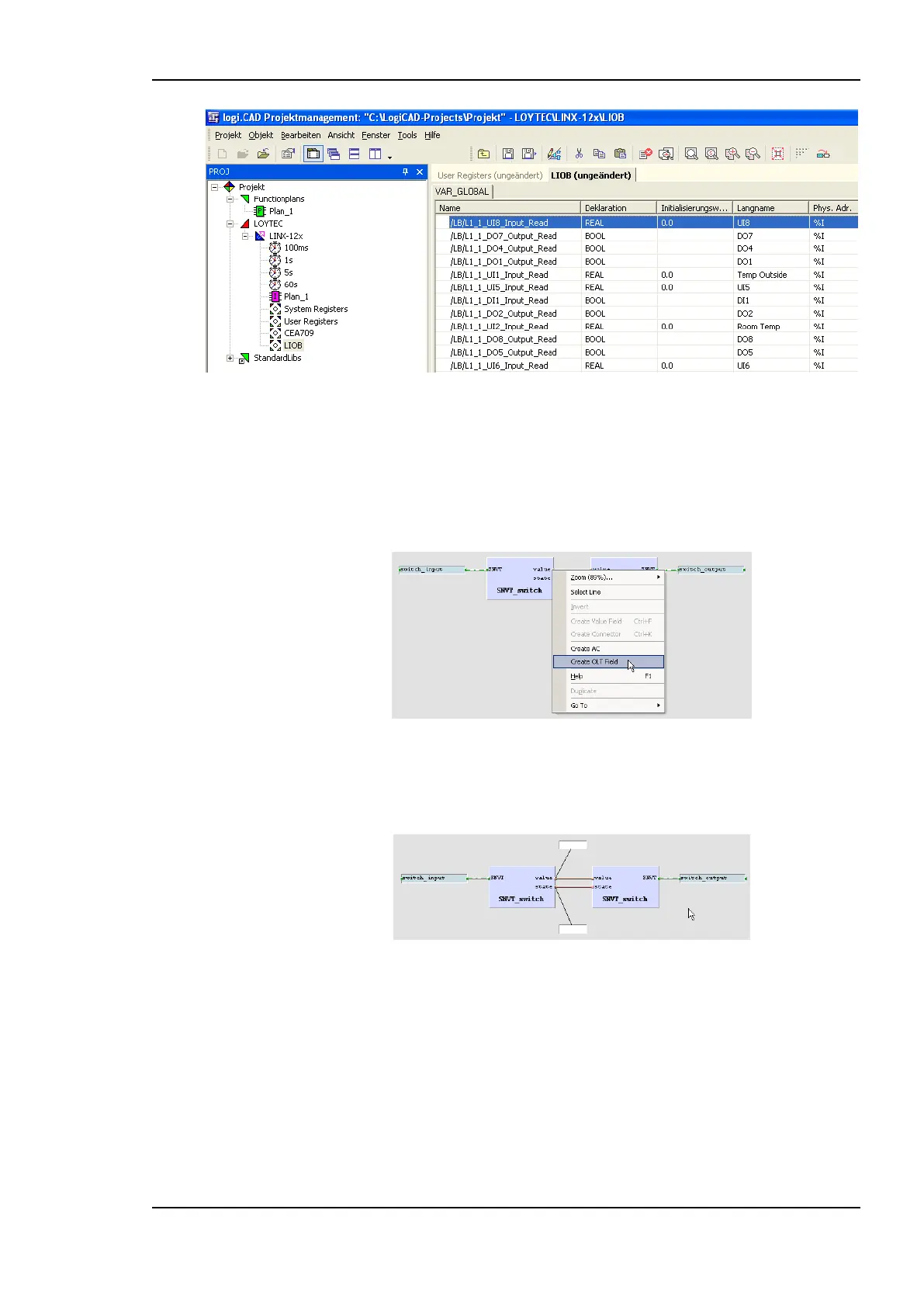
Figure 18: Exposed PLC data points appear in LogiCAD
11. Now the logic can be developed on the function plan.
12. For later debugging, it is good practice to add online test fields to the drawing, to
display the current value of the signals during online test. To do this, right-click on the
value output of the left function block and select Create OLT Field from the context
menu, as shown in Figure 19.
Figure 19: Create online test fields
13. Place the fields above and below the drawing as shown in Figure 20, then press the
Save button to save your changes.
Figure 20: Online Test fields
14. Finally, open the context menu of the LINX-11x device again and select Code
Generation. In the dialog, press the button Start to start the code generation process.
On success, the code generation window reports Errors=0 and Warnings=1.
15. Close the window by pressing the OK button. Now the compiled IEC61131 program
can be downloaded to the device. Right-click the tree element LINX-11x and select
Download from the context menu. A connection dialog will appear and ask for the type
of connection and additional information.



 To Next Page