214683 138 Revision A
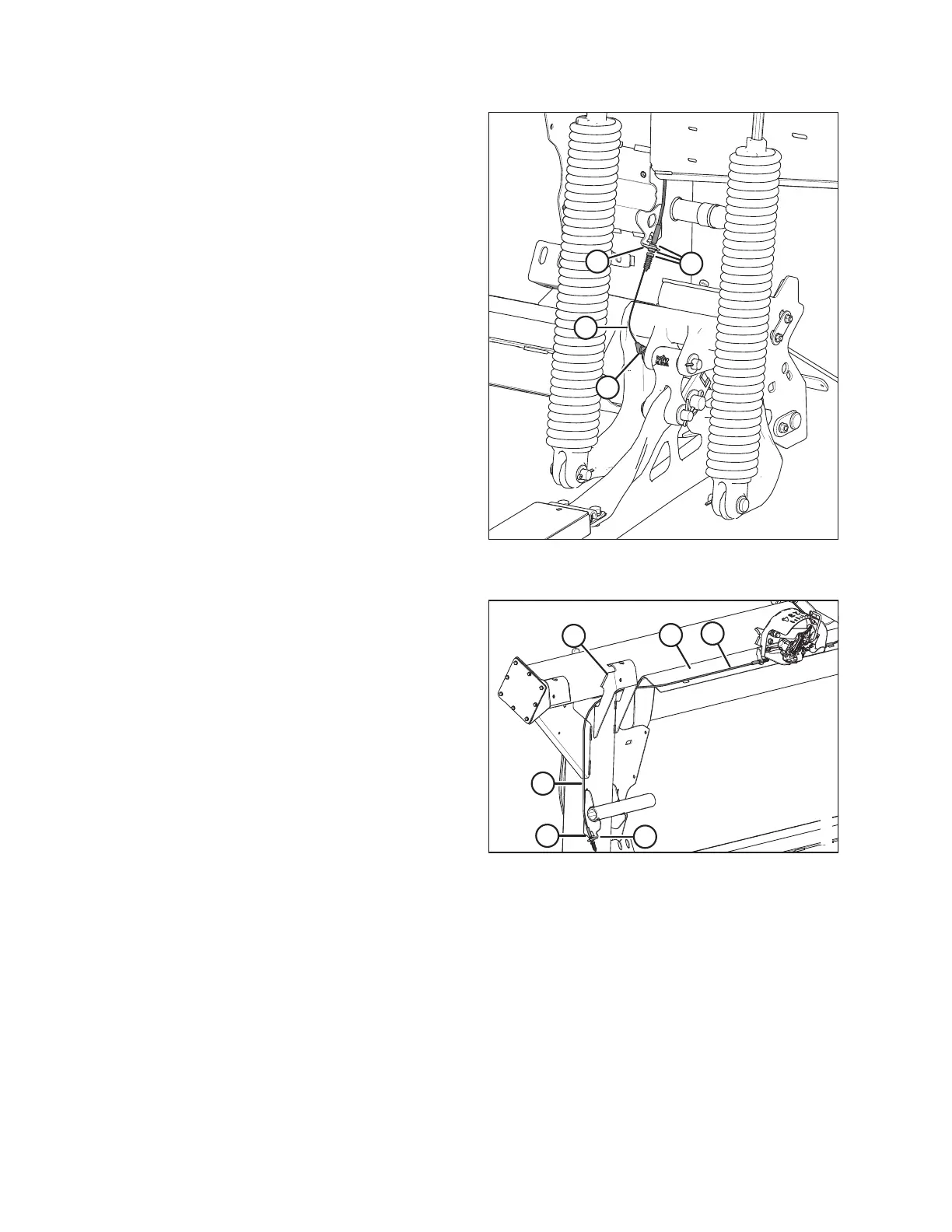
Figure 3.180: Left Front Side of Float Module –
Right Side is Opposite
10. Slide new float indicator cable (B) through the slot in the
cable stop support (D), and secure in place with the
cable boot seal and jam nuts (C).
11. Secure the cable eye on the end of float indicator
cable (B) to the float lever with the nut, washer, and
bolt (A) retained from Step 1, page 135. The washer
goes between the cable eye and the bolt.
12. Torque nut to 8.6 Nm (76 lbf·in.).
Figure 3.181: Cable Routing on Right Side of
Float Module
13. Route the right end of the new float indicator cable (A)
along top angle (B), behind gussets (C) at the top of the
inboard float spring, and then down the side of the float
module frame.
14. Slide new float indicator cable (A) through the slot in the
cable stop support (D), and secure in place with the
cable boot and jam nuts (E).
15. Secure the cable eye on the end of float indicator
cable (A) to the float lever with the nut, washer, and bolt
retained from Step 1, page 135. The washer goes
between the cable eye and the bolt head. Refer to
previous illustration.
16. Torque nut to 8.6 Nm (76 lbf·in.).
NOTE:
The cable eye must remain free to turn on the bolt.
OPERATION








 To Next Page