214683 161 Revision A
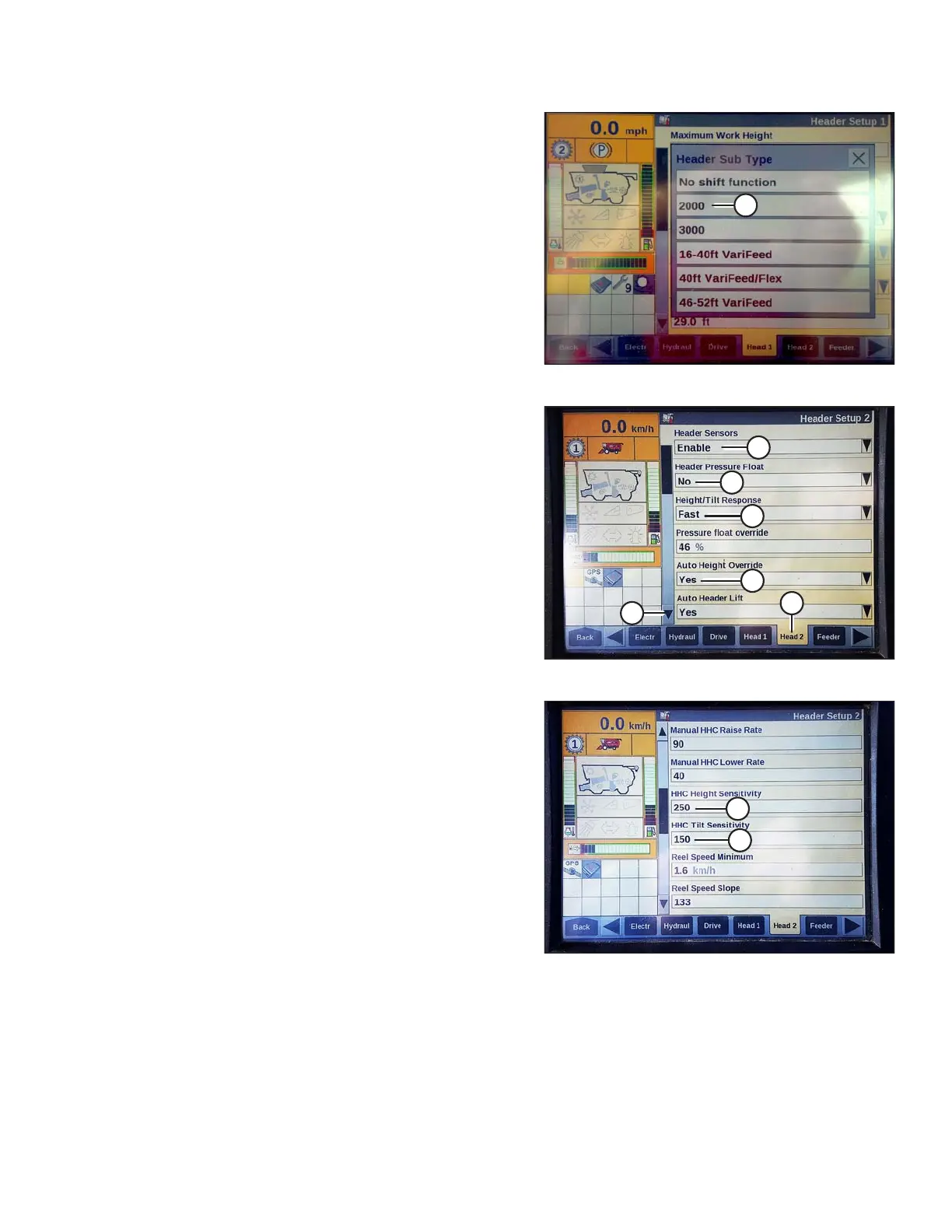
Figure 3.235: Case IH Combine Display
6. Locate the HEADER SUB TYPE field.
7. Select 2000 (A).
Figure 3.236: Case IH Combine Display
8. Select the HEAD 2 tab (A).
9. In the HEADER SENSORS field (B), select ENABLE.
10. In the HEADER PRESSURE FLOAT field (C),
select NO.
11. In the HEIGHT/TILT RESPONSE field (D), select FAST.
12. In the AUTO HEIGHT OVERRIDE field (E), select YES.
13. Press the down arrow (F) to go to the next page.
Figure 3.237: Case IH Combine Display
14. Locate the HHC HEIGHT SENSITIVITY field (A), and
set as follows:
• If using a single-sensor system, set HHC HEIGHT
SENSITIVITY to 180.
• If using a two-sensor system, set HHC HEIGHT
SENSITIVITY to 250.
NOTE:
If hunting occurs during operation, decrease this setting
by 20 points at a time until hunting no longer occurs.
15. Set the HHC TILT SENSITIVITY (B) to 150. Increase or
decrease as desired.
OPERATION








 To Next Page