214683 245 Revision A
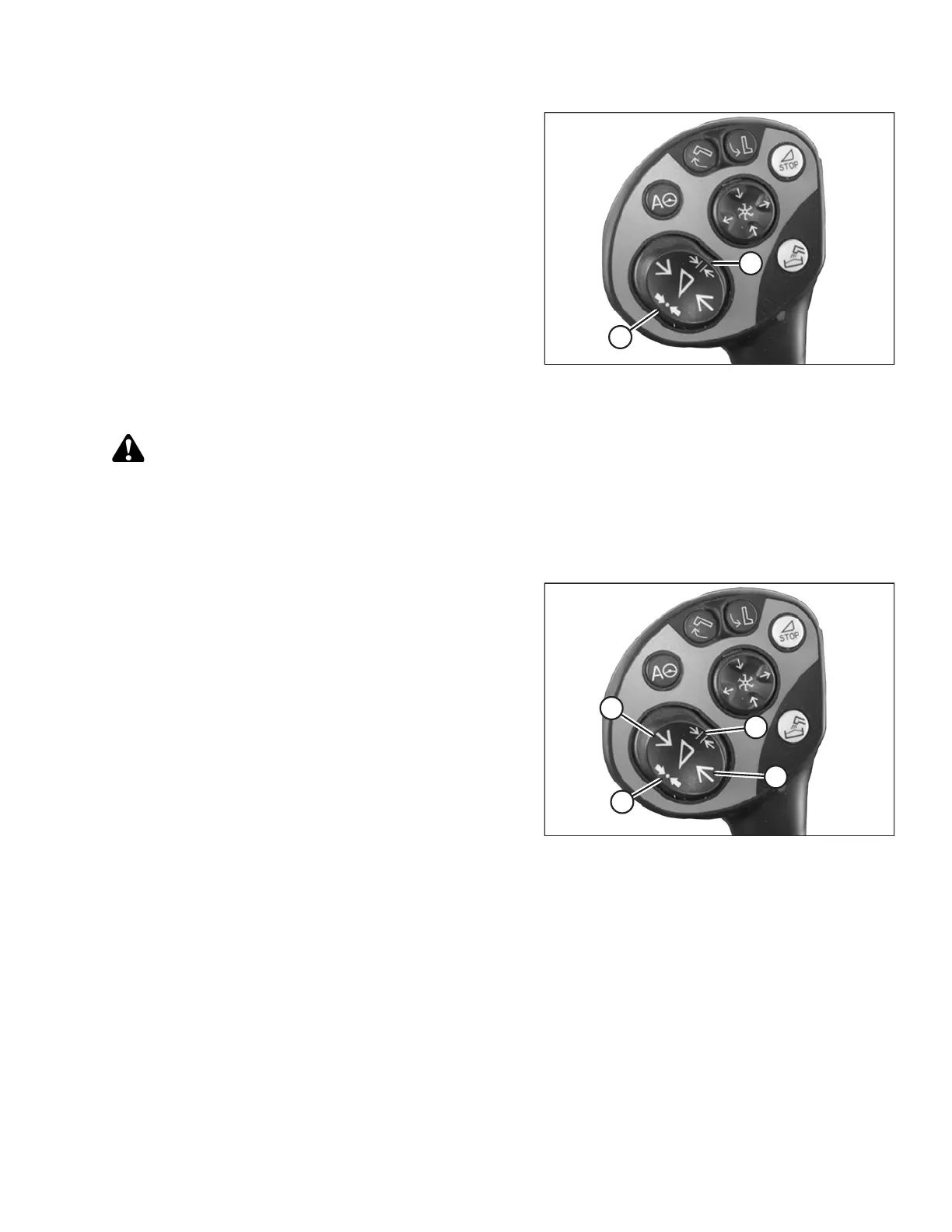
Figure 3.423: Control Handle Buttons
8. Briefly press button (A) or button (B) in order to select
the set point.
9. Repeat Step 7, page 244 for the set point.
Setting Cutting Height Manually (CLAAS 500 Series)
CAUTION
Check to be sure all bystanders have cleared the area.
NOTE:
Changes may have been made to the combine controls or display since this document was published. Refer to the
combine operator’s manual for updates.
Figure 3.424: Control Handle Buttons
1. Use button (A) to raise the header or button (B) to lower
the header to the desired cutting height.
2. Press and hold button (C) for 3 seconds to store the
cutting height into the CEBIS (an alarm will sound when
the new setting has been stored).
3. Program a second set point, if desired, by using
button (A) to raise the header or button (B) to lower the
header to the desired cutting height, and briefly press
button (C) to store the second set point into the CEBIS
(an alarm will sound when the new setting has
been stored).
NOTE:
For above the ground cutting, repeat Step 1, page 245,
and use button (D) instead of button (C) while repeating
Step 2, page 245.
OPERATION








 To Next Page