214683 266 Revision A
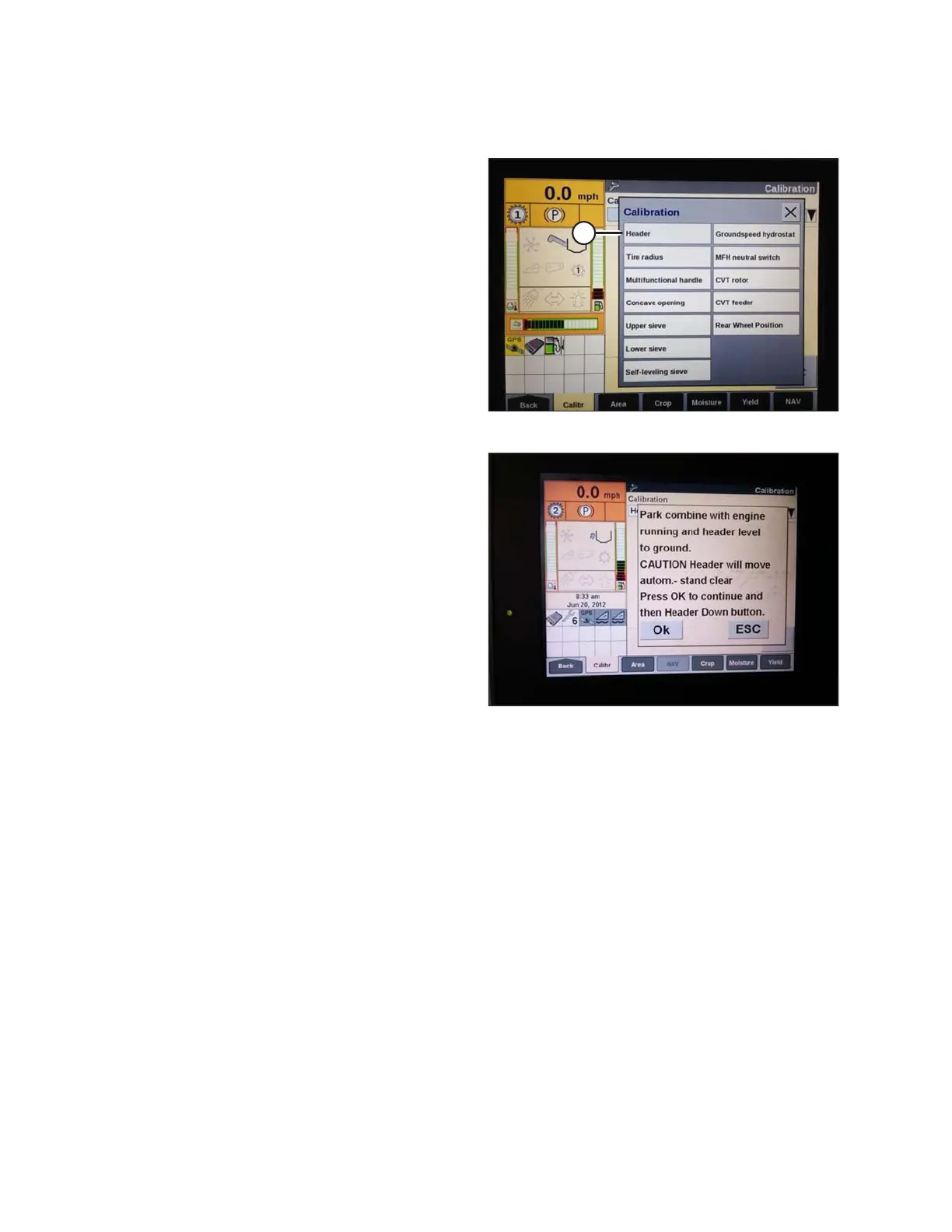
1. Select CALIBRATION on the combine display, and press the RIGHT ARROW navigation key to enter the
information box.
Figure 3.467: New Holland Combine Display
2. Select HEADER (A), and press ENTER. The
CALIBRATION dialog box opens.
NOTE:
You can use the up and down navigation keys to move
between options.
Figure 3.468: New Holland Combine Display
3. Follow the calibration steps in the order in which they
appear in the dialog box. As you proceed through the
calibration process, the display will automatically
update to show the next step.
NOTE:
Pressing the ESC key during any of the steps or letting
the system sit idle for more than 3 minutes will cause
the calibration procedure to stop.
NOTE:
Refer to your combine operator’s manual for an
explanation of any error codes.
4. When all steps have been completed, CALIBRATION SUCCESSFUL message is displayed on the screen. Exit
the CALIBRATION menu by pressing the ENTER or ESC key.
NOTE:
If float was set heavier to complete AHHC calibration procedure, adjust to recommended operating float after
the calibration is complete.
5. If the unit does not function properly, conduct the maximum stubble height calibration.
OPERATION








 To Next Page