Pathway Technical Reference Manual
Proprietary 110 of 190
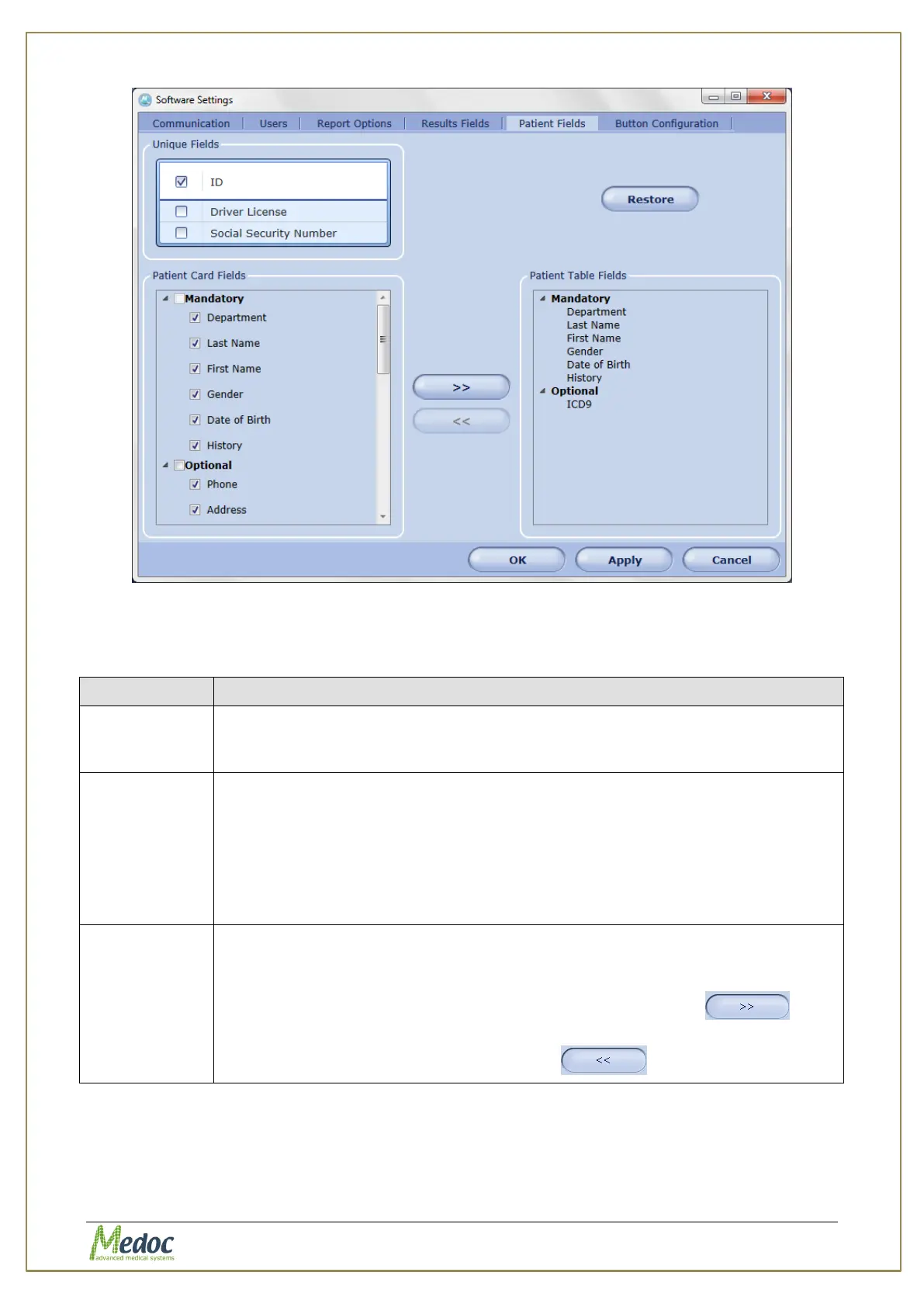
Figure 74: Patient Fields Configuration Screen
The available options are described in the table below:
Table 24: Patient Fields
Used for conclusive patient identification (more than one can be selected).
These fields must be unique per patient. Two or more patients cannot have
the same value in a unique field.
Fields that appear in the patient editor when creating or editing patient
records. To add or remove fields from the patient records select or unselect
the check boxes on the left respectively.
1. Mandatory fields – used for patient identification and cannot be deleted
(unselected)
2. Optional fields – commonly used fields (can be edited)
3. User Defined fields – customizable fields
Fields that appear in the patient list (table). Only fields which appear in the
patient card can also be displayed in the list.
1. To add fields from the patient card to the patient table select the fields
from the patient card list and click the Move Right button
2. To remove fields from the patient table select the fields from the patient
table list and click the Move Left button



 To Next Page