Pathway Technical Reference Manual
Proprietary 84 of 190
7.7.8 Chain Program
The purpose of the Chain Method is to chain several programs one after the other. The result
is a master program which runs the selected programs continuously, each program repeated
by the number of cycles defined and in order according to the indexed list.
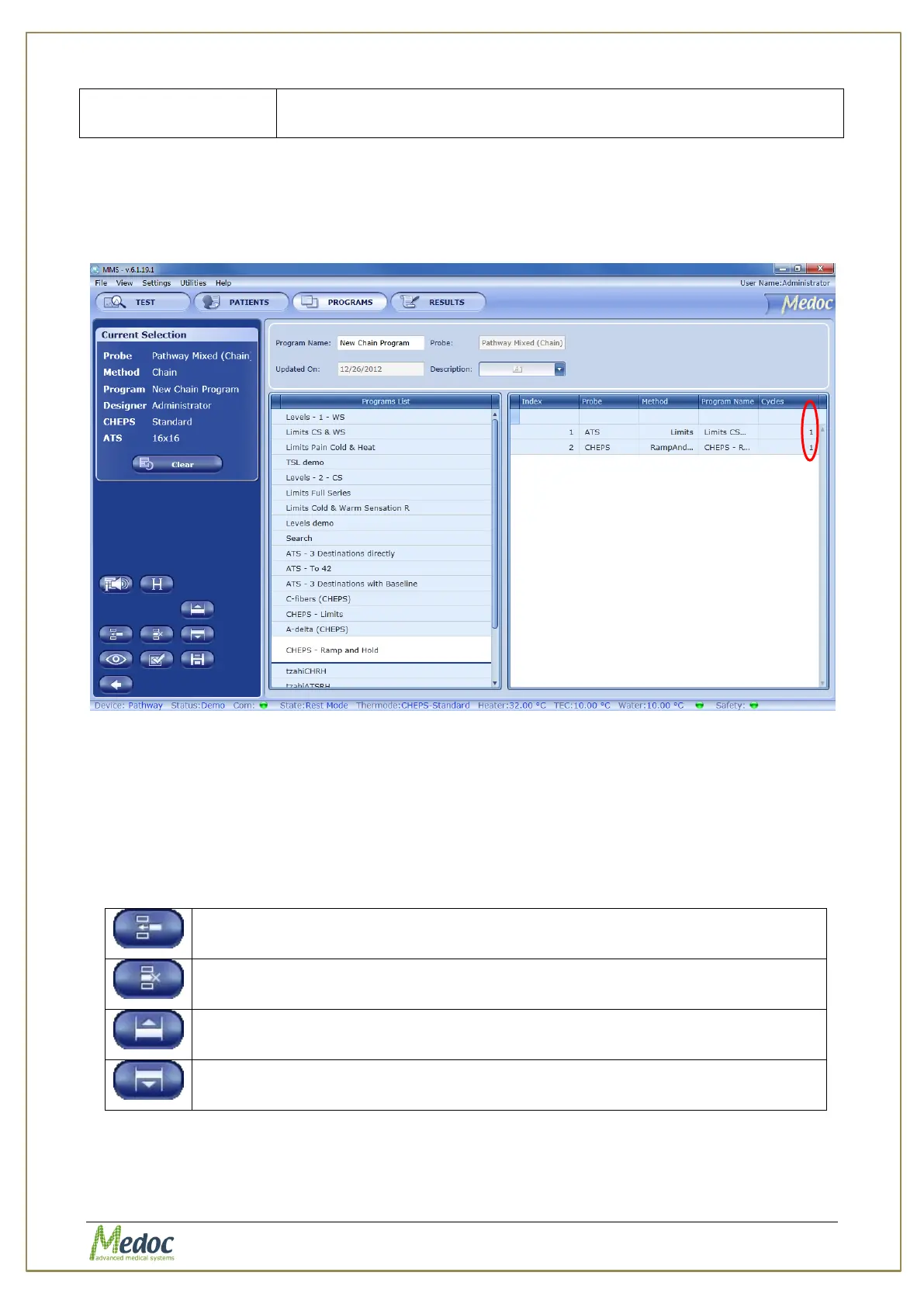
Figure 44: Chain Program Editor
Figure 44 shows the program editor for a Chain program. The left column displays all the
programs currently in the database. The right column displays the selected programs to chain
together.
To add a program from the database to the chain program, click on the program name from
the program list on the left. The program will be added to the list on the right. Adjust the
number of cycles (first column from the right) to repeat the program if needed.
The following options are available for chain program:
Adds the program selected from the Program List to the chained list, below
the selected program in the chained program list.
Deletes the selected program from the chained program list.
Moves the selected program up the index (up the list).
Moves the selected program down the index (down the list).
Indicate when Thermode temperature reaches specific temperature
points. See section 7.9.



 To Next Page