Pathway Technical Reference Manual
Proprietary 121 of 190
10.3 Test Settings
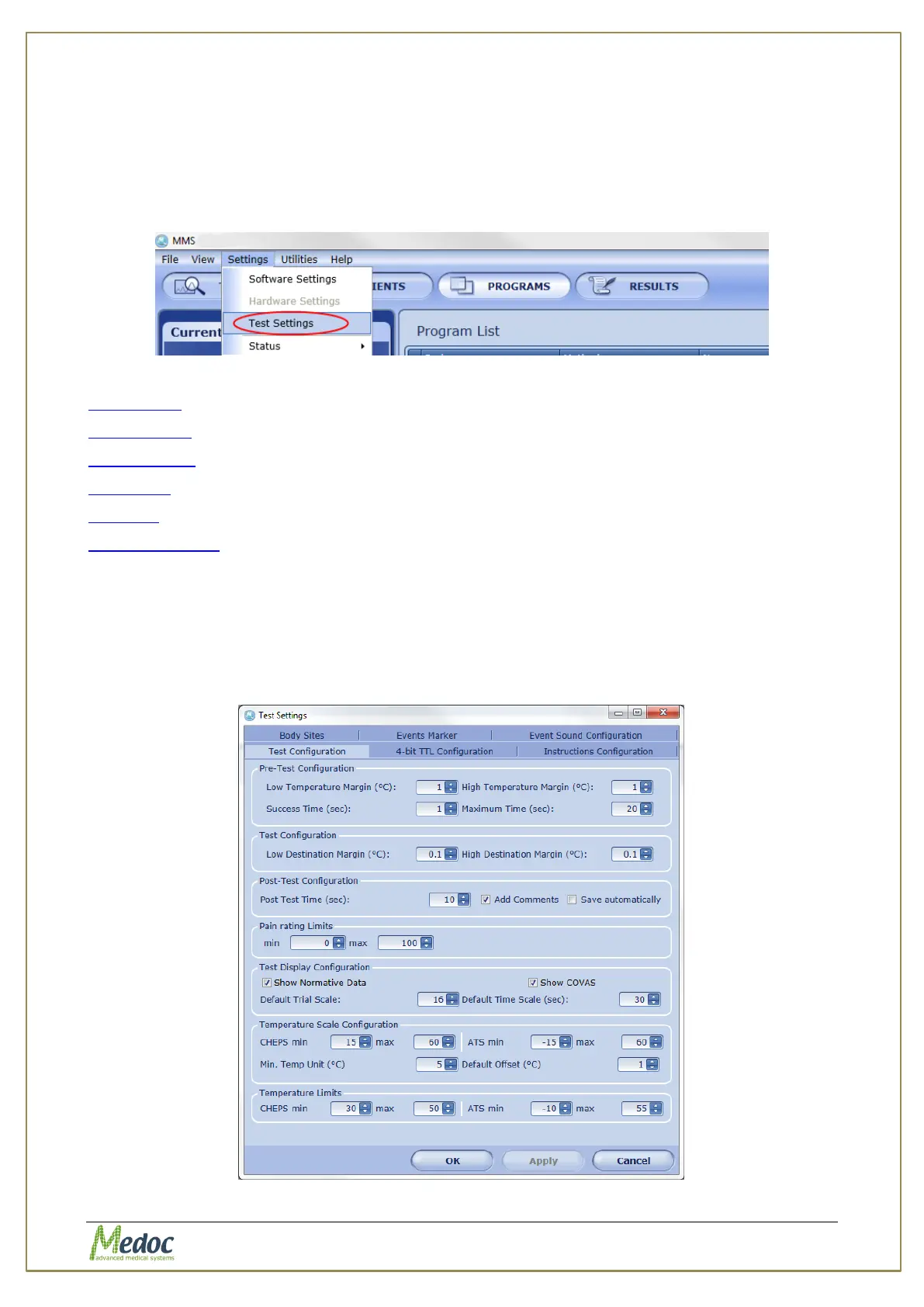
The Test Settings menu includes settings and preferences which affect how the tests are
performed and displayed.
To access the test settings options, from the top menu bar, select Settings and then Test
Settings.
The following settings can be accessed from the Test Settings menu:
Test display– change how the test is performed and displayed
Event Marker – configure the F2-F10 keys for marking events
Event Sounds – configure the sounds used for the different standard events
Body Sites – customize list of body sites.
4-Bit TTL – configure the 4-bit TTL words assigned to standard events
Test Instructions – modify text and audio test instructions for the different program types
10.3.1 Test Configuration
Control test behavior and appearance.
To access the Test Configuration settings: from the top menu bar, select Settings and then
Test Settings. In the Test Settings window that opens, select the Test Configuration tab.
The following window is displayed:
Figure 82: Test Configuration Settings



 To Next Page