Pathway Technical Reference Manual
Proprietary 45 of 190
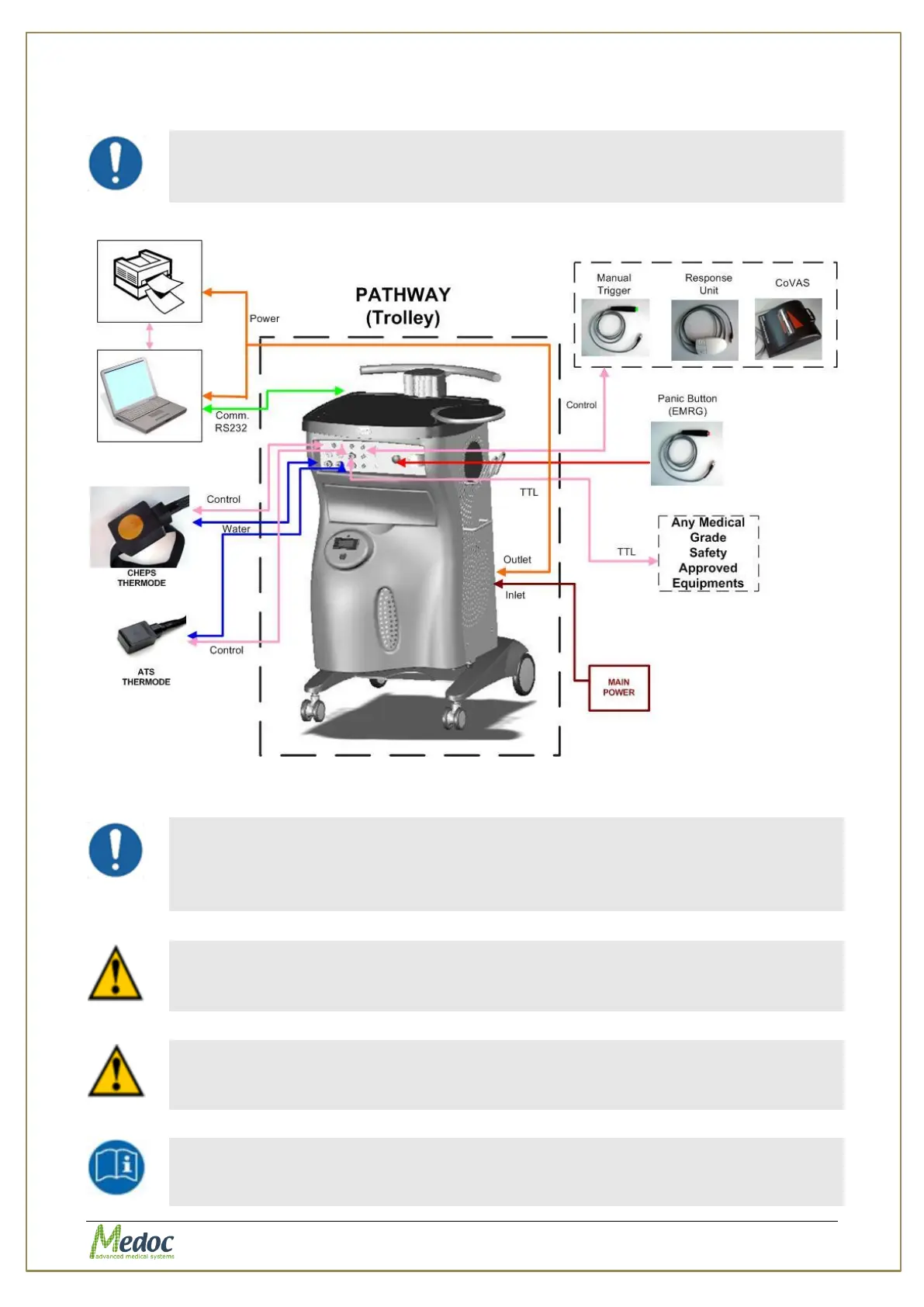
4. Connect the laptop (and printer if using) to the voltage output connector at the back of the
PATWAY trolley. See Figure 14
Make sure the all Thermode connectors are properly connected and
secure in place. Make sure that there is no coolant leakage from the
water connectors
Figure 13: Pathway Connection Diagram
Laptop and printer are not supplied by Medoc.
The computer used should be dedicated only to PATHWAY system.
Medoc takes no responsibility for any conflicts which may occur with other
programs installed on the same computer.
The total power consumption of the laptop and printer connected to the
power inlet of the trolley must not exceed 330 W.
Note that the power supply is sufficient of laptop and printer only (1.5A)
The external laptop and printer must be connected to the trolley power
outlet or through a Medical Grade Isolation Transformer only.
The USB cable connecting between the PATHWAY and the laptop should
only be connected after installation of Medoc Main Station software. See
section 4.9.



 To Next Page