Signal Integrity Conditioning
Microsemi Proprietary and Confidential UG0677 User Guide Revision 9.0 112
5.3.1 IO Editor—Signal Integrity
To access the Signal Integrity tab from IO Editor:
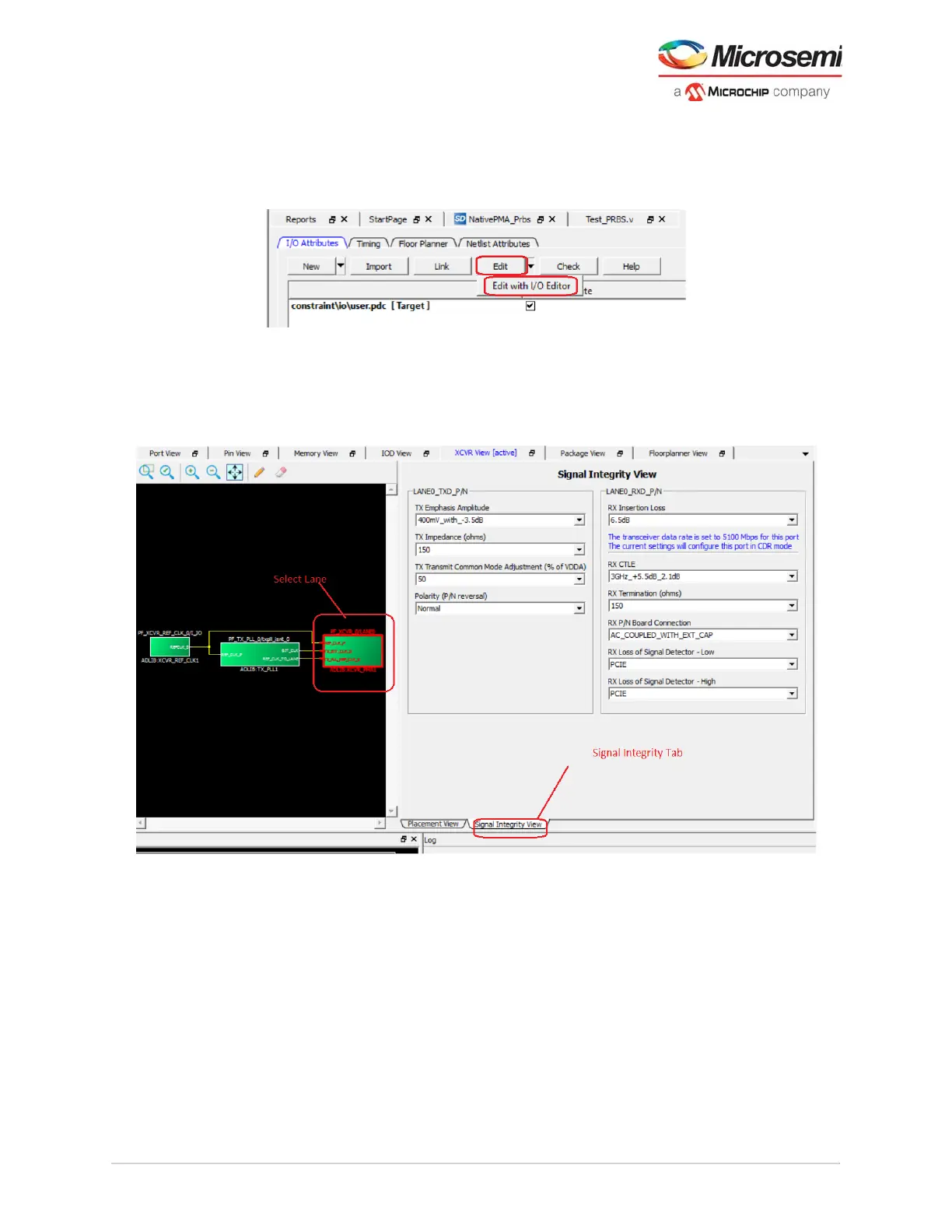
1. Open Constraint Manager > Edit > Edit with I/O Editor.
Figure 91 • IO Editor—XCVR View
2. In the XCVR View [active] tab, select Signal Integrity View tab and the XCVR lane to edit signal
integrity settings as shown in the following figure.
Signal Integrity panel displays the default values from the initial PDC when XCVR is created by the
Libero SoC software. If user modifies the default values in the Signal Integrity tab of the IO Editor, it
writes in the PDC.
Figure 92 • IO Editor—Signal Integrity View
5.3.2 PDC Constraint File Commands for XCVR Signal Integrity
PDC constraint support uses the set_io pdc commands to set the related parameters.The settings are
applied only to the dedicated XCVR ports—TX_P, TX_N (outputs), RX_P, and RX_N (inputs)
Example: set_io -port_name TX_P -TX_EMPHASIS_AMPLITUDE 100mV_with_0dB
Note: User can set the parameter on the P or N side and it applies to both.



 To Next Page