15.3 Terminal End Removal and Installation
Although this procedure shows a nozzle terminal end, the process is the
same for manifold terminal ends.
15.3.1 Terminal End Removal
CAUTION
Care must be taken when removing the element sleeve to avoid damage to
the ceramic sleeve or terminal nut.
CAUTION
1. If the terminal end is covered with plastic, warm the terminal end prior to
removing the element sleeve.
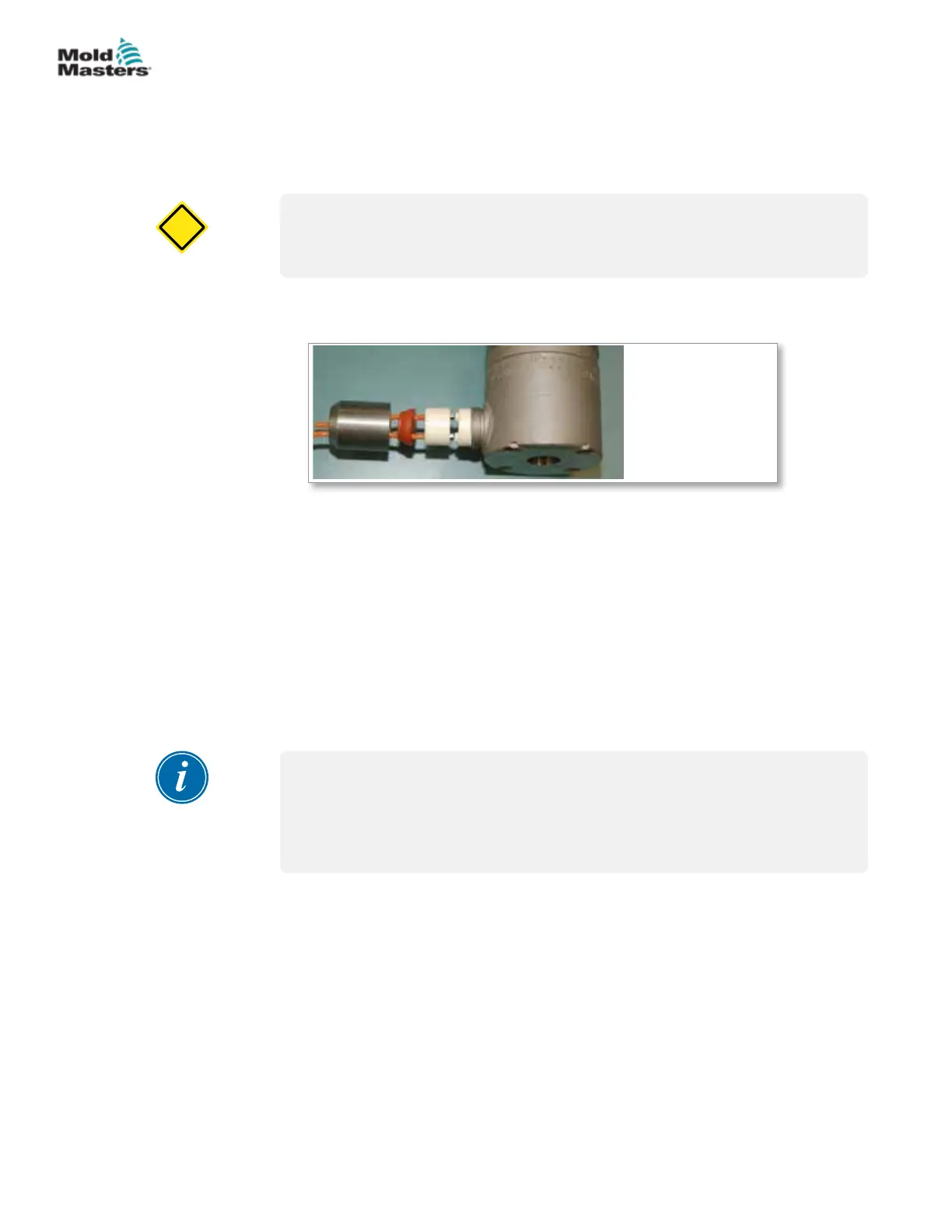
1. Nozzle ange
2. Ceramic insert
3. Ceramic sleeve
4. Seal
5. Element sleeve
22
11
33
44
55
Figure 15-6 Nozzle terminal assembly
2. Grip the element sleeve at the threaded area and turn counter clockwise.
If the wires rotate with the sleeve, damage may result.
3. Remove the seal.
4. Remove the set screw from the ceramic sleeve.
5. Remove the power leads.
15.3.2 Terminal Installation
Although this procedure shows a manifold, the process is the same for nozzle
terminal ends.
NOTE
Please contact Mold-Masters Spare Parts Department to ensure you
have the correct repair kit and crimping tool. The tools, along with the lead
wire replacement kit, are available through the Mold-Masters Spare Parts
Department.
15-8
© 2020 Mold-Masters (2007) Limited. All Rights Reserved.
MAINTENANCE
Hot Runner User Manual


 To Next Page