5.21.5 Inlet Extension with Pressure Sleeve
CAUTION
Always install the inlet extension, pressure sleeve, clamp plate and locating
ring with the mold plates in the horizontal position. Failure to do so could
result in damage to the components and cause material leakage.
CAUTION
1. Place the inlet extension on the manifold.
2. Cut the inlet extension pressure sleeve to the required height.
NOTE
A pressure sleeve is supplied oversize in length. Refer to General Assembly
drawing to determine length of pressure sleeve.
1
2
3
4
5
6
7
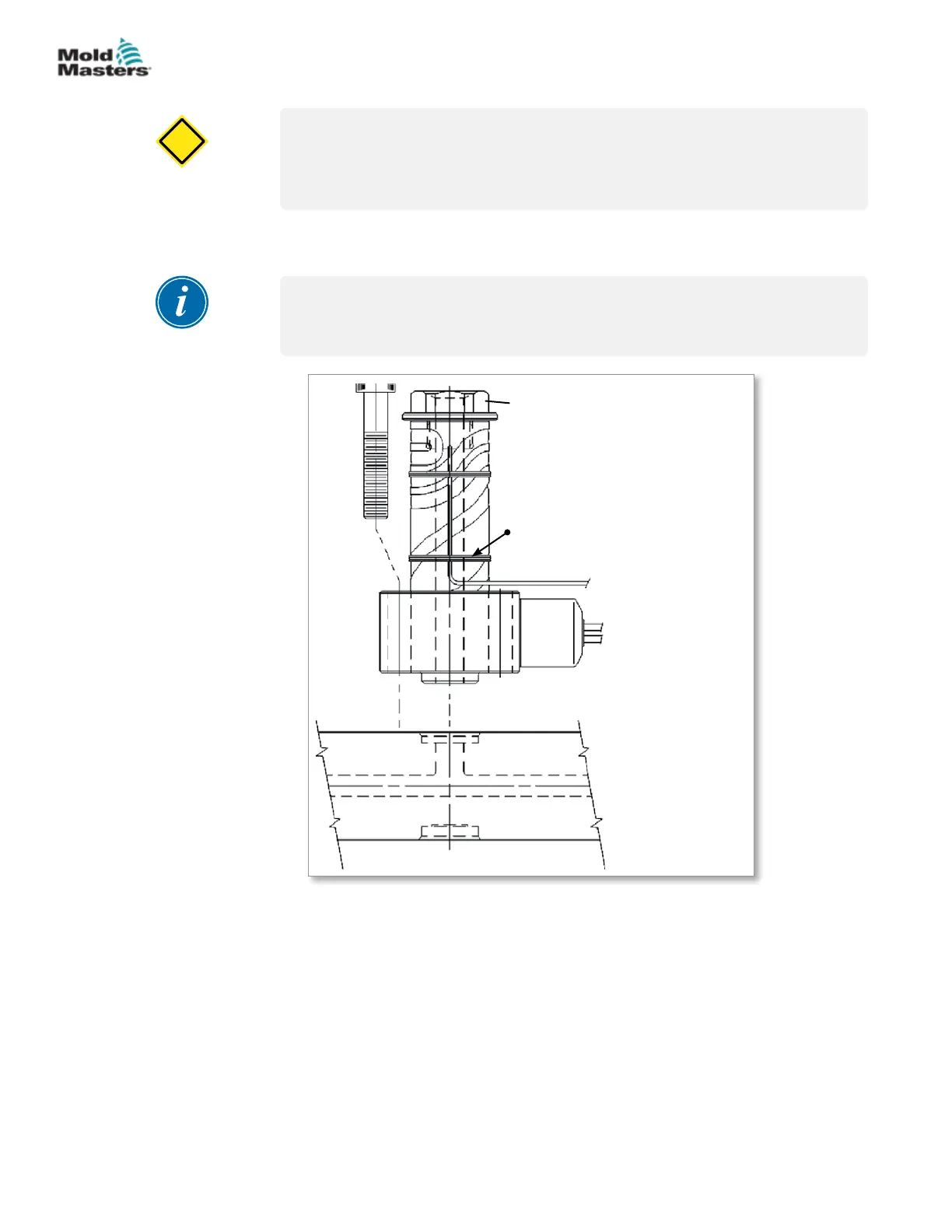
1. Extension
2. Inlet extension
3. Thermocouple
4. Manifold
5. Nozzle ange
6. Screw
7. Wire wrap
Figure 5-42 Inlet extension
3. Chamfer the outside edge of the pressure sleeve.
4. Place zone number on each wire and thermocouple.
5. Tape wires for each zone together.
6. Install the wires into the wire channels and secure with wire retainers.
5-49ASSEMBLY
Hot Runner User Manual
© 2020 Mold-Masters (2007) Limited. All Rights Reserved.


 To Next Page