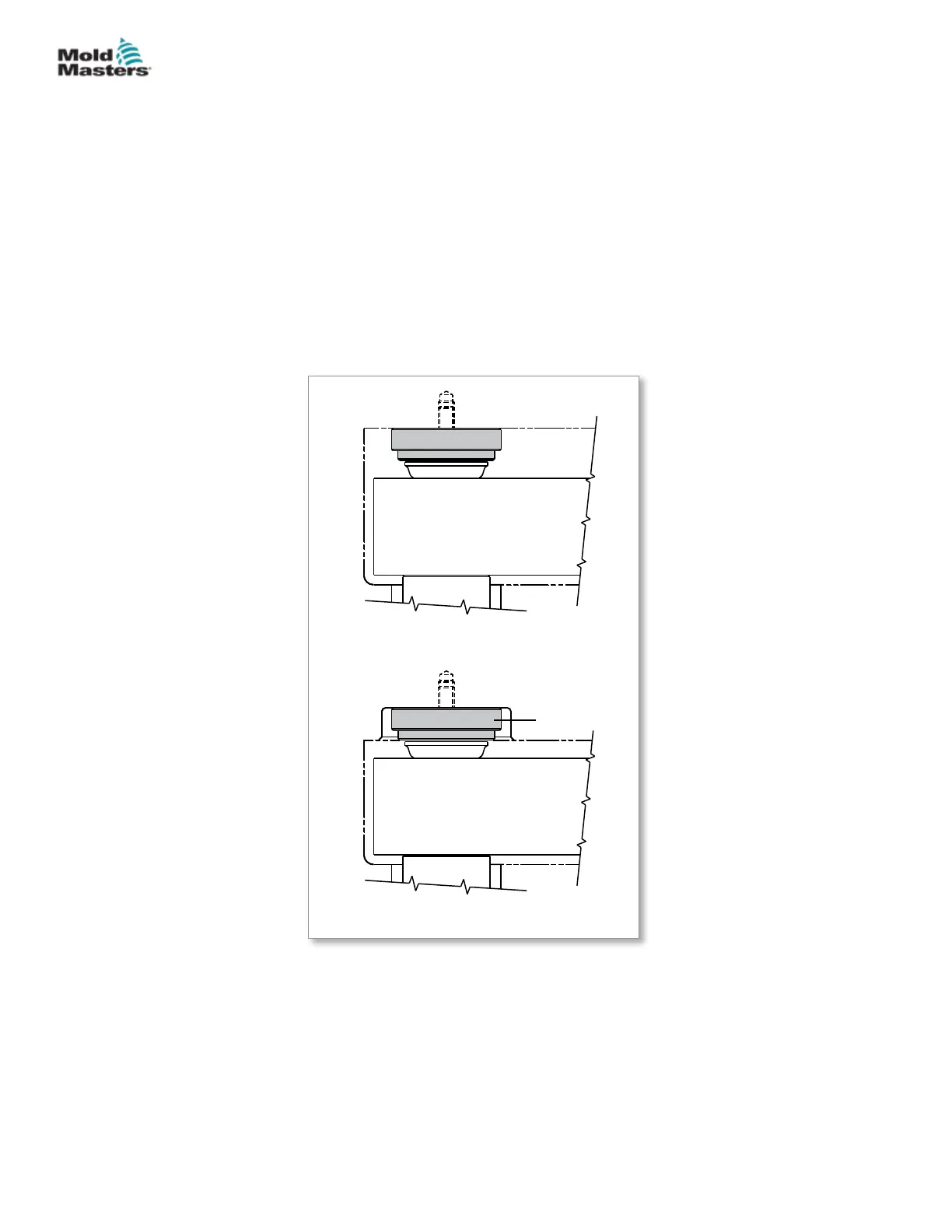
5.17.4 EcoDisk Installation
EcoDisks are present on all Sprint systems and optional on others. They are
installed directly onto the clamp plate and will align with the pressure disks
when assembled.
1. Lay the clamp plate on a work bench with the bottom face up.
2. Locate the EcoDisk on the clamp plate as indicated on the General
Assembly drawing. Ensure the ceramic disk is facing upwards and will
contact the pressure disk when assembled.
3. Secure the EcoDisk with an M5 at head screw uniformly, following the
plate assembly specication.
4. Repeat for all EcoDisks.
There is no change to pressure disk assembly when using the EcoDisk.
A) Standard mount
B) Flush mount for retrot or stack height
limit
EcoDisk
Pressure disk
M5X0.8 screw
Manifold
EcoDisk
Pressure disk
M5X0.8 screw
Manifold
Figure 5-31 EcoDisk mounting congurations
5-39ASSEMBLY
Hot Runner User Manual
© 2020 Mold-Masters (2007) Limited. All Rights Reserved.


 To Next Page