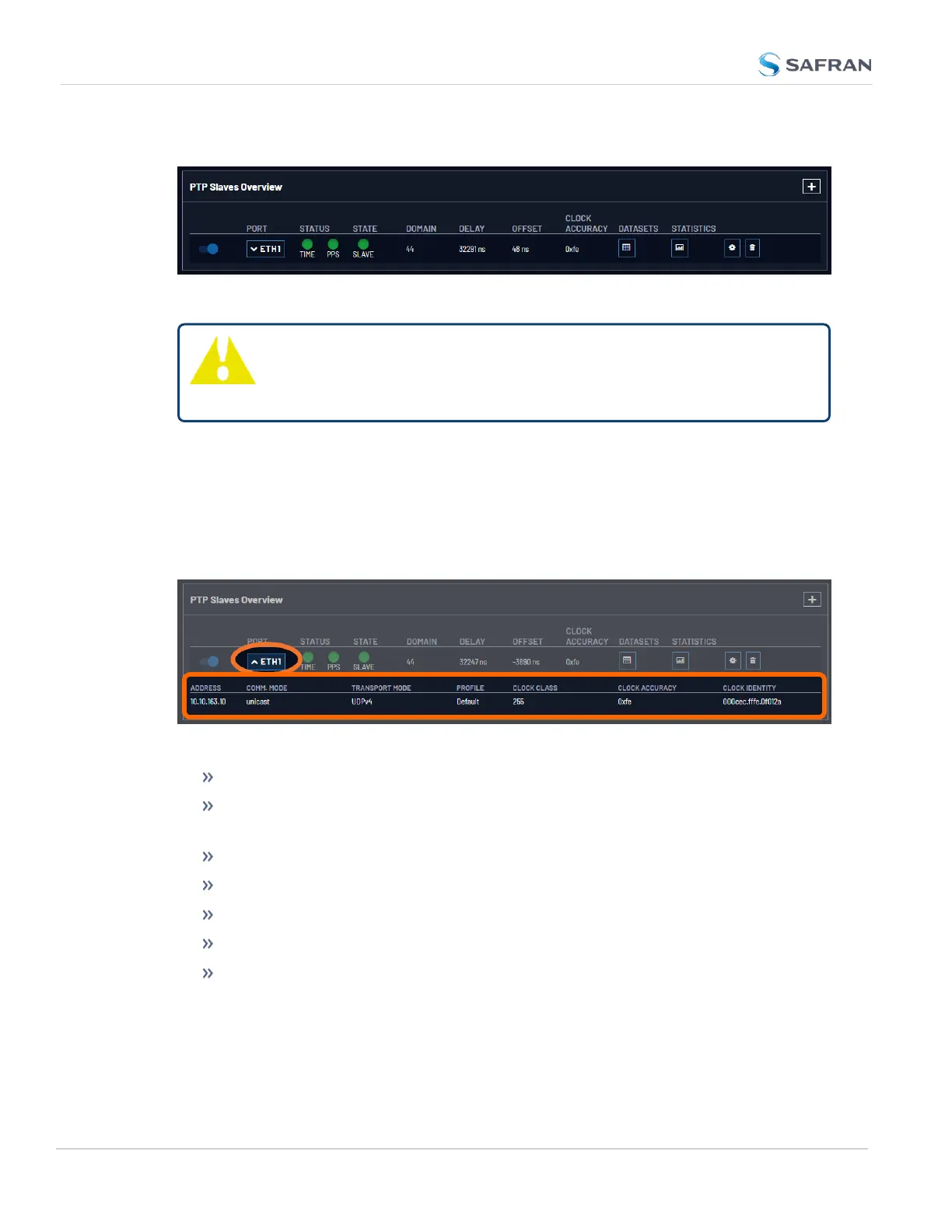
The PTPSlaves Overview Panel
Figure 2-9: PTP Slaves Overview Panel
Tip: You will not see any data in this panel if you do not have a
PTPSlave configured. See"Configure a New PTP Master or
PTPSlave" on page150
The PTPSlaves Overview panel contains an overview of each PTP slave con-
figured on the unit, along with links to view more specific information.
The ON/OFF toggle will Enable/Disable PTPon the specific port.
The Port dropdown lists the port (eth0/eth1), and displays additional con-
figuration information if the drop-down is selected:
Figure 2-10: PTP Slaves Overview Drop Down
Address: the IPor MAC address associated with the Ethernet port.
Comm. Mode: the PTP transmission mode configuration (Unicast, Multicast,
or Hybrid).
Transport Mode: (Ethernet, UDP on IPv4, UDP on IPv6).
Profile: the currently selected PTP profile.
Clock Class: as reported by the PTP data.
Clock Accuracy: as reported by the PTP data.
Clock Identity: a unique identifier for the PTP instance.
The Status LEDs display the Validity for the Time and PPS provided by the PTP
Master associated with this slave.
142
CHAPTER 2 • VersaSync User Manual Rev. 12
2.8 Configuring Network Settings



 To Next Page