63 22 726 D3561
D3561.201.01.03.02 05.2012
209
Sirona Dental Systems GmbH 5 Care, cleaning and maintenance by the practice team
Operating Instructions SINIUS / SINIUS CS 5.6 Sanitation
båÖäáëÜ
Starting sanitation
➢ Touch the
Start
key.
The sanitation process starts.
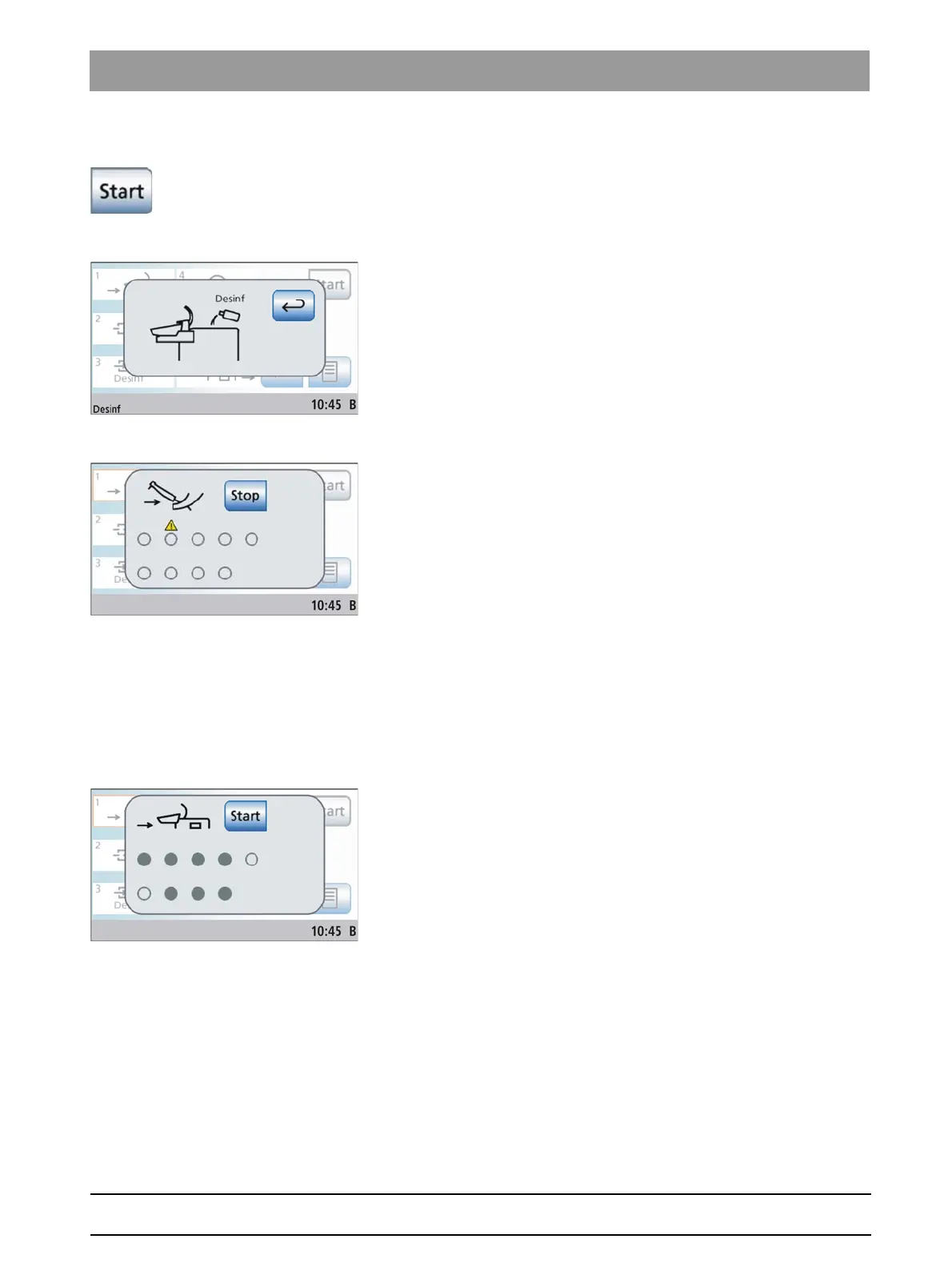
Error message: Refill with DENTOSEPT P disinfectant
If the
Disinf
display appears after the sanitation process is started, the
supply of DENTOSEPT P disinfectant in the reservoir of the water unit is
not sufficient to sanitize the treatment center. Sanitation cannot be started
with insufficient disinfectant; see "Refilling DENTOSEPT P
disinfectant" [ → 200].
Error message: Depositing instruments
If the
Depositing instruments
display appears after sanitation has been
started, the treatment center has detected that not all of the instruments
have been placed in their holders.
➢ Check the instruments marked with a warning triangle on the
touchscreen.
When all of the instruments have been deposited, sanitation
phase 1 begins automatically.
Sanitation phase 1 – Inserting instruments and suction hoses into the
receptacle on the water unit
The water unit has an integrated receptacle for water carrying
instruments and suction hoses. It enables all instruments and suction
hoses to be simultaneously treated with the increased sanitizing
concentration and then rinsed with water. For this purpose, sanitizable
instruments and suction hoses must be inserted into the receptacles.
✔ Sanitation phase 1 is highlighted on the touchscreen.
✔ The
Insert instruments in water unit
display appears on the touch
screen.
1. Remove the SPRAYVIT sleeves from the valve bodies, the straight
and contra-angle handpieces from the sanitizable instruments, and
the suction cannulas from the suction hoses.















 To Next Page