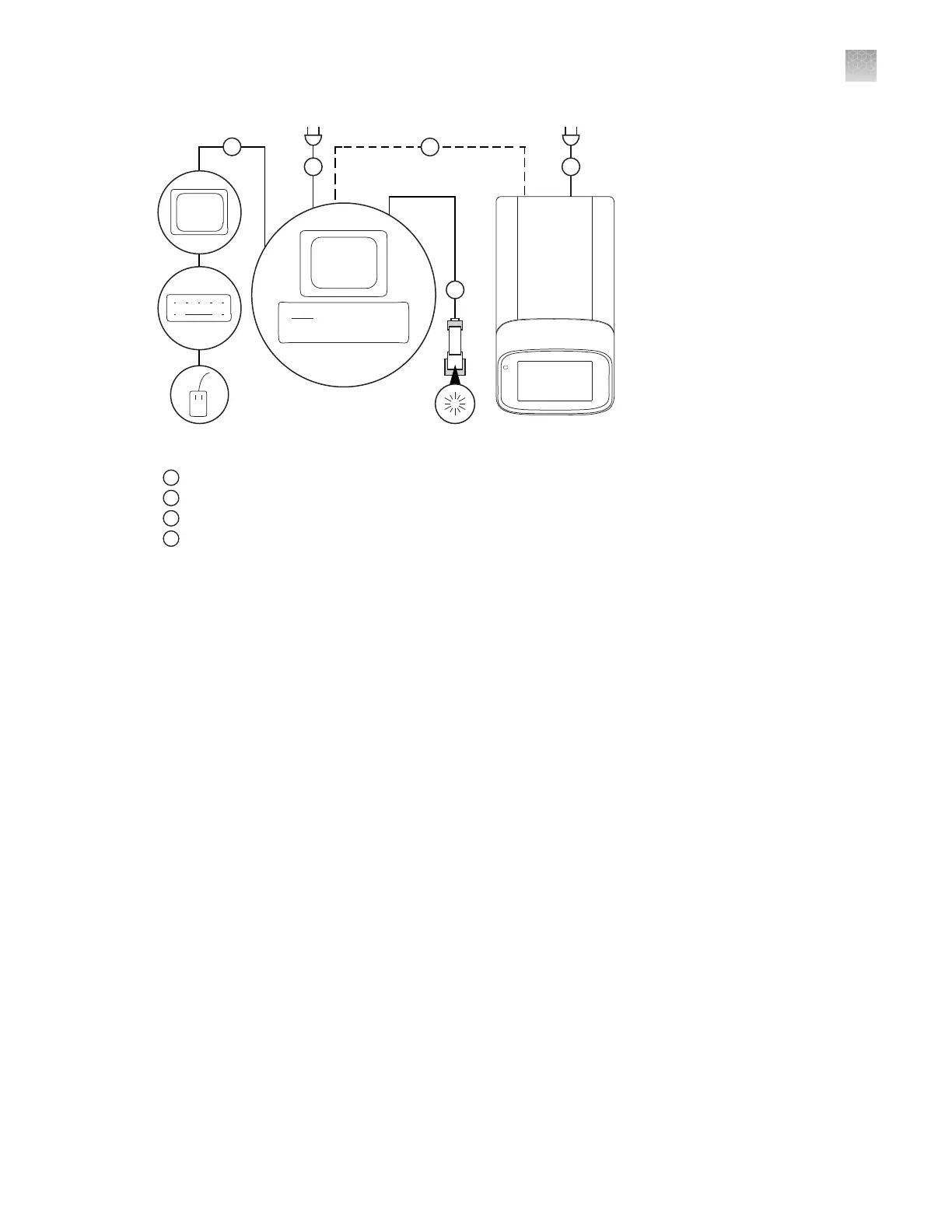
Figure 26 Instrument‑t
o‑computer connections (minitower configuration)
1
Detachable power supply cord compatible with local power supply receptacle.
2
Connection between the computer and the instrument.
3
Connection between the computer and the monitor, keyboard, and mouse.
4
Connection between the computer and the (optional) handheld bar
code scanner.
Download and install the desktop software
Computer requirements for the desktop software
The desktop software can be installed on a customer‑provided computer. The following list contains the
minimum software requirements for a customer-provided computer.
•
Operating system—Windows
™
10 (64‑bit) or Macintosh
™
OS 10.01
•
Processor—Pentium
®
4 processor or comparable
•
Memory—4 GB RAM
•
Hard drive—10 GB
•
Monitor—1280 × 1024 resolution
Download the desktop software
1.
Go to thermofisher.com/qpcrsoftware.
2.
Select the link for the QuantStudio
™
6 Pro and 7 Pro Real-Time PCR Systems.
3.
Download the software.
The example files are embedded in the software.
Appendix B Connect the instrument t
o a network
Download and install the desktop software
B
QuantStudio
™
6 Pro Real-Time PCR System and QuantStudio
™
7 Pro Real-Time PCR System User Guide
197












 To Next Page