Software description
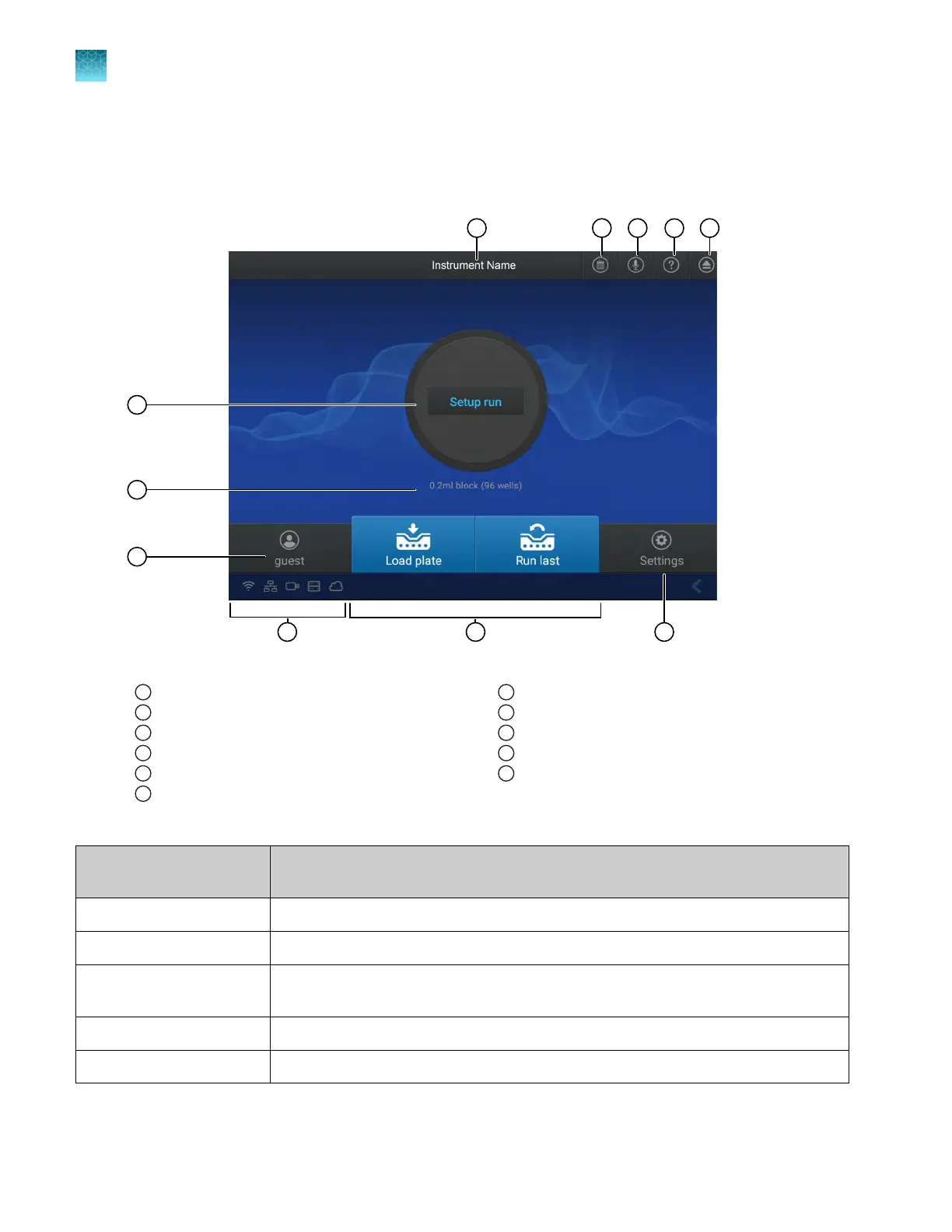
Parts of the home screen
Figure 5 Home screen
1
Instrument name
2
Instrument calendar
3
Microphone
4
Help
5
Eject
6
Status dial
7
Block installed
8
Current user
9
Connectivity icons
10
Buttons to access plate files
11
Instrument settings
Table 1 Parts of the home screen
Element of the home
scr
een
Function
Instrument name Set by the administrator to identify the instrument.
Calendar Schedule time for a run or see runs that are scheduled.
Microphone Shows the status of the microphone (see “Indicators for voice commands” on
page 23 and “Enable or disable the microphone” on page 44).
Help Access the Help.
Eject Open or close the drawer to insert or remove a plate or a TaqMan
™
Array Card.
Chapter 1 Product information
Software description
1
24
QuantStudio
™
6 Pro Real-Time PCR System and QuantStudio
™
7 Pro Real-Time PCR System User Guide












 To Next Page