(continued)
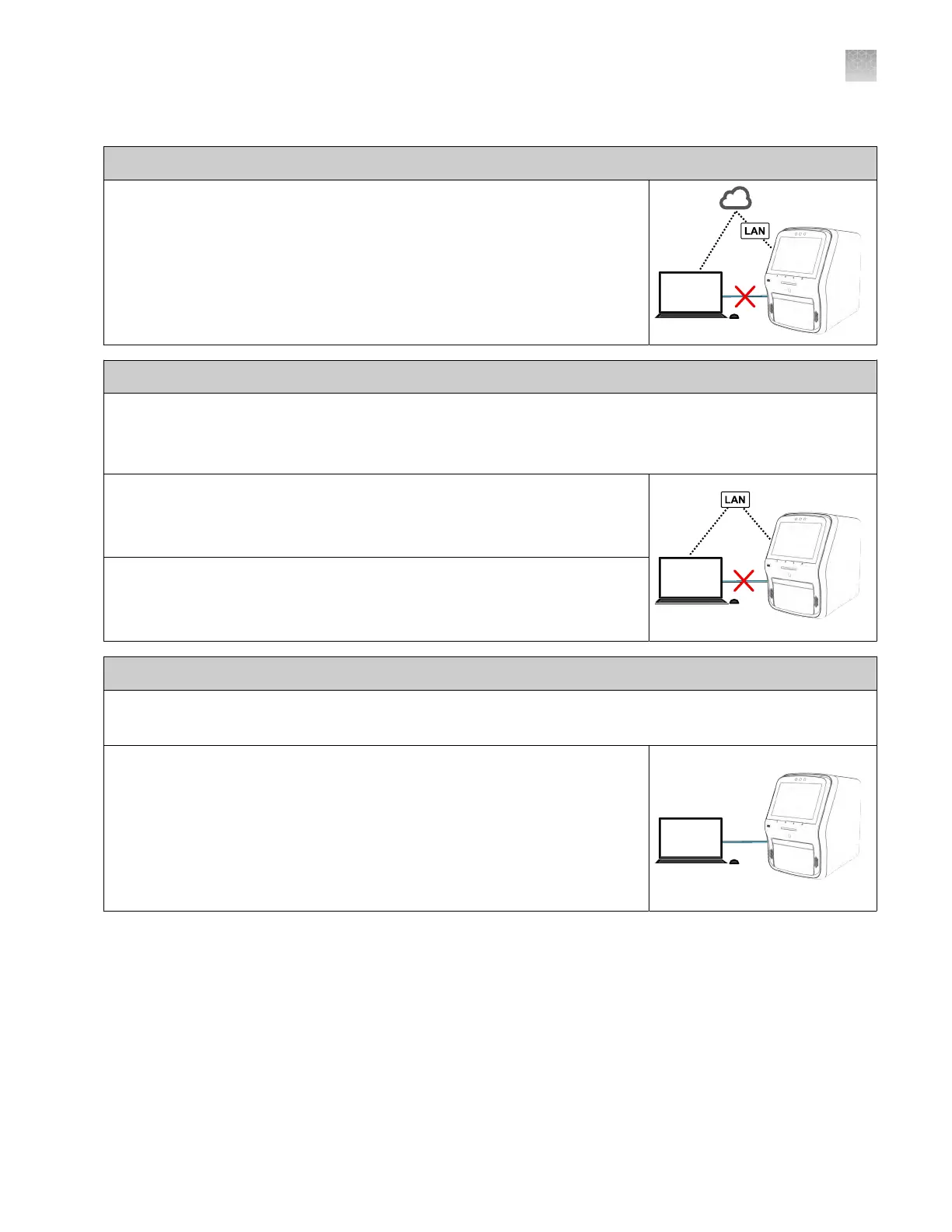
Connect cloud-based platform connection
•
Instrument‑to‑Connect platform connection (select an option):
–
Wired connection to the network using an Ethernet cable – or–
–
Wireless connection to the network using the instrument Wi‑Fi module
Local area network (LAN) connection
•
A comput
er provided by Thermo Fisher Scientific with the QuantStudio
™
Design and Analysis Desktop
Software.
•
The computer and instrument must be on the same subnet mask.
•
Computer‑to‑LAN connection (select an option):
–
Wired connection to the network using an Ethernet cable – or–
–
Wireless connection to the network
•
Instrument‑t
o‑LAN connection (select an option):
–
Wired connection to the network using an Ethernet cable – or–
–
Wireless connection to the network using the instrument Wi‑Fi module
Direct connection
•
A comput
er provided by Thermo Fisher Scientific with the QuantStudio
™
Design and Analysis Desktop
Software.
•
Comput
er‑to‑instrument connection: Direct, wired connection between the
computer and the instrument using an Ethernet cable.
IMPORTANT! A dir
ect instrument‑to‑computer connection cannot be
combined with the LAN or the Connect cloud-based platform configurations.
Appendix B Connect the instrument to a network
Networking
B
QuantStudio
™
6 Pro Real-Time PCR System and QuantStudio
™
7 Pro Real-Time PCR System User Guide
199












 To Next Page