(continued)
File location
Description and function
Post-read
•
In endpoint PCR, the pre-read data is saved in this folder for post-read
analysis.
Files
IMPORTANT! Plate files and data files are not included in a back-up of the instrument and are not
restored when a backup of the instrument is restored.
Plate files and data files must be transferred separately. See Chapter 6, “View and manage files”.
System templates are included in the back-up and are restored when a backup of the instrument is
restored.
All file types ar
e applicable to both plates and TaqMan
™
Array Cards.
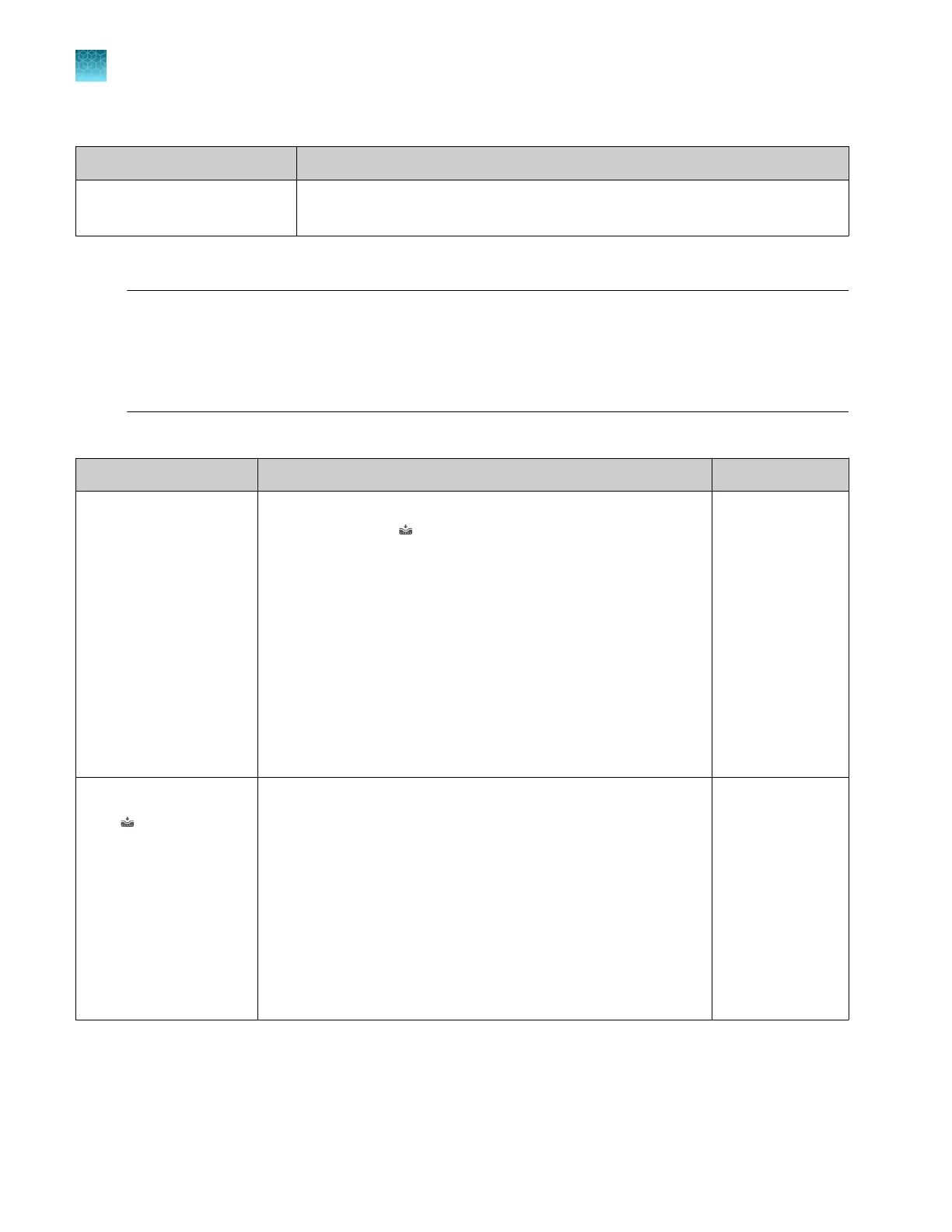
Item Description and function Supported in
System template
•
A non-editable t
emplate.
•
Accessed from
(Load plate file) and the T
emplates folder
(only system templates are stored in this folder).
•
Accessed from the Set up run button.
•
Is saved as a separate plate file if it is edited.
•
Contains the thermal protocol for the real-time PCR.
•
Does not contain the sample information.
•
Does not contain the target information.
•
Sample information and target information must be added
(saved as a separate plate file). The sample information and
target information can be added on the desktop software or
on the Connect platform after the run is complete.
Instrument
Desktop
Connect
Plate File
From
(Load plate file)
•
A file that has been saved fr
om a system template.
•
Can be edited and saved.
•
Can be edited and saved as a separate plate file.
•
Contains the thermal protocol for the real-time PCR.
•
Can contain the sample information.
•
Can contain the target information.
•
Sample information and target information must be added if
not present. The sample information and target information
can be added on the desktop software or on the Connect
platform after the run is complete.
Instrument
Desktop
Connect
Chapter 1 Product information
Software description
1
28
QuantStudio
™
6 Pro Real-Time PCR System and QuantStudio
™
7 Pro Real-Time PCR System User Guide












 To Next Page