EN
102
Software Module
11.7.2. Settings
Image Area
A preview of the threshold analysis appears in the image area.
The threshold value process is only applied within the selected region of interest.
Depending on the gray-scale values and the selected settings, the pixels in the region
of interest become either black or white (white: foreground, black: background).
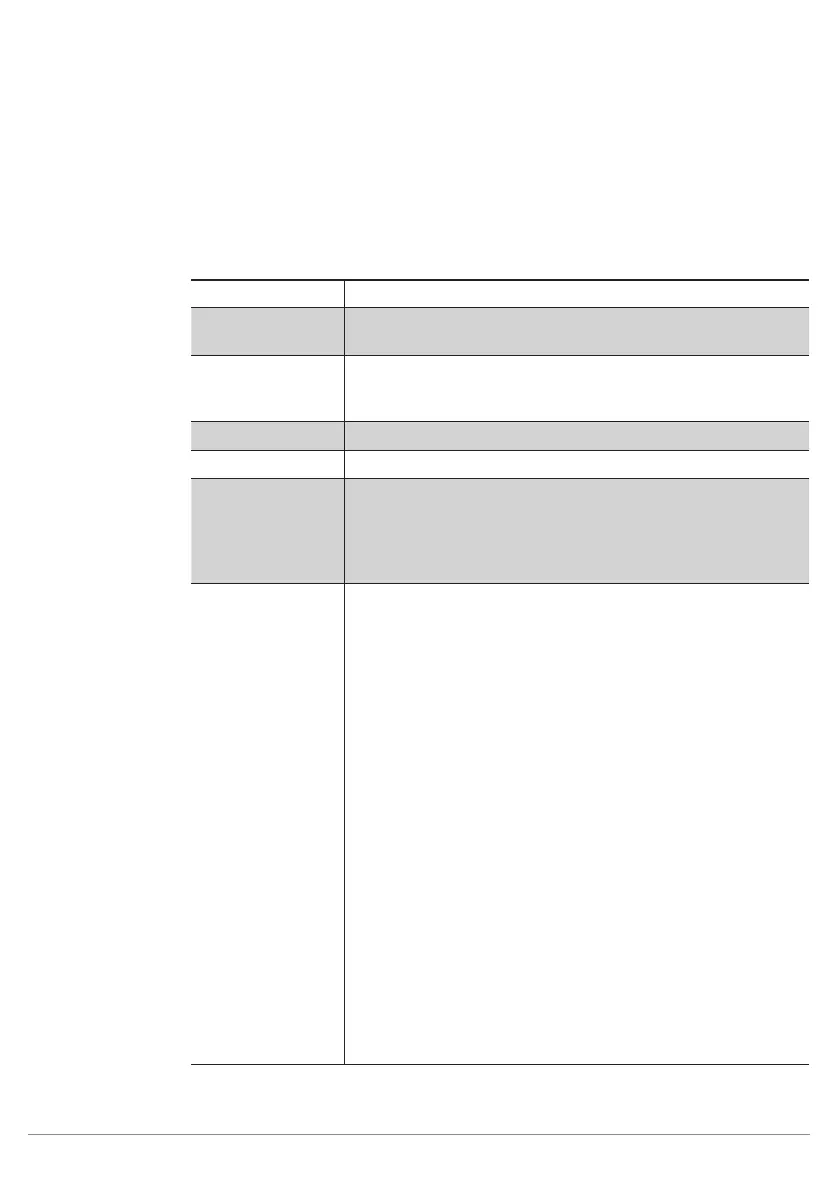
Property
The following settings/results appear.
Process Time [ms] Sensor processing time for the process steps
Module State Error codes to give support in error diagnosis. (see section
18.5)
Pixel Count Display of the number of white pixels counted in the region of
interest. The upper and lower thresholds of the pixel value can
be adjusted.
Input Region Selection of the region for the threshold process
Input Image Selection of the image input
Teach The current number of detected pixels (pixel count value) is
taught-in. The range between minimum and maximum
remains unchanged, but the minimum and maximum values
of the pixel count value are adjusted such that the current
number of detected pixels is half way between the two values.
Mode Threshold values can be adjusted statically or adaptively.
Note: Threshold values can be dynamically corrected in order
to compensate for minimal brightness fluctuation or different
surface finishes. However, brightness differences can only be
compensated for in settings which are already relatively stable
by means of this adaptive adjustment.
Static
Thresholds are set to fixed values with the
Threshold Low and Threshold High func-
tions.
Adaptive by
Reference
The threshold value is calculated on the basis
of the mean value of the respective surface
and is thus corrected.
Range 1: Foreground >= Background (fore-
ground is brighter than background)
Range 2: Foreground < Background (back-
ground is brighter than foreground)
Adaptive by
Histogram
The threshold values can be ideally adjusted
by repositioning the arrows in the histogram, in
which pixel distribution is displayed along with
the corresponding gray-scale values. Howev-
er, settings can also be entered manually with
the help of the Offset and the Quantile 1 and
2 functions.



 To Next Page