93
Smart Camera / Vision-Sensor / 1D-/2D-Code-Scanner / OCR Reader
11.5.2. Settings
Image Area
The region of interest is highlighted green in the image area (default setting).
Property
The following settings/results appear.
Process Time
[ms]
Sensor processing time for the process steps in the region module.
Module State Error codes to give support in error diagnosis. (see section 18.5)
Input Image Selection of the image input
Coordinate
System
Selection can be made regarding how the region of interest should
be tracked.
Function Field
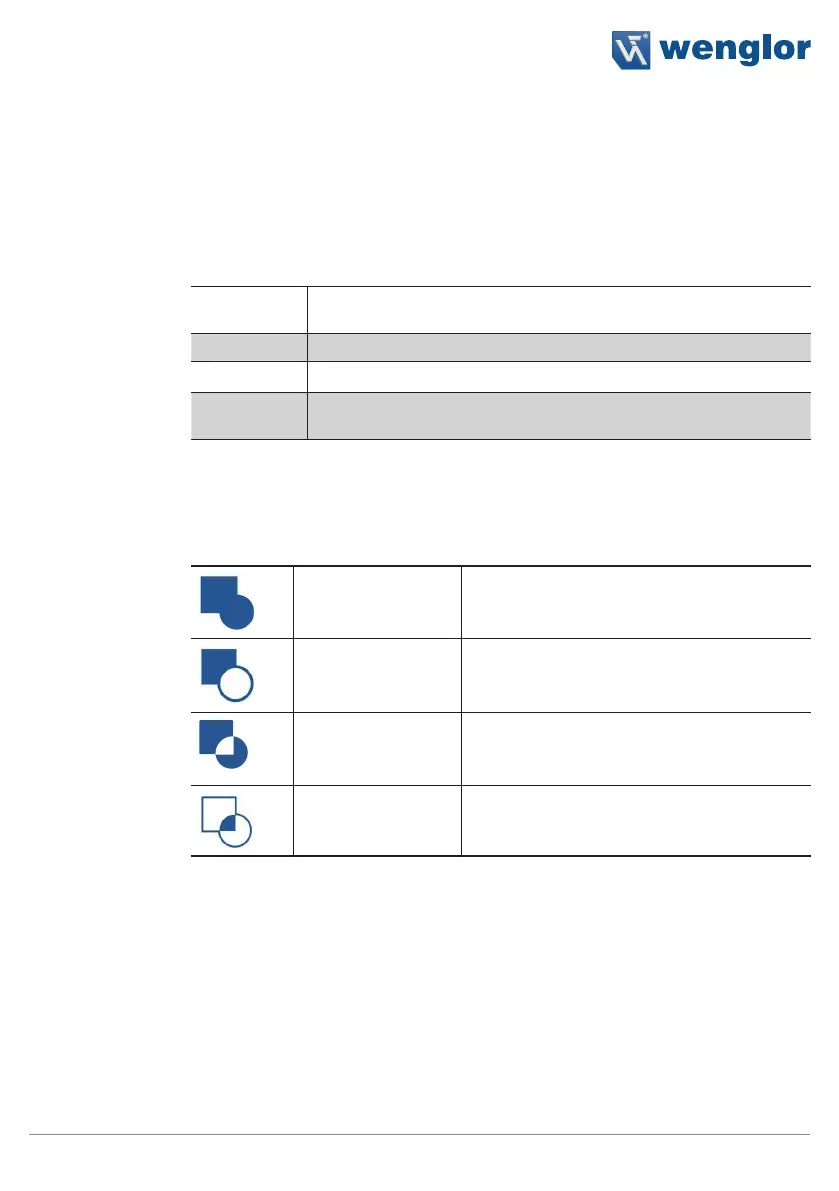
New shapes can be added to the toolbar module.
1. Select the mathematical operation.
Add shape
The new shape should be added to the overall
shape.
Subtract shape
The new shape should be removed to the
overall shape.
Subtract symmetric
The common area of the new shape is re-
moved from the overall shape.
Intersect shape
The common area of the new shape and the
overall shape should be selected.
Note: The order of the shapes is dictated by the order in which they are created and
cannot be subsequently changed. As a result, the overall shape of all previously exist-
ing shapes is always used for the offsetting of shapes.



 To Next Page