EN
68
Software Module
11.2. Camera Device Module
11.2.1. Overview
Objective
Set up the camera for optimized preparation of image processing. Load stored images for
subsequent image processing.
Prerequisites
1. Sensor is correctly connected (see section 5.5)
2. Connection has been established from the sensor to the software (see section 10.1.1)
Procedure
Various image recording settings can be changed in order to obtain the best possible cam-
era image for subsequent image processing. For example focal point, exposure time and
illumination can be adapted to the respective ambient conditions.
Furthermore, the camera area which is read out can be reduced in size. In this way, sensor
processing time can be reduced and the refresh rate can be increased.
In addition to live images, stored images or image series can be loaded to the software in
the offline mode. The camera supports a resolution of up to 736 x 480 pixels.
11.2.2. Setting Parameters
Image Area
If connection to the sensor has been established, the live image is displayed in the image
area. If no connection has been established, the initial window appears in the image area.
Blue Gain
The image’s blue content is changed by means of automatic white balancing of the color
camera. This changed value can also be adjusted manually.
Red Gain
The image’s red content is changed by means of automatic white balancing of the color
camera. This changed value can also be adjusted manually.
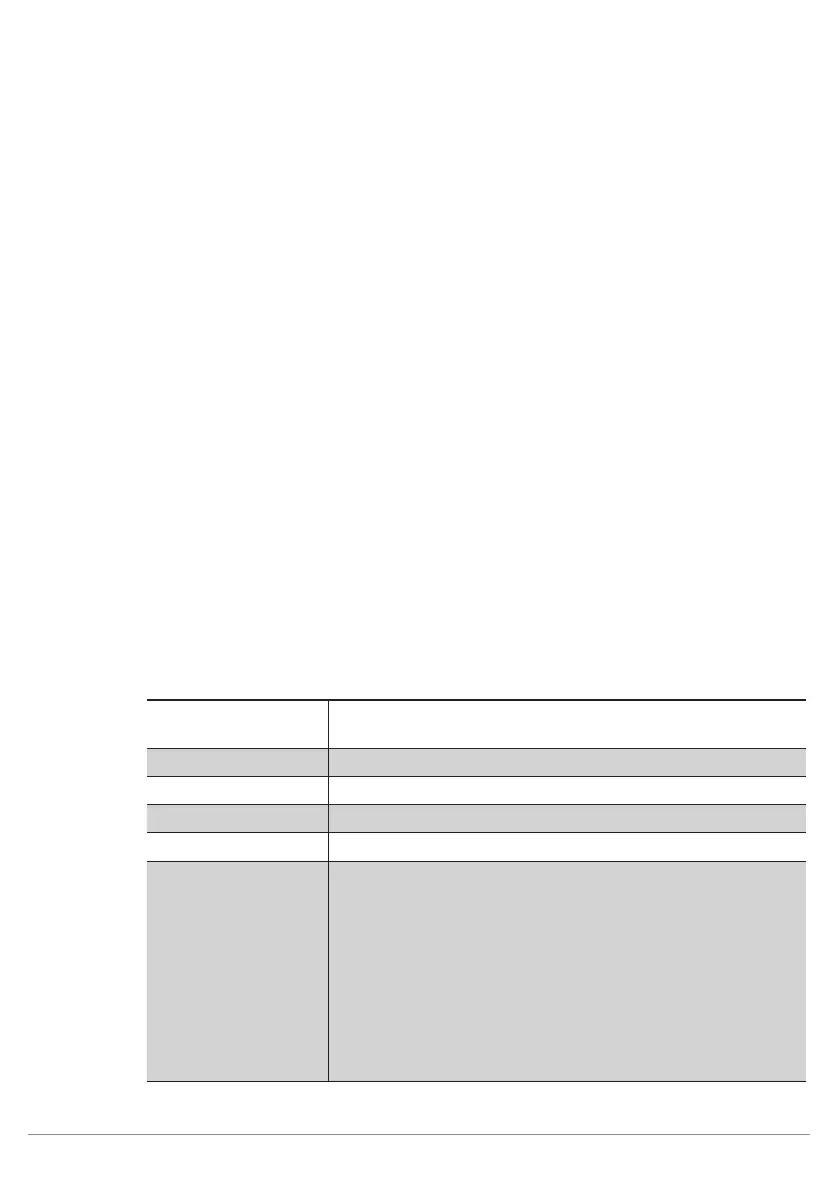
Property
The following settings/results appear:
Process Time [ms] Sensor processing time for the process steps in the device cam-
era module
Module State Error codes to give support in error diagnosis. (see section 18.5)
Capture Duration Processing time for image recording
Queue Position Number of images which are currently in the input buffer
Color Mode Displays the sensor’s image chip variant (color or monochrome).
Exposure Time (µs) Exposure time is the period of time during which the CMOS sen-
sor receives light. Exposure time can be selected within a range
of 0.017 to 30 ms. It can be adjusted in steps of 0.001 ms.
Short exposure times are used for dynamic processes in order to
avoid motion blur.
Long exposure times are used for static processes.
• Short exposure times are used for dynamic processes in or-
der to avoid motion blur.
• Long exposure times are used for static processes.
Note: Long exposure times (>1 ms) reduce light current serves
as a safety mechanism and prevents overloading of the LEDs.



 To Next Page