EN
78
Software Module
11.3.3.3. Teach Image
Objective
The last taught in teach box is displayed in the upper left-hand corner. It’s used as a
reference value for future search operations.
Property
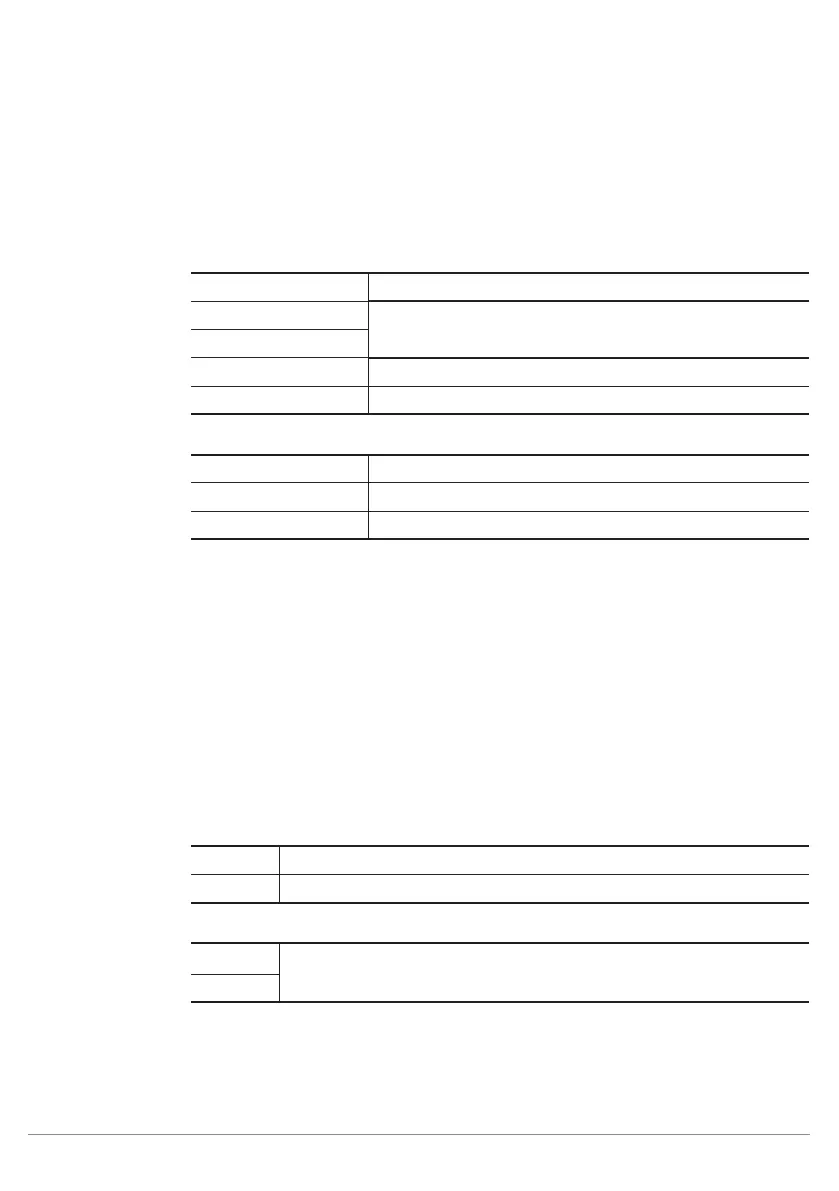
The following settings/results are displayed under origin:
Image Type Display of the image type
X (px)
Coordinate of the sensor image coordinate system (see sec-
tion 18.3)
Y (px)
Width (px) Width of the teach image
Height (px) Height of the teach image
The following settings/results are displayed under raw 8-bit:
Size Number of pixels read out
Bits per Pixel Display of the number of bits required to transmit one pixel
Channel Type Type of the image channel"
11.3.3.4. Teach Box
Objective
A reliably detectable area (especially high-contrast area, special shape, edge or cor-
ner) with a size of 16 x 16 pixels can be specified within the image area and then taught
in to the settings for the localizer module. This taught in area serves as a reference
value. Detection of closest correspondence to this taught in area is then detected in
the search area of every image.
Image Area
As a standard feature, the teach box with a size of 16 x 16 pixels is displayed at the
upper left-hand edge of the image in the image area. Its position within the image area
can be freely varied. The teach box is then taught in to the localizer module (see sec-
tion 11.3.2).
Property
The following settings/results are displayed:
Width Width of the search box along the X-axis
Height Height of the search box along the Y-axis
The following settings/results are displayed under origin:
X (px)
Coordinate of the sensor image coordinate system (see section 18.3)
Y (px)



 To Next Page