145
Smart Camera / Vision-Sensor / 1D-/2D-Code-Scanner / OCR Reader
11.14.3.3. Search Region
Goal
The area of the image within which characters will be searched for can be specified. Using
a small search region reduces evaluation time and increases the refresh rate.
Characteristic
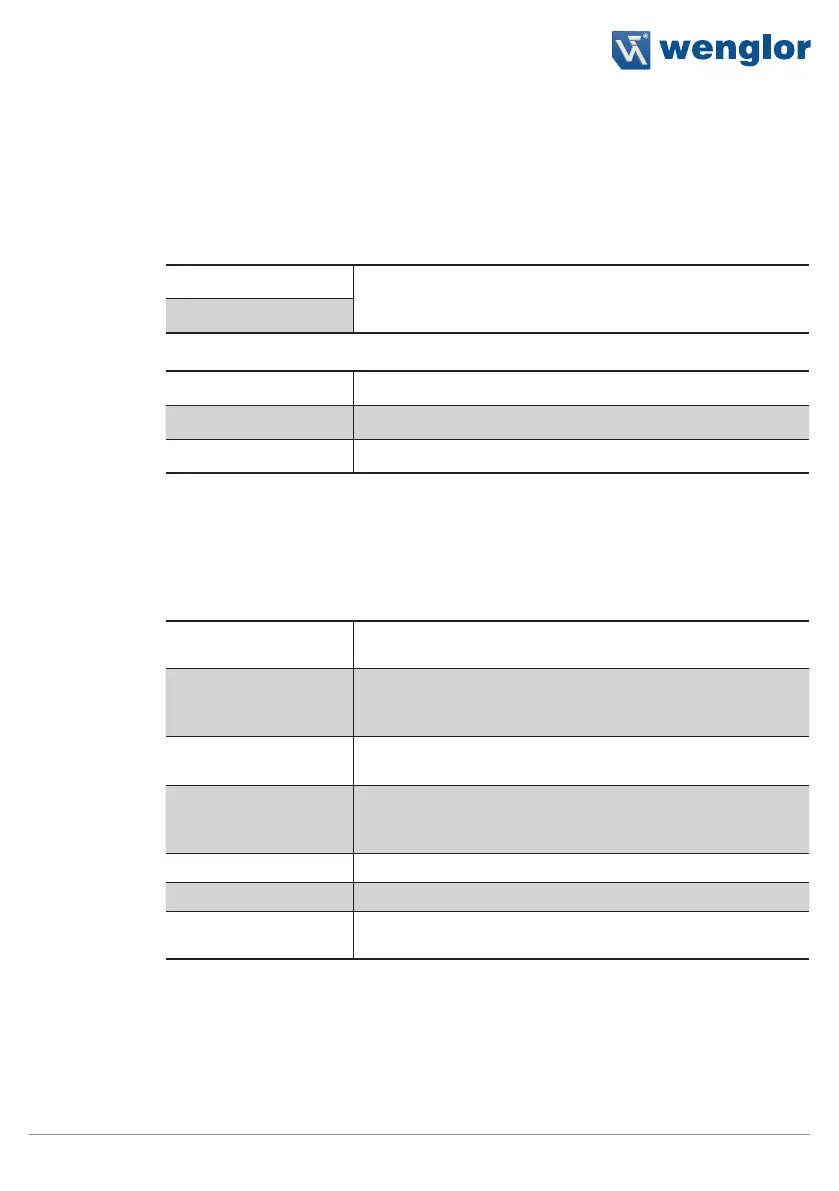
The following settings/results are displayed for any given selected segment
The following settings/results for the search region are displayed under reference point:
X (px) Coordinate of the image sensor’s coordinate system (see sec-
tion 18.3.
Y (px)
The search region settings are also displayed in the characteristics:
Width (px) Search box width
Height (px) Search box height
Phi (degrees) Search box rotation angle
11.14.3.4. Find Lines
Goal
The module can read out several lines from a search region. The presettings for the lines
to be expected are entered under “find lines”.
Characteristic
The following settings/results are available:
Line detection This function is initially deactivated. The search algorithm is
activated by switching the mode to standard.
Angle [degrees] If the angle range is set to 0, the module automatically calcu-
lates the angle of the rows with reference to the search region.
The resulting value is displayed.
Maximum number of
lines
The number of lines to be expected is specified.
Angle range [degrees] The angle between the search region and the expected lines
is specified. If this value is set to 0, the module calculates the
angle automatically.
Min. line height (px) Minimum height of the expected lines
Max. line height (px) Maximum height of the expected lines
Min. line spacing (px) The search algorithm of each line is expanded by one-third of
the line spacing value in positive or negative direction.



 To Next Page