185
Smart Camera / Vision-Sensor / 1D-/2D-Code-Scanner / OCR Reader
12.2. Procedure
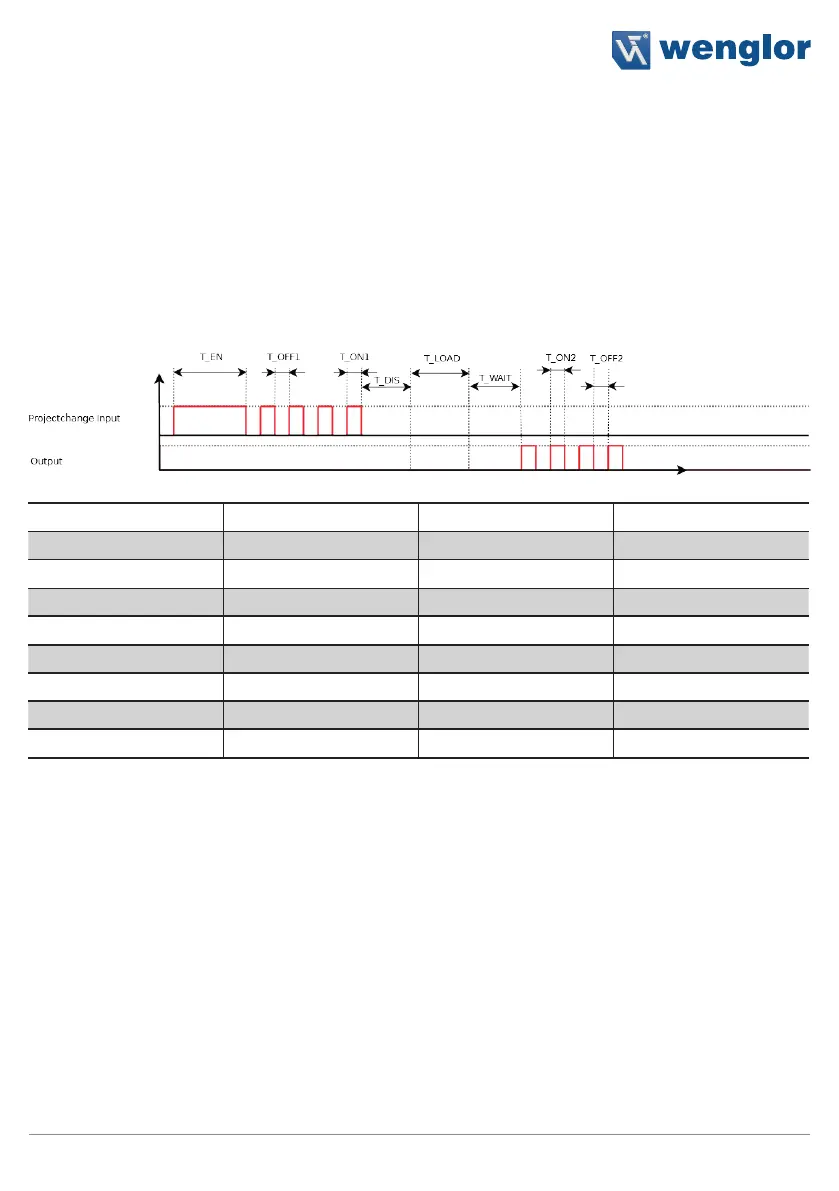
The sensor is switched to the project change mode by applying a voltage of greater than 7 V (high) to the previ-
ously selected input pin for a duration of T_EN.
Each positive edge is counted in the project change mode (one positive edge = project 1, two positive edges
= project 2 etc.), until a voltage of less than 2 V (low) has been applied to the project change input for a dura-
tion of T_DIS.
If an output has been set up as a feedback output (project change output), the project selection is read out from
this output using the number of pulses to identify the project number.
Designation Typical Min Max
T_EN 2000 ms 1000 ms 5000 ms
T_OFF1 250 ms 100 ms 1000 ms
T_ON1 250 ms 100 ms 1000 ms
T_DIS 1000 ms 1000 ms -
T_LOAD 12000 ms 10000 ms 15000 ms
T_WAIT 1000 ms - -
T_OFF2 250 ms - -
T_ON2 250 ms - -
13. Network Settings
The weQube is equipped with a web-based configuration interface which functions independent of the operat-
ing systems. You can configure the sensor conveniently at a standard web browser. (see section 18.4)



 To Next Page