161
Smart Camera / Vision-Sensor / 1D-/2D-Code-Scanner / OCR Reader
11.17.2. Settings
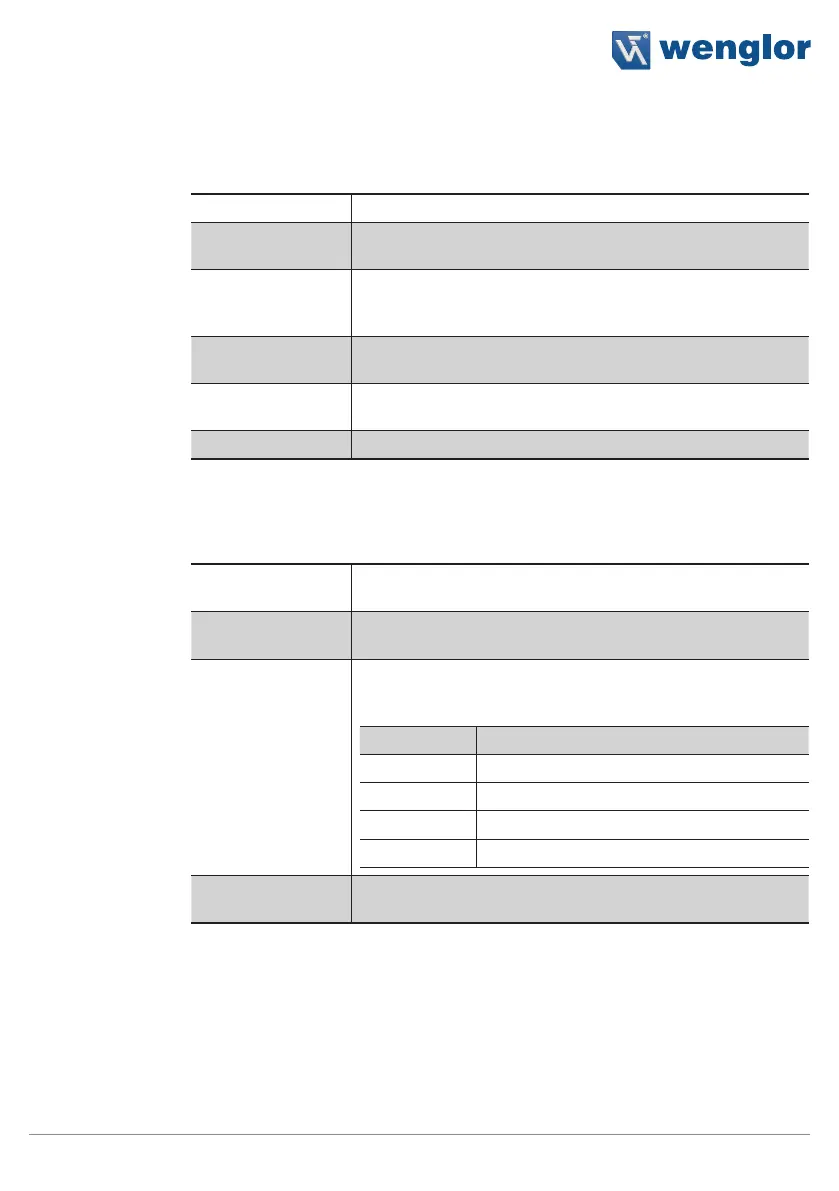
Property
The following settings/results appear.
Process Time [ms] Sensor processing time for the process steps
Module State Error codes to give support in error diagnosis (see section
18.5)
Input String The match code can either be entered statically as text or as a
combination of text and characters, or dynamic reference can
be made to a software parameter via a link.
Any Match If any character string is identical to the input string, the param-
eter is set to 1 (check box activated).
No Match If no character string is identical to the input string, the param-
eter is set to 1 (check box activated).
Number Elements Number of possible texts for comparison
11.17.2.1. Number Elements
Property
The following settings/results appear:
Match Display indicating whether or not the match code comparison
was successful. Box activated: evaluation successful
Mismatch Display indicating whether or not the match code comparison
was successful. Box activated: evaluation unsuccessful
Match Code The text or combination of characters to which comparison will
take place is selected.
The following wildcards are also available for the characters:
Place Holder For Character
* Any number of characters
? Exactly one character
[abc] a, b or c may appear at this position.
[^A] Any character other than A at this position
Match Teach The current text or combination of characters is saved as a
match code.



 To Next Page