EN
158
Software Module
11.16.3. Configuration
The pattern matching module includes the following configuration options:
• Results list
• Search region
• Taught-in rectangle
• Contour models
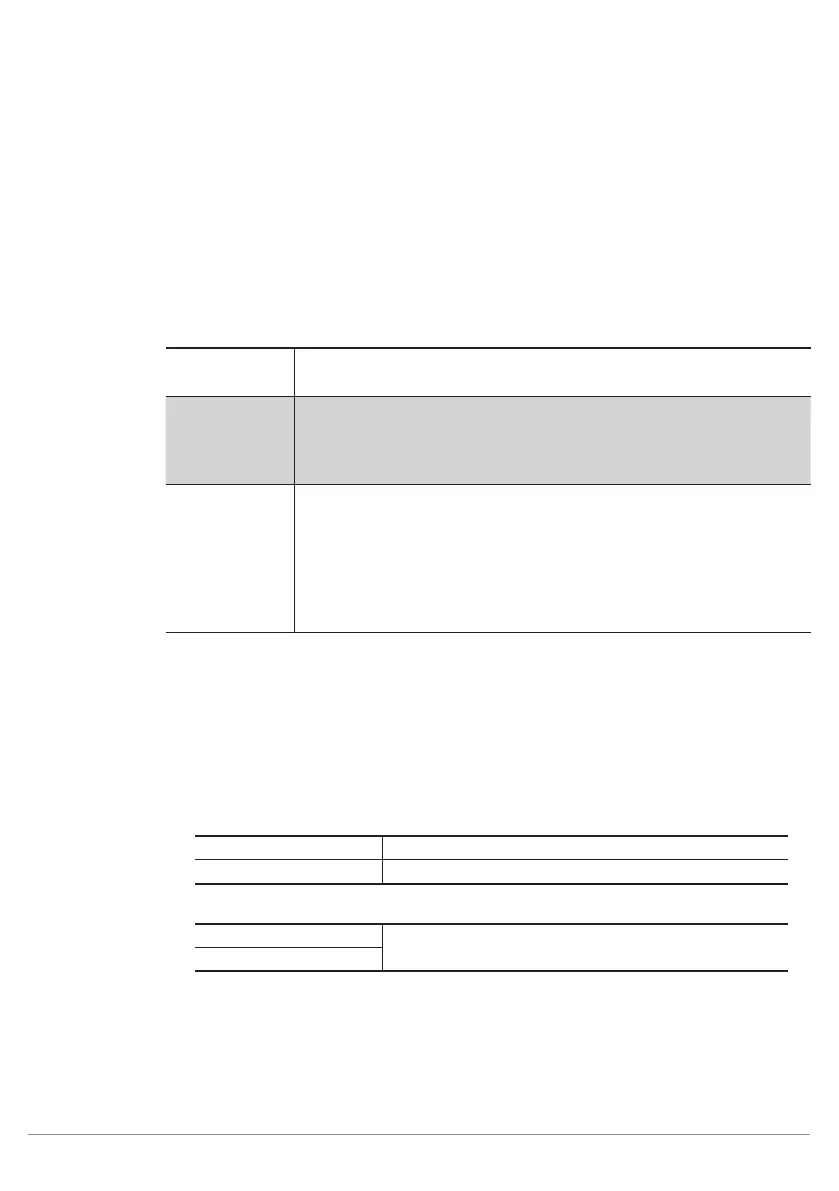
11.16.3.1. Results List Sub-Module
Characteristic
The following settings/results are displayed:
Reading results
#1
The name of the detected object is displayed.
Quality The displayed number describes the quality of coincidence between
the detected object and the taught-in models. The number can lie
between 0 (not recognized) and 1 (full coincidence to the taught-in
model).
Coordinate
System
Details concerning the initial coordinate system are displayed. The co-
ordinate system is comprised of the following parameters:
Phi (degrees): coordinate system rotation in degrees
X (px): distance of the coordinate system from the left-hand edge of
the image chip
X (px): distance of the coordinate system from the top edge of the im-
age chip
11.16.3.2. Search Region Sub-Module
Objective
The image area within which objects are detected can be specified. Using a small
search region reduces processing time and increases the image refresh rate.
Image Area
As a default feature, the search region encompasses the entire camera image. It ap-
pears in the image area as a dashed frame, where it can be adjusted.
Characteristics
Search region settings are also displayed in the settings/results area.
Width (px) Search region width
Height (px) Search region height
The following settings are displayed under reference point.
X (px) Coordinates of the image sensor’s coordinate system
(see section 18.3)
Y (px)



 To Next Page