131
Smart Camera / Vision-Sensor / 1D-/2D-Code-Scanner / OCR Reader
11.12.2. Settings
Property
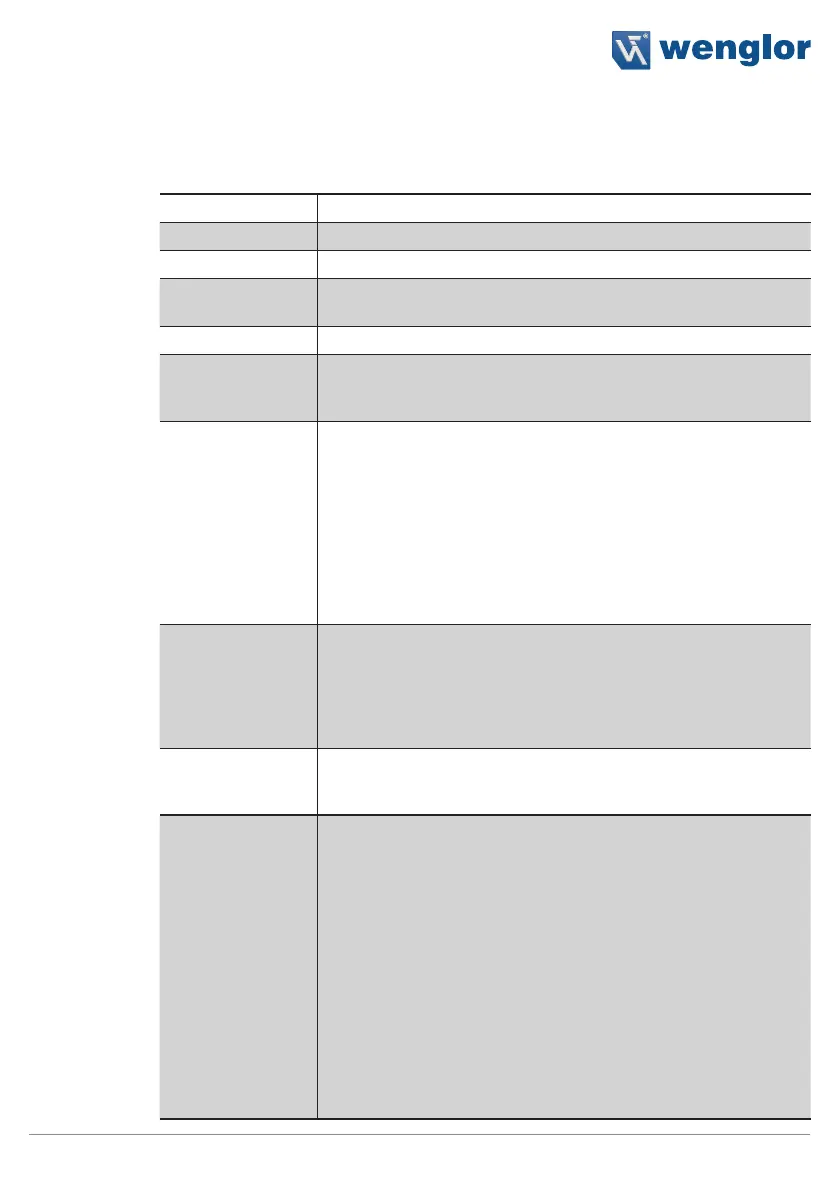
The following settings/results appear.
Process Time [ms] Sensor processing time for the module
Module State Error codes to give support in error diagnosis (see section 18.5)
Reading True Count The number of 2D codes which have been read is displayed.
Teach Reading of the current 2D code is adjusted to the respective condi-
tions.
Input Image Selection of the channel for the image input
Code Type The type of 2D code can be selected.
• Data Matrix ECC 200
• QR Code • PDF417
Recognition In the case of poor code quality, it’s advisable to set this parameter
to enhanced or maximum.
Standard
Easily legible 2D codes are recognized quickly
and reliably in the standard mode.
Enhanced
Difficult 2D codes can be read in the enhanced
mode. However, processing takes longer.
Maximum
Even partially destroyed 2D codes can be read in
the maximum mode. However, this mode requires
the biggest amount of processing time.
Read Timeout [s] The time during which the sensor attempts to read the code. If
reading is not successful within this period of time, the process is
aborted and the reading results are rendered invalid. Time can be
set within a range of 0 to 20 seconds in steps of 1 ms. Aborting the
reading process takes about 20 ms, and thus the module’s mini-
mum processing time is 20 ms.
Reading Max Count The maximum number of codes to be read simultaneously can be
specified. Up to 20 codes can be read during one image recording
operation.
Quality Grading Quality grading of the code can be activated.
Note: Activation of this function increases the module’s decoding
time.
None
No quality grading
ISO/IEC 15415
Quality grading in accordance with ISO/
IEC15415
AIM DPM-1-2006
Quality grading in accordance with AIM
DPM-1-2006
Note: Only available for ECC200 and QR
Code.
Note: The results of the code evaluation in accordance with
the selected standard can be found in the configuration
reading list (see section 11.4.3.1).



 To Next Page