EN
198
Appendix
18.5. weQube Software Module States
There is a description in the weQube manual in section 9. Here is some additional information.
If you need further license keys for your weQube do the following:
1. Open your weQube PC application and use the "Connect to Device" button.
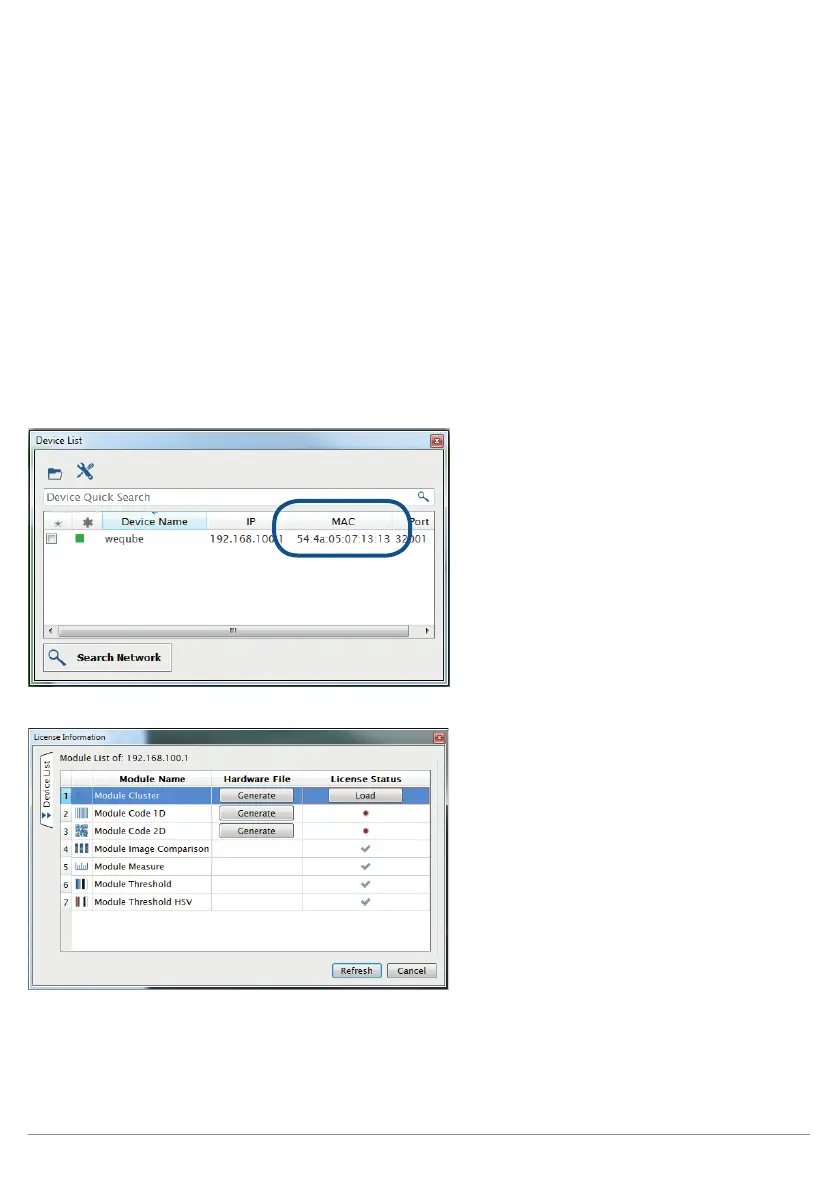
2. Note the MAC address of your weQube sensor down (Device List).
3. Double click the related sensor entry to establish a connection to the device.
4. Open the license information by pressing the menu entry "Help -> Licenses".
5. Select the module you wanna license and press the "Generate" button to save the Hardware File.
6. Send the file to wenglor by e-mail.
Attention: If you have more than one weQube send one e-mail per weQube.
Write always the following e-mail subject: weQube License Request for ##:##:##:##:##:##
7. Replace the ##:##:##:##:##:## in the subject with the MAC address of your weQube.
Example: weQube License Request for 54:4A:05:07:13:13
Image 1: MAC Address in Device List
Image 2: License window



 To Next Page