181
Smart Camera / Vision-Sensor / 1D-/2D-Code-Scanner / OCR Reader
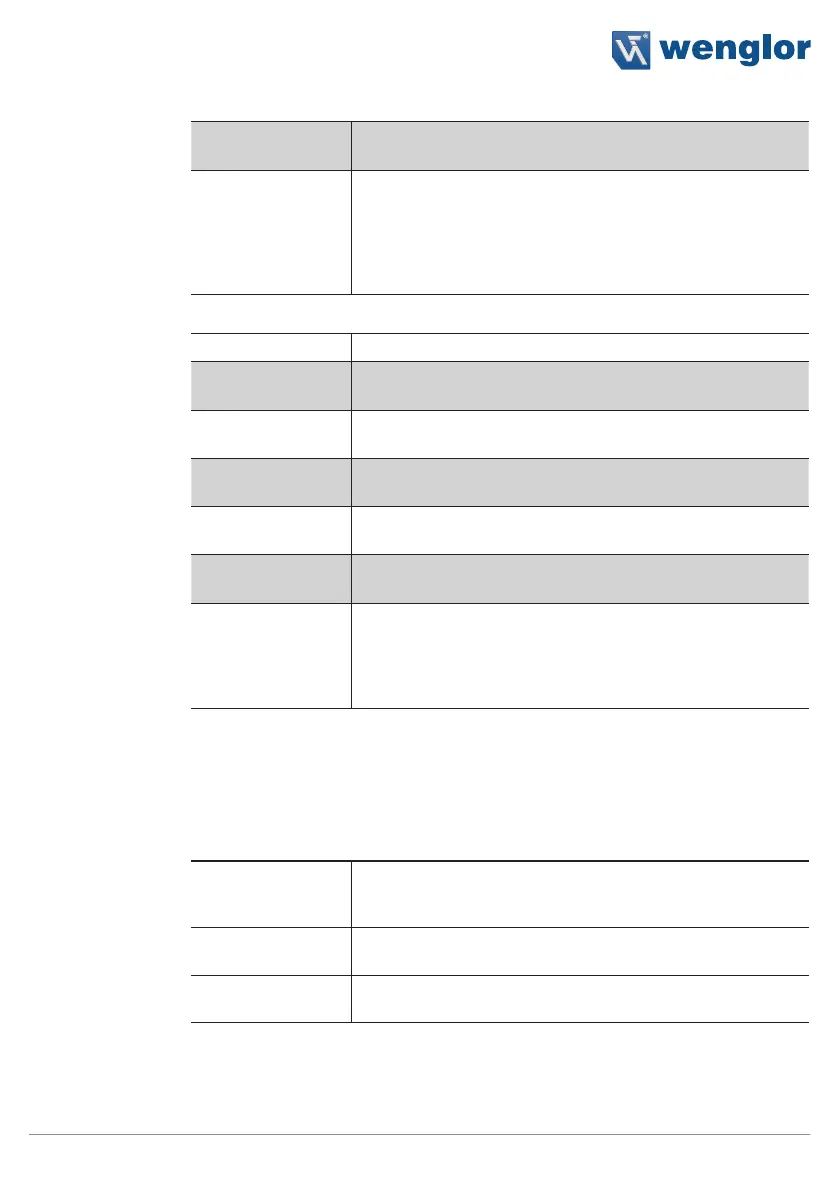
Property
Image Link to the desired image in the sensor
Observer This Boolean value determines whether or not an image is
saved. If this value is linked, the application can be set up such
that, for example, only error images are saved. Network load is
reduced as a result, and data are pre-filtered.
If the Boolean value have the status “false” the image will be
saved.
String:
Process Time [ms] Sensor processing time for the process steps
Module State Error codes to give support in error diagnosis (see section
“18.5. weQube Software Module States” on page 198)
Preamble The characters specified here precede the output data.
Postamble The characters specified here follow the output data.
Delimiter The delimiter used to separate the individual data packets
from each other is specified here.
Output The preview of the output value is displayed, which consists of
preamble, delimiter and postamble.
String Count The number of desired values to be transmitted is defined.
String Count 1...8
The value can be entered statically or linked to a value. This
value is then transmitted via the interface.
11.24.4. Error Handling
This setting can be used to set performance of the properties when a linked event demonstrates an error status.
Property
Individual texts can be displayed:
Substitute BOOL
Types by
If this checkbox has been activated, all properties of the Bool-
ean type are replaced by the active value, if the linked file type
demonstrates an error.
Substitute INT
Types by
The numeric value can be specified which is used as a sub-
stitute value in the event of a linked data type which is faulty.
Substitute STRING
Types by
The text is specified which is used as a substitute text, when
the linked data type is faulty.



 To Next Page