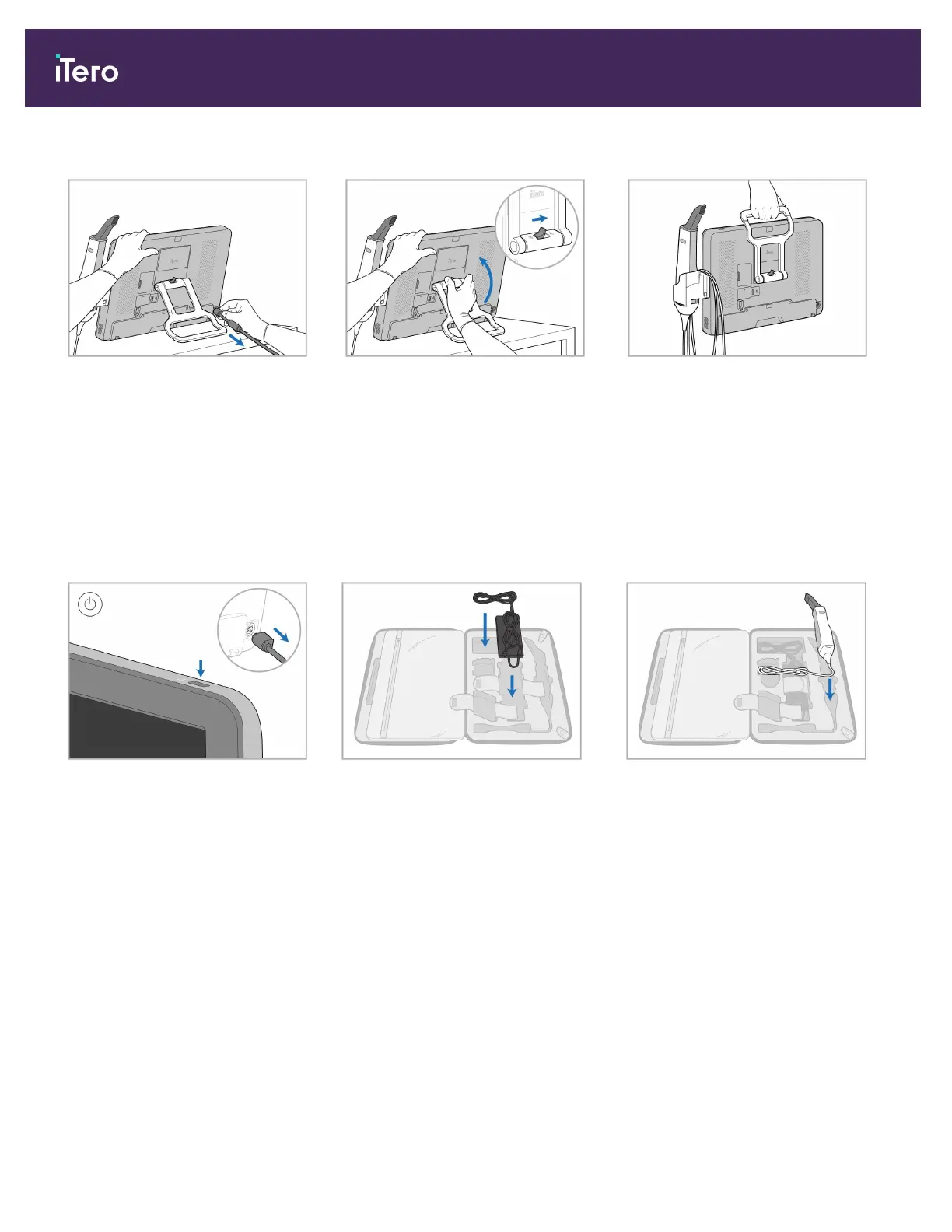
2.4.2 Moving the scanner within the clinic
1. Disconnect the power cable. 2. While holding the computing unit
with one hand, slide the locking
latch to the right to unlock the
handle and then move the handle to
carrying position.
3. Loosely wrap the wand cable
around the cradle for easy and safe
portability.
2.4.3 Using the trolley for transportation
Before transporting the scanner, it must be packed into the supplied trolley.
1. Turn off the scanner and
disconnect the power cable.
2. For easier packing, start by placing
the power supply in its designated
compartment in the trolley. Wrap the
thinner part of the cable and place it
on top of the power supply, and then
wrap the thicker part of the cable
and place it in its compartment in the
trolley.
3. Disconnect the wand and place it in
its compartment in the trolley.
iTero Element 5D and iTero Element 5D Plus imaging systems User manual
28 © 2022 Align Technology, Inc. All rights reserved.



 To Next Page