9.5 Troubleshooting
9-31
9.5 Troubleshooting
Refer to this section if the MT8820A does not work properly. When your trouble is
not described in this section or not solved even if an action is taken, contact Anritsu
or an authorized agents. For measurement, refer to the operation manual for the
measurement software or optional device.
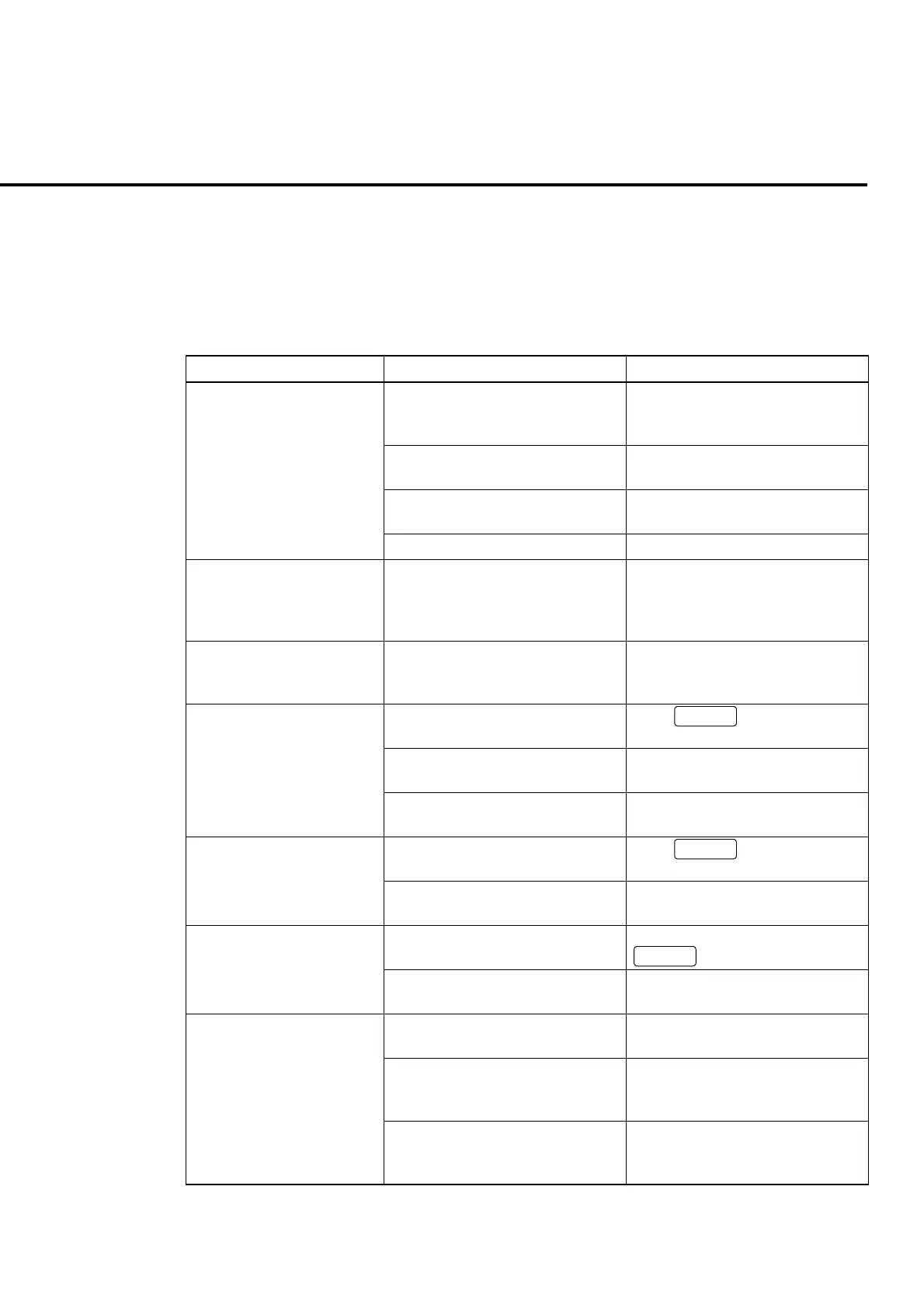
Phenomenon Probable cause Action
The power cord is not connected
properly, or pulled out of the plug
or inlet.
Connect the power cord correctly.
The main power switch on the rear
panel is not On.
Press the main power switch to turn
On.
The power switch is not pressed
properly.
Press the power switch for more
than one second.
The power is not turned on.
A fuse is blown out Replace the fuse
When 2 minutes or more
lapsed after the power was
turned On, the initialization
screen does not change.
Turn the power Off once and turn it
On again. If the same error recurs,
turn the power Off and contact an
Anritsu service center.
Nothing is displayed on the
LCD.
A command to turn Off the LCD
power is transmitted by the remote
control.
Transmit a command to turn LCD
power On.
The setting window is not activated. Press
Focus
to activate the
setting window.
Outside of the parameter setting
range.
Specify the value within the
parameter setting range.
A parameter cannot be set.
The setting conditions are not
satisfied.
Check the parameter setting range.
A window is not activated. Press
Focus
to activate the
window to be displayed.
A window is not displayed.
A common screen is displayed. A window is not displayed on the
common screen.
A function menu is displayed on
other menu page.
Switch the page by pressing
Next
.
A function menu cannot be
found.
The displayed screen or window is
not correct.
Open a screen or window that can
display a menu.
A memory card is not inserted or
wrongly inserted.
Correctly insert the memory card to
the memory card slot.
The memory card is not formatted. Format a memory card to MS-DOS
format at PC or other devices
beforehand to use.
• A parameter file cannot be
saved or read out.
• Hard copy cannot be
taken.
A file to be overwritten is a read-
only file.
Release read-only attribute of the
file to be overwritten at PC or other
devices.













 To Next Page