Section 4 Basic Operation
4-22
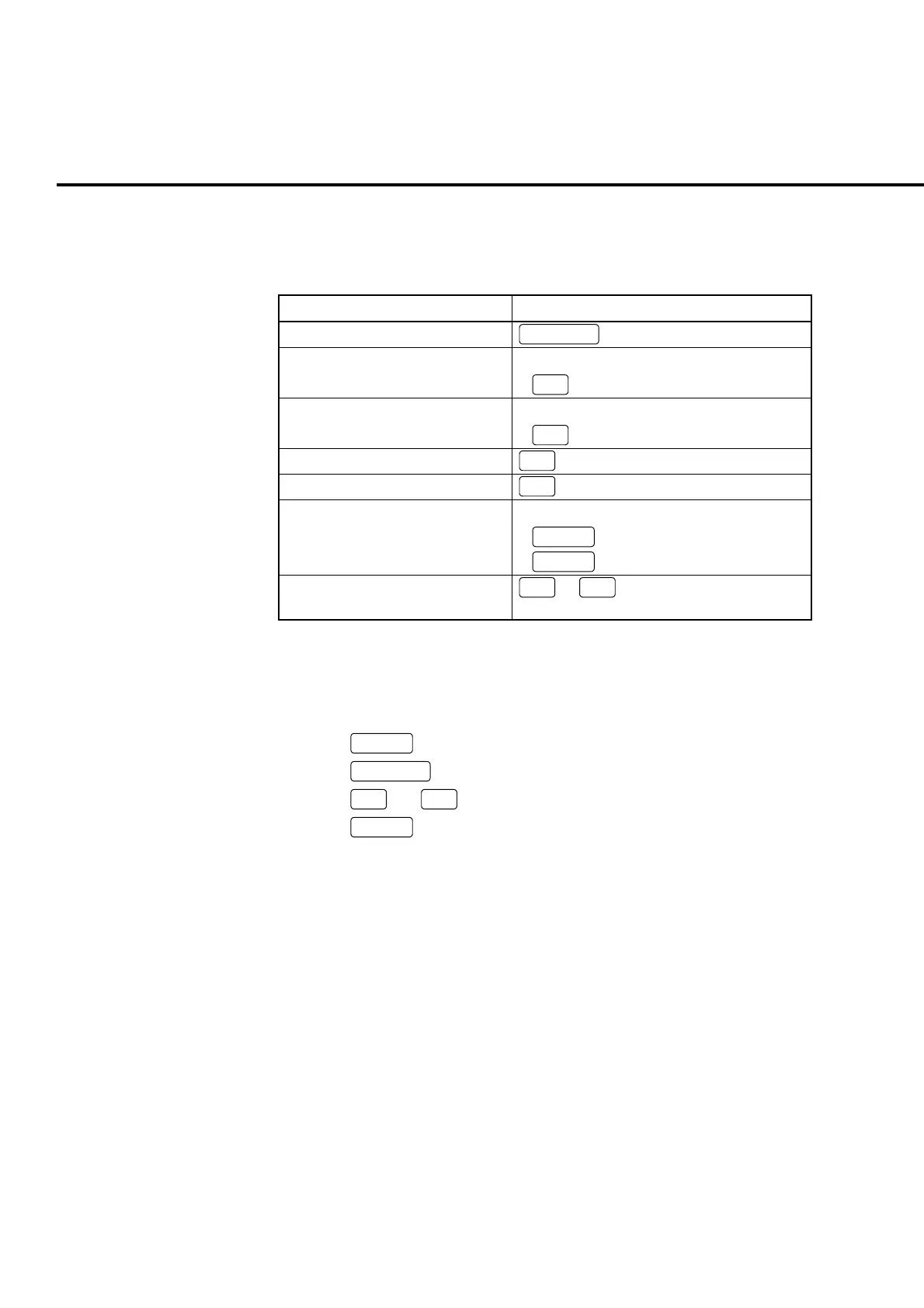
Operations described in a table below are performed in a popup window for all
menus.
Table 4-6-3-1 Operating popup window for all menus
popup window for all menus Operation
Display/hide all menus
Functions
Move the cursor upward • Turn the encoder to the left
•
∧
(Move between pages)
Move the cursor downward • Turn the encoder to the right
•
∨
Move between pages
Move the cursor to the left
<
Move the cursor to the right
>
Execute the menu for cursor • Press the encoder
•
Set
•
Enter
Execute the menu on the page on
which cursor is displayed
F1
to
F7
Example:
To perform Band Calibration with all menus displayed
[Procedure]
1. Press
Screen
to open the desired measurement screen.
2. Press
Functions
to open the Functions menu.
3. Press
>
and
∨
to move the cursor to Band Calibration.
4. Press
Set
to start calibration within the system band.
4.6.4 Types of function menus
The following types of function menus are provided according to the functions:
(1) Execution menu
(2) Numeric value entry menu
(3) Character string entry menu
(4) Item display menu
(5) Item selection menu
(6) Tag selection menu
(7) Toggle menu













 To Next Page