Section 4 Basic Operation
4-4
4.1.2 Status area
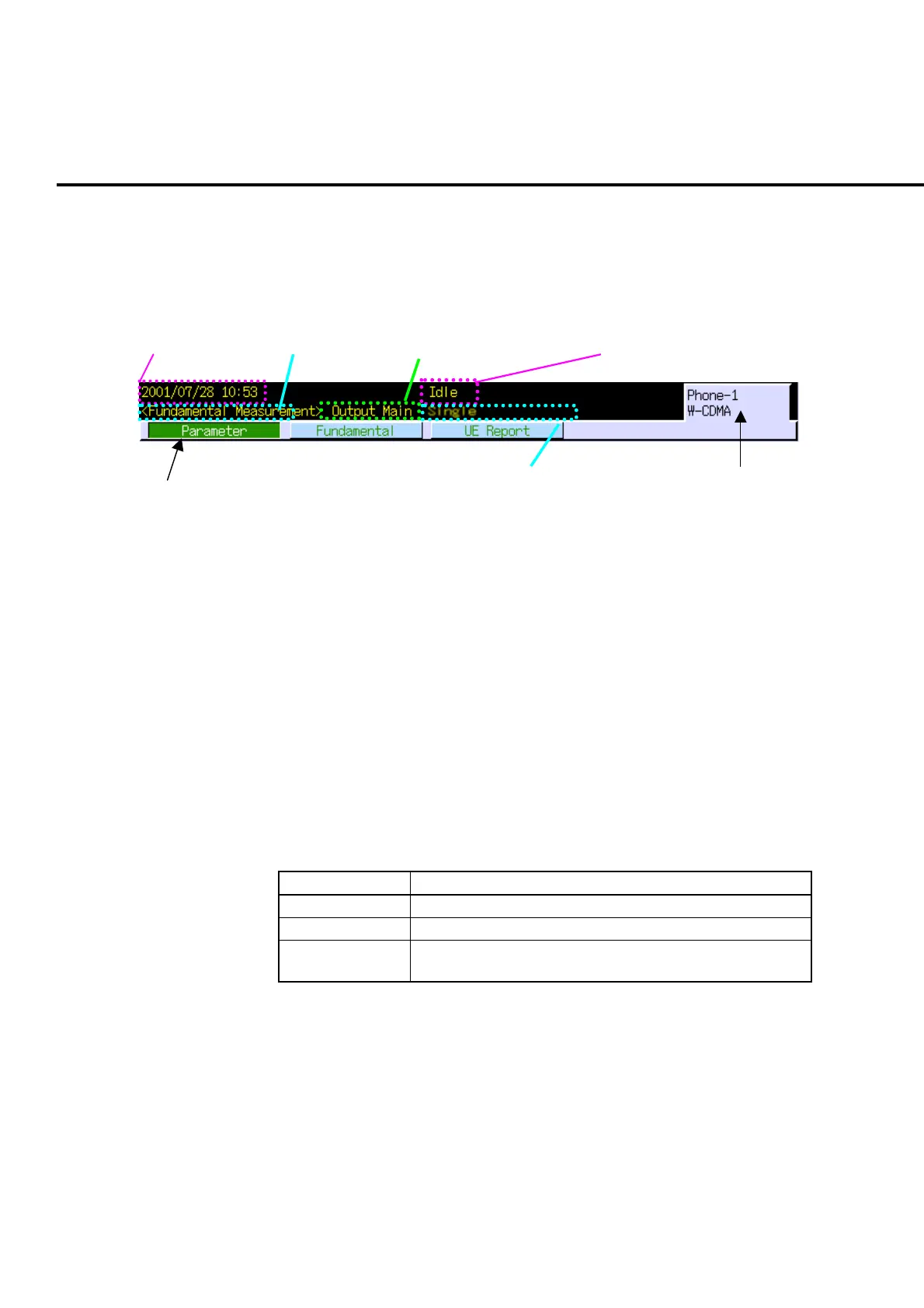
The status area displays the measurement software type, opened screen type, window
status, and basic information to indicate the current operation status such as date/time,
call processing status, etc.
1. Title 2. Screen type 3. RF signal output connector 4. Call processing status
5. Measurement mode 6. Window list bar
7. Phone under measurement
and measurement software
Fig. 4-1-2-1 Status area
1. Title
The date and time or character information is displayed. The title can be set
on the System Configuration screen.
2. Screen type
The screen type currently being opened is displayed. It indicates operation
mode for MT8820A.
3. Output connector/status for RF signal
Connector type or status for RF signal output from MT8820A is displayed.
Output connector for RF signal can be set in RF Output on the System Configu-
ration screen.
Table 4-1-2-1 Output connector/status for RF signal
Display Description
Output Main Main 1 main input/output connector
Output AUX AUX 1 auxiliary output connector
UNCAL Output level is UNCAL status (Output signal is outside of
guaranteed accuracy.
4. Call processing status
The call processing status is displayed. It indicates the communication status
between MT8820A and the phone.













 To Next Page