This function is supported on select models.
Procedure
Step 1 Select
Main Menu
>
NETWORK
>
3G/4G
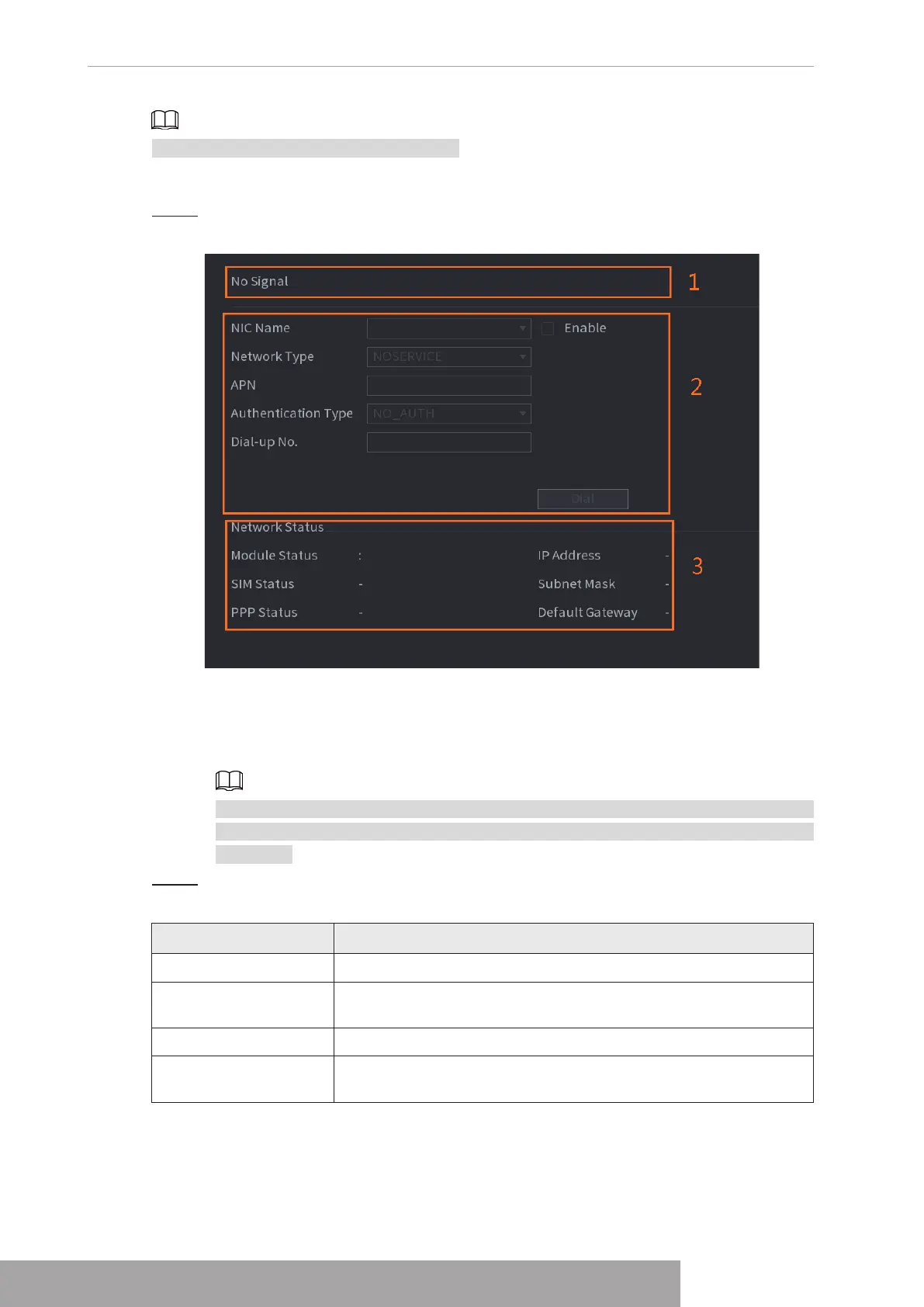
Figure 4-227
The interface is divided into three main areas:
● Zone 1 displays a 3G/4G signal indication.
● Zone 2 displays 3G/4G module configuration information.
● Zone 3 displays the status information of the 3G/4G module.
Zone 2 displays the corresponding information when the 3G/4G module is connected,
while Zone 1 and Zone 3 will only display the corresponding content when the 3G/4G
is enabled.
Step 2 Configure Parameters.
Table 4-70
Parameter Description
NIC Name Select a NIC name.
Network Type.
Select a 3G/4G network type to distinguish between 3G/4G
modules from different vendors.
APN, Dial-up No. Main parameters of PPP dial.
Authentication Type
Select PAP, CHAP or NO_AUTH. NO_AUTH represents no
authentication for 3G/4G.
Copyright © NSS Sp. z o.o.
User‘s Manual 222



 To Next Page