Controls C 1
ekrPro Com
60
web guide controller EDV-No.: MD.191.00.05/1.6.x Chapter: C 1
with analog sensors Date: 23.11.2007 Page: 3/6
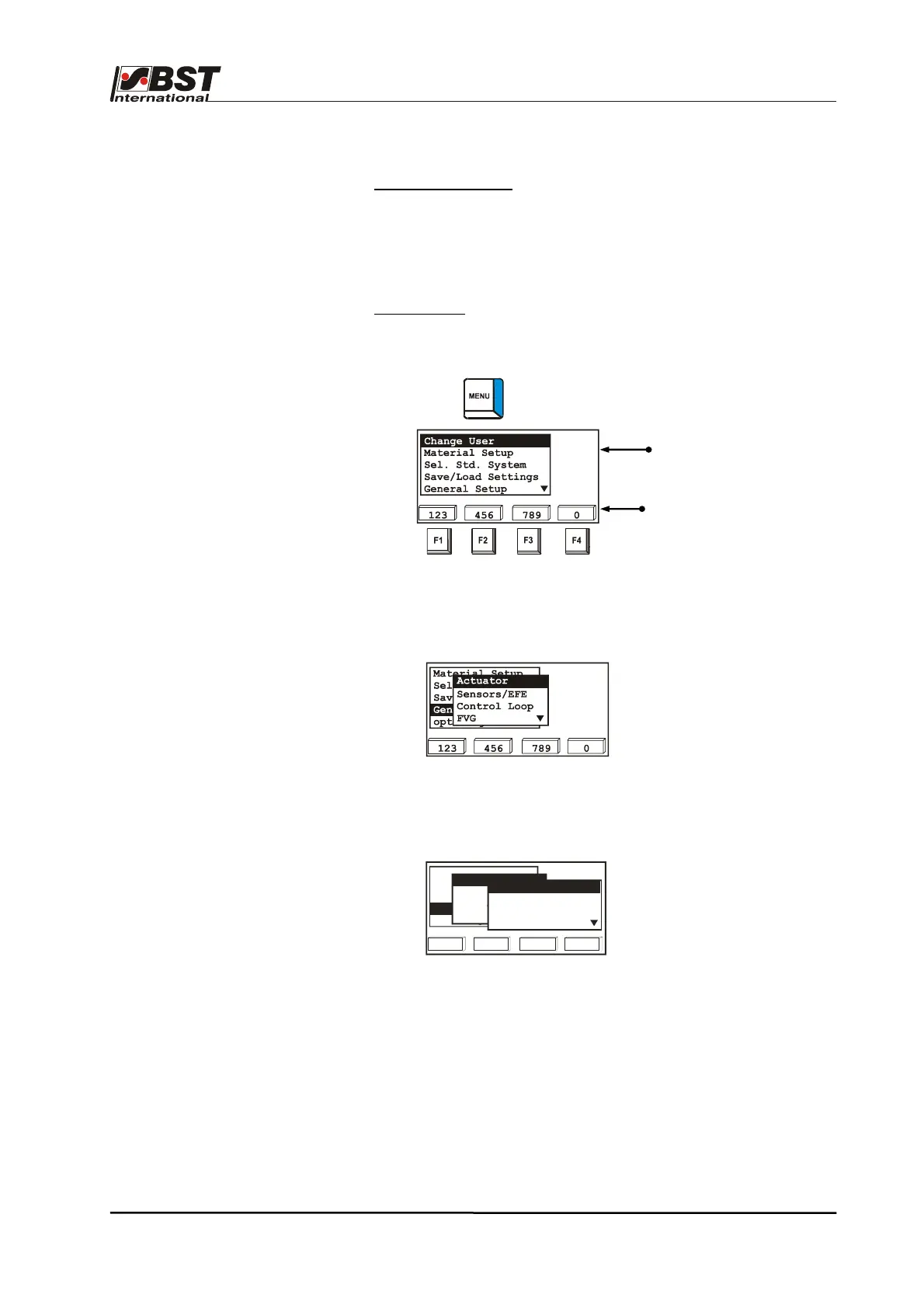
Shortcut functions
The function keys are assigned numbers in the equipment menu.
Therefore a menu option can be selected by using the arrow keys
to navigate to the required menu sub-option or it can be selected
directly by using the shortcut number instead.
For example:
Selecting the actuator
The associated menu sub-option is 611
(see navigation overview as well).
1. Press key. This will display the set-up menu.
To enter the shortcut number:
2. Press F2 key 3x = 6.
The "General setup" menu including the first "Actuator"
submenu is called up.
3. Press the F1-key once = 1
The required dialog will be displayed and you can now use the
arrow keys to select the parameter that has to be modified.
Assignment of allocated
function keys
Current position
in device menu
61
123 456 789 0
Material Setup
Sel. Std. System
Save/Load Settings
opt. Logic
General Setup
Actuator
Sensors/EFE
Control Loop
FVG
Type (EMS&Hydr.)
Hydraulics Add-on
Direction
SC-Transducer
611
1



 To Next Page