Commissioning B 3
ekrPro Com
60
web guide controller EDV No.: MD.191.01.05/1.6.x Chapter: B 3
with analog sensors Date: 23.11.2007 Page: 8/73
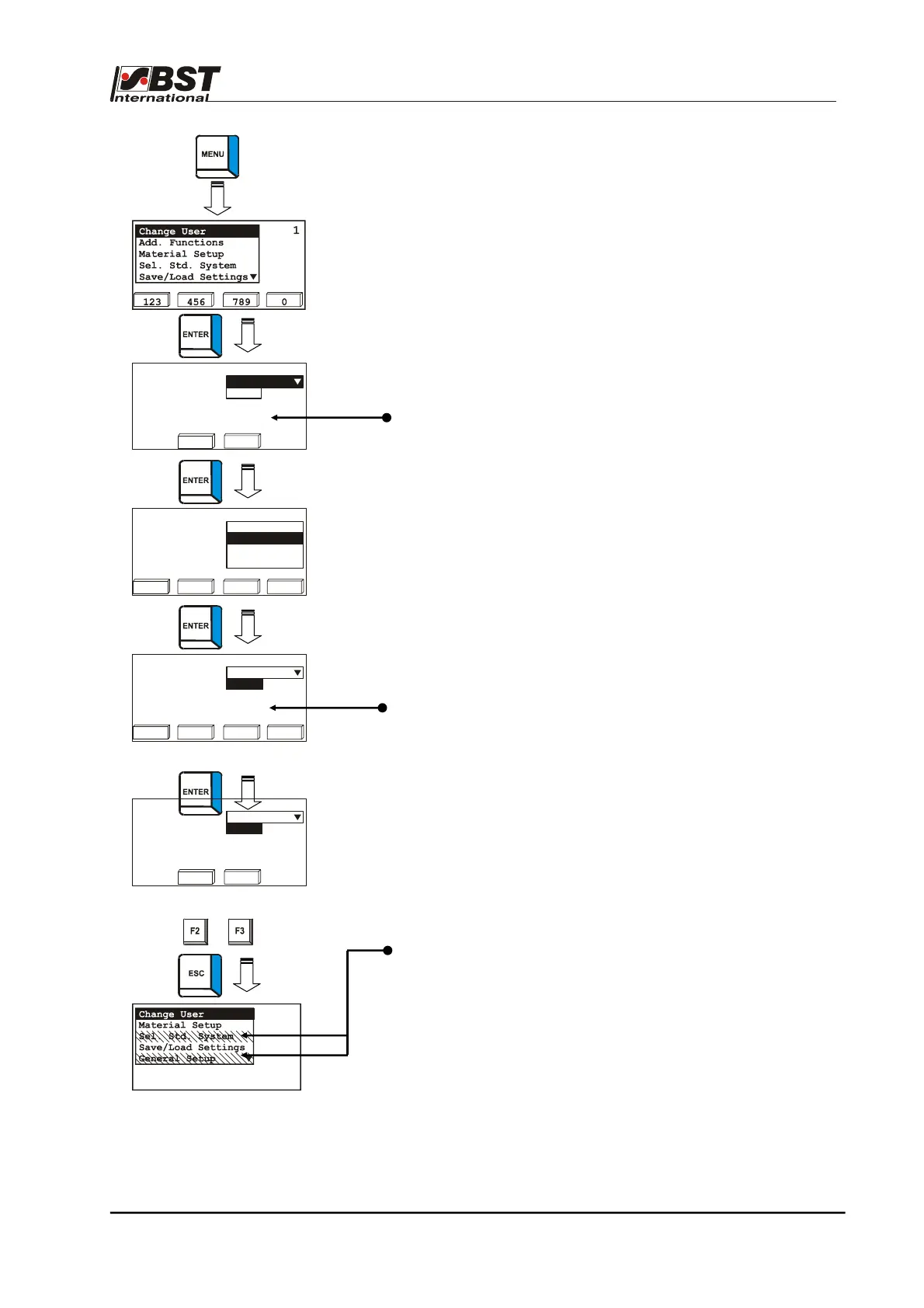
Selection of user level is undertaken from the Change User menu.
1. Select Change User menu and press ENTER.
2. The user level selection window appears.
In the lower part of the window the active user level is
displayed (Admin. in the example).
Press the ENTER button and the user level option list will then
be opened.
Select the desired user level with the up and down arrow
keys.
Confirm the selection by pressing ENTER.
3. Use the right and left arrow keys to select the Password
editing box and press ENTER.
Enter the password and confirm the entry with ENTER.
4. Press the F3-key (login).
The controller changes to the selected user level.
The Setup menu selection window appears.
Entries, for which there are no user rights in the selected user
level are shown greyed out.
Enter user level & password
User level Mainten.
Password
Current
user level: Admin
00000
123 456 789 0
Enter user level & password
User level
Password 0
Operator
Current
user level: Admin.
logout
login
Enter user level & password
User level Operator
Password
Current
Mainten.
Admin.
user level BST Support
123 456 789 0
logout
login
Enter user level & password
User level Mainten.
Password
Current
user level: Admin
1



 To Next Page