2/3
3. Mode
35310
35310
Maintenance
!
!!
! Exposure Advance Unit
!
!!
! Exposure Engine Section 1
!
!!
! Exposure Engine Section 2
*1. Even though the laser unit is in normal condition, it may take five minutes or more for the G Laser Output ON to turn from Asynchronous to
Synchronous after performing G Laser Output ON.
!
!!
! Exposure Engine Section (Details)
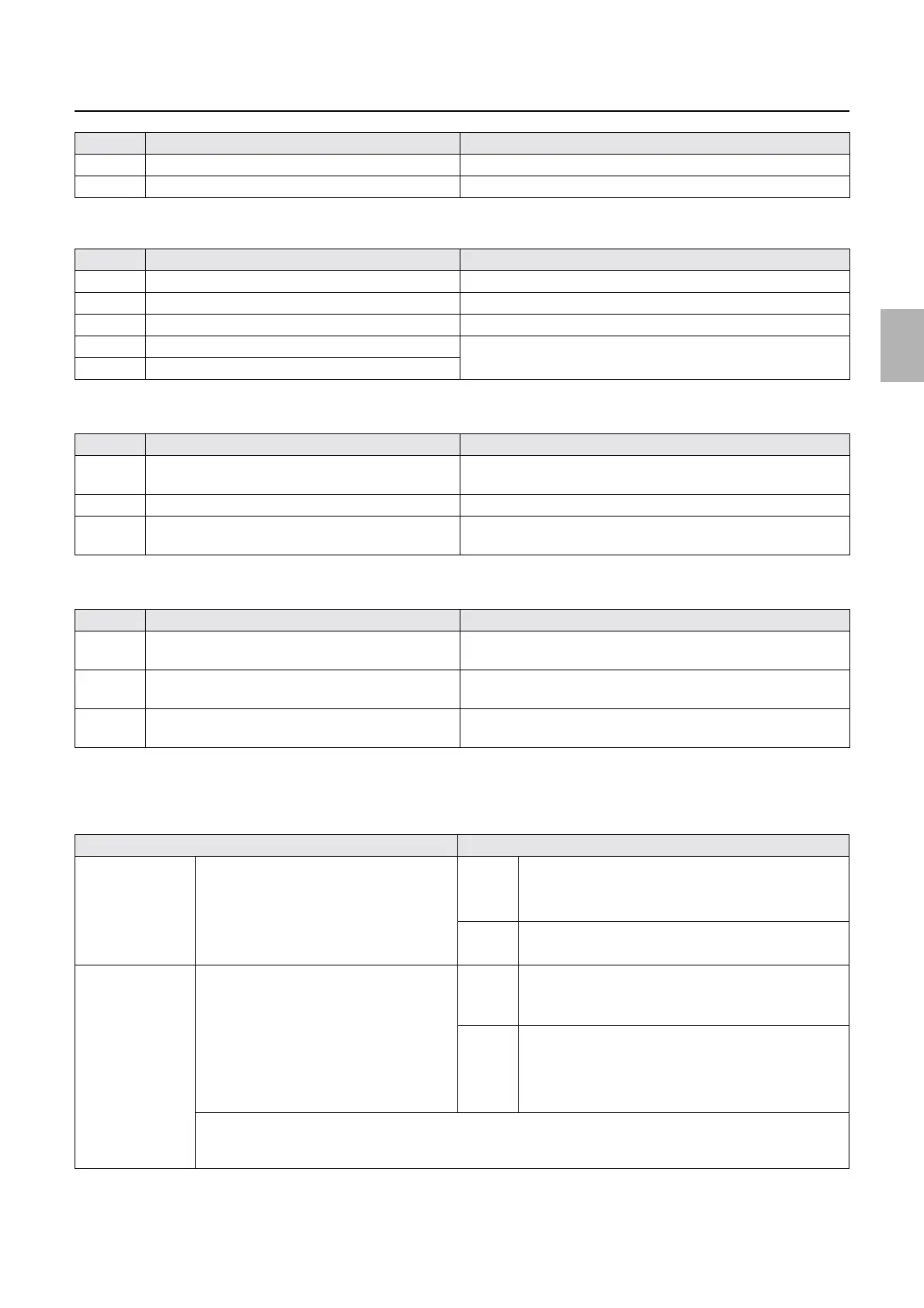
4 Width Change Motor A2 Press Execute to operate once.
5 Paper Magazine Lamp A Press Execute to turn on, and Cancel to turn off.
No. Display Status
1 Exposure Advance Motor 1 Press Execute to operate for the set time.
2 Exposure Advance Pressure Change Motor 1 Clicking Execute repeats compressing and releasing operations.
3 Exposure Advance Motor 2 Press Execute to operate for the set time.
4 Exposure Advance Pressure Change Motor 2 Clicking Execute repeats compressing and releasing operations.
5 Exposure Advance Pressure Change Motor 3
No. Display Status
1 Polygon Mirror OFF Press Execute to stop the polygon mirror.
Press Cancel to start the polygon mirror.
2 Laser Unit Cooling Fan 1,2 ON Press Execute to start, and Cancel to stop.
3 Laser Unit Heater ON Press Execute to turn on the laser unit heater.
Press Cancel to turn off the laser unit heater.
No. Display Status
1 R Laser Output ON Press Execute to turn on the R laser output.
Press Cancel to turn off the R laser output.
2G Laser Output ON
*1
Press Execute to turn on the G laser output.
Press Cancel to turn off the G laser output.
3 B Laser Output ON Press Execute to turn on the B laser output.
Press Cancel to turn off the B laser output.
Display Status
Synchronous/Asyn
chronous
Polygon Mirror Synchronous Synchro
nous
When the polygon mirror rotates properly and is stable
• When entering the output check
• When turning ON the polygon mirror
Asynchr
onous
The polygon mirror does not normally rotate.
• When turning OFF the polygon mirror
Synchronous/Asyn
chronous
Laser Synchronous Sensor Synchro
nous
When either of R/G/B laser is emitting
• When the polygon mirror is synchronous and either
of R/G/B laser output is turned ON
Asynchr
onous
When all the R/G/B lasers are not emitting
• When entering the output check
• When the polygon mirror is asynchronous
• When the R/G/B laser output are all OFF
This part checks the output condition of each R/G/B laser.
Since the Synchronous Check cannot be carried out in the same condition as the usual printing operation even if all
the R/G/B lasers light, a problem may occur in the usual operation with no trouble at the Output Check.
No. Display Status
Distributed by: minilablaser.com



 To Next Page