4. Troubleshooting
4202
2/9
4202
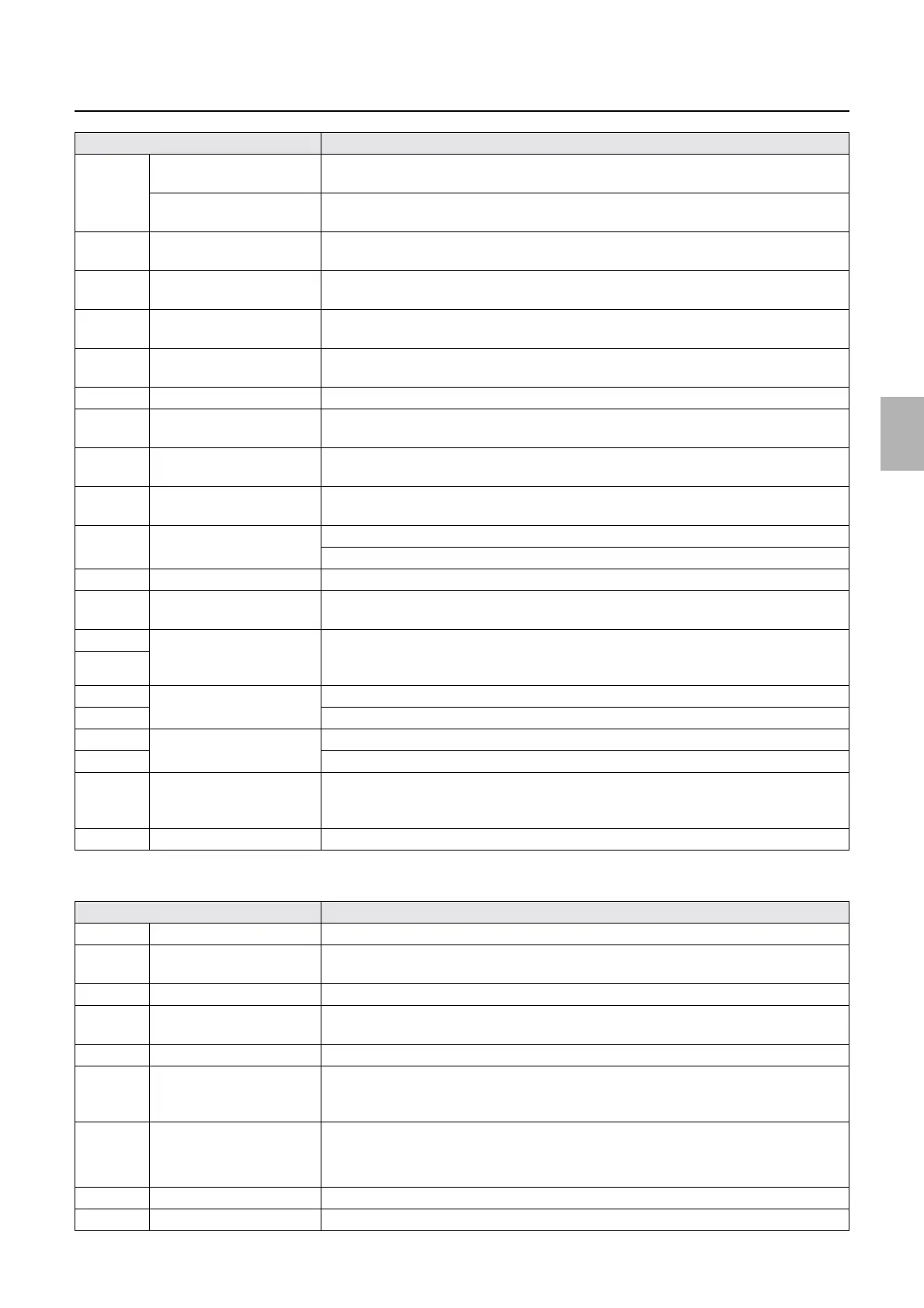
Diagnosis appendix for the failures: Symptom due to the connection failure of wiring
!
!!
! Laser control PCB
J/P204 Connects to the quad
magazine PCB.
When the status of Magazine Unit A/Magazine Unit A2-1 is confirmed in Input Checks, all
the paper magazine code sensors are DARK.
Connects to the triple
magazine PCB.
No.01047-00002 Close printer door. occurs when printing is started.
J/P206 Connects to printer I/O PCB
2.
No.06210-00005 Paper remains in the Paper Supply Unit. occurs.
J/P207 Connects to printer I/O PCB
3.
No.06211-00001 Paper remains in the Exposure Advance Unit. occurs.
J/P208 Connects to the triple
magazine PCB.
No.06227-00001 Paper did not load. Paper Magazine A occurs when printing is started.
J/P209 Connects to printer I/O PCB
3.
No.06224-00003 Paper remains in the Processor loading unit. occurs.
J/P210 Connects to the CVP PCB. Correction value is not printed.
J/P211 Connects to paper magazine
code sensor B/C.
The magazine is not detected. (All magazine code sensors B/C are DARK.)
J/P212 Connects to the laser control
PCB.
No.06087-00022 Laser Control PCB system error. occurs when printing is started.
J/P213 Connects to the quad
magazine PCB.
No.06196-00002 Paper did not rewind. Paper Magazine A2 or No.06210-00004 Paper
remains in the Paper Supply Unit. occurs.
J/P214 Connects to printer I/O PCB
1.
No.06137-00001 Exposure Advance Pressure Change Motor 2 operation error. occurs.
No.06186-00001 Exposure Advance Pressure Change Motor 3 operation error. occurs.
J/P215 Unused −
J/P218 Connects to printer power
supply 5 (5 V-2)
No.06901-00512 ARCNET communication error. Printer Processor LASER occurs.
J/P219 Connecting to the laser
control PCB
(LASER)
No.06901-00521 ARCNET communication error. Printer ProcessorLASER occurs.
J/P220
J/P221 Connects to the printer I/F
main PCB (ARCNET)
No.06901-00009 ARCNET communication error. Printer Processor occurs.
J/P222 No.06901-00008 ARCNET communication error. Processor occurs.
J/P223 Connects to the processor
control PCB (ARCNET)
No.06901-00513 ARCNET communication error. Printer LASER occurs.
J/P224 No.06901-00512 ARCNET communication error. LASER occurs.
J/P225 Inputs the power supply
(+24 V, GND) from laser
power supply 3.
No.06136-00001 Exposure Advance Pressure Change Motor 1 operation error. occurs.
J/P226 Connects to the buzzer. The buzzer does not sound.
Connector No. Symptom
J/P1501 Connects to the laser unit. No.06073-00003 Synchronous Sensor error. occurs when printing is started.
J/P1502 Connects to the G-AOM
driver.
No.06073-00002 Synchronous Sensor error. occurs when printing is started.
J/P1503 Connects to the laser unit. No.06073-00001 Synchronous Sensor error. occurs when printing is started.
J/P1504 Connects to the laser unit. • In Printer Information on Status Display, Laser temperature control status does not
change from Temperature control started for five minutes or more.
J/P1505 Connects to the laser unit. No.06073-00001 Synchronous Sensor error. occurs when printing is started.
J/P1506 Inputs the power supply (+5
V) from printer power
supply 5.
The following symptom appears when printing is started.
• No.06901-00512 ARCNET communication error. LASER occurs.
J/P1508 Connects to the G-AOM
driver.
The following symptom appears when printing is started.
• No.06073-00002 Synchronous Sensor error. occurs.
• Unexposured prints are output.
J/P1509 Connects to the laser unit. No malfunctions in the operations will occur on this condition.
J/P1510 Unused −
Connector No. Symptom
Distributed by: minilablaser.com



 To Next Page