6. Electrical parts
66005
2/3
66005
Description of PCB (printer section)
IMPORTANT
• If you use the subnet mask 255. 255. 255. 224, specify an IP Address from those between 192 . 168 . 1 . 1 and 192 .
168 . 1 . 30. If an IP Address 192 . 168 . 1 .31 or higher is entered, the network is not connected normally.
• You can check the condition of the Printer I/F Main PCB with Image Path Check in
☞35920 or Printer I/F Main PCB
Self-Diagnostic in
☞35930 before replacing it.
• For precautions when handling optical fiber cables and LVPECL cables, see
☞68100.
!
!!
! Unused connector
!
!!
! Component parts table
NOTE
• There are other types of TP for the printer I/F main PCB than described above, but they are not used for service.
• DS1 is not mounted on J391489.
!
!!
! Removing the Printer I/F Main PCB
1. Remove the paper supply unit.
☞25610
• When replacing a PCB, save the Memory data and Logdata of when a problem (error) occurs.
Press the Alt key and the Y key on the keyboard when the problem occurs.
☞31110
• Return the failed PCB with the Memory data and Logdata.
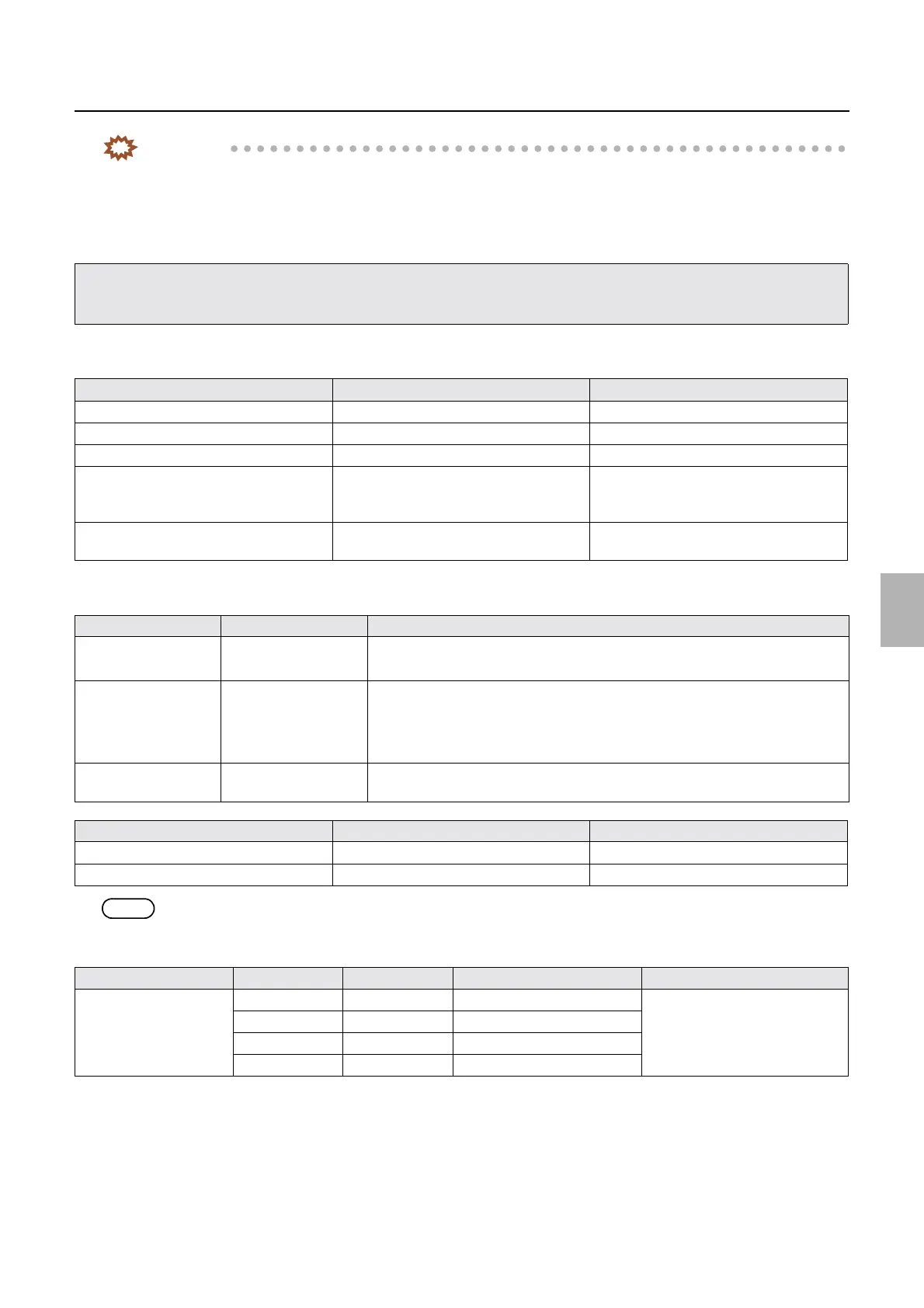
Connector No. Purpose Remarks
P1204, P1205, P1212 Unused
P1202, P1203, P1210 Unused Not mounted on J391489
CN6 Unused
P1211 Capacity booster Used only for
LP7500/LP7600/LP7700/LP7900,
3702/3703/3704/3705
P1213, P1214 Connects to the display module (keyboard
PCB)
Option
LED No. Purpose Status
LED1
(Red LED)
For checking the
connection
• OFF: The PC and the printer I/F main PCB does not communicate.
• ON: The PC and the printer I/F main PCB normally communicates.
LED2
(Red LED)
For checking data
transfer
• OFF: The PC and the printer I/F main PCB does not communicate.
• Blinking: The PC and the printer I/F main PCB normally communicates.
• Quickly blinking: The data is being transferred from the PC to the printer I/F
main PCB.
LED3, LED4, LED5,
LED6
Unused
Test point No. Purpose Measurement with voltmeter
TP27, TP28, TP29, TP30, TP31 Ground Possible
TP21 DC+5 V voltage measurement Possible
Switch No. Bit No. Settings Purpose Remarks
DS1 1 OFF Unused Be sure to turn off.
2OFFUnused
3OFFUnused
4OFFUnused
Distributed by: minilablaser.com



 To Next Page