Instructor User Guide
Lesson Plan Profile Workspace
Lesson Plan Profile Workspace
13 Oct 2017
Page 207
14. Lesson Plan Profile Workspace
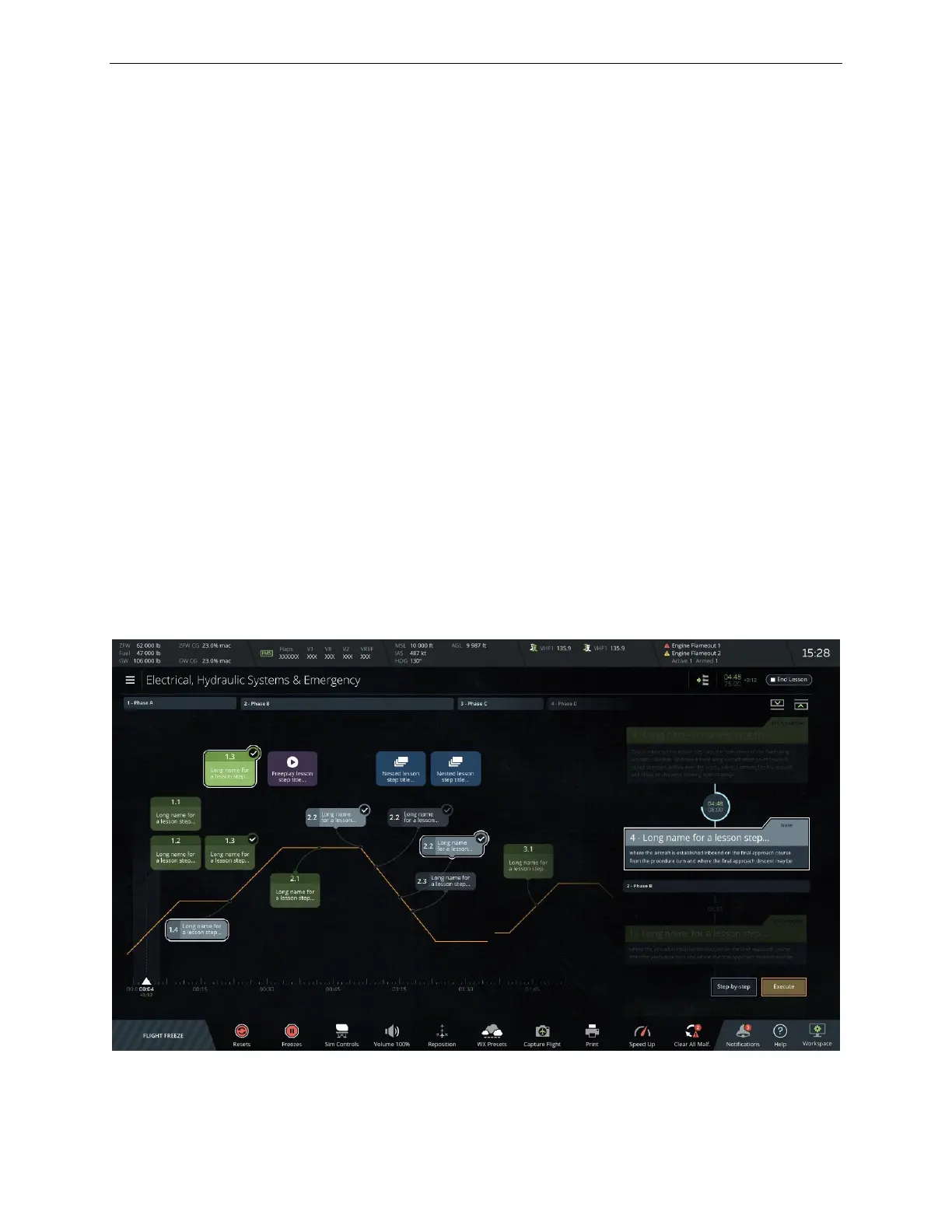
The Lesson Plan Profile workspace provides a graphical representation of all the
training elements included in the selected lesson. The training elements such as
training phases and associated steps are presented over a flight profile (amber line)
that is defined in the CAE Slick web-based lesson plan editor.
Unlike the LESSON PLAN Tab in the Control Board, that shows the lesson training
phases and steps in two scrollable sections, the Lesson Plan Profile workspace
provides an alternate mean to show the same lesson elements.
The Lesson Plan Profile workspace allows instructor to see at a quick glance most, if
not all the training elements included in the lesson plan. This of course is driven by
the size of the lesson.
The Lesson Plan Profile workspace features:
• A Map Header (identical to the Map workspace header)
• A Main Section which is divided in two view modes:
o Canvas
o List
• A Map Footer (identical to the Control board footer)
Figure 110 Lesson Plan Profile Workspace



 To Next Page